Building an AI Frontend with Chainlit and OAuth2 Authentication

Today we’ll explore how to build a secure AI frontend using Chainlit. Chainlit is Python framework that allows us to create interactive AI applications. In this example we are going to reuse the weather tool created in a previous post. Also, we will implement OAuth2 authentication with a Nginx as a reverse proxy.

The project consists of four main components:

  1. Nginx Reverse Proxy: Handles authentication via auth_request and routes traffic
  2. Fake OAuth Server: Simple Flask app that simulates OAuth2 authentication
  3. Chainlit Application: The main chat interface with AI capabilities
  4. Strands AI Agent: Weather-focused AI assistant with custom tools

The Nginx configuration implements OAuth2 authentication using the auth_request module:

server {
    listen 8000;

    location / {
        auth_request /oauth2/auth;
        
        auth_request_set $user_jwt $upstream_http_x_user_jwt;
        add_header X-Debug-User-JWT $user_jwt always;
        
        error_page 401 = @error401;
        try_files $uri @proxy_to_app;
    }

    location = /oauth2/auth {
        internal;
        proxy_pass http://oauth2/oauth2/auth;
        proxy_pass_request_body off;
        proxy_set_header Content-Length "";
        proxy_set_header X-Original-URI $request_uri;
        proxy_set_header X-Original-Remote-Addr $remote_addr;
        proxy_set_header X-Original-Host $host;
    }

    location @proxy_to_app {
        proxy_set_header X-User-JWT $user_jwt;
        proxy_pass http://chainlit;
    }
}

Key Features:

  • Every request to / triggers an authentication check via /oauth2/auth
  • JWT token is extracted from the OAuth response and forwarded to Chainlit
  • Unauthenticated users are redirected to the OAuth sign-in page
  • The JWT token is passed to Chainlit via the X-User-JWT header

A simple Flask application simulates an OAuth2 provider for demonstration purposes. In a production environment, you would replace this with a real OAuth2 provider or implemente the whole OAuth2 flow.

@app.get(f"/oauth2/auth")
def auth():
    now = datetime.now()
    response = make_response(jsonify(dict(error='OK')), 200)
    expiration = now + JWT_EXPIRATION_TIMEDELTA
    user = 'gonzalo'
    display_name = 'Gonzalo'
    response.headers['X-User-JWT'] = str(jwt.encode(dict(
        user=user,
        display_name=display_name,
        exp=int(expiration.timestamp())
    ), SECRET, algorithm=JWT_ALGORITHM))
    logger.info("Fake OAuth authentication successful")
    return response

Chainlit processes the JWT token via a custom header authentication callback:

@cl.header_auth_callback
def header_auth_callback(headers: Dict) -> Optional[cl.User]:
    if headers.get("x-user-jwt"):
        jwt_token = headers.get("x-user-jwt")
        try:
            decoded_payload = jwt.decode(jwt_token, SECRET, algorithms=[JWT_ALGORITHM])
            return cl.User(
                identifier=decoded_payload['user'],
                display_name=decoded_payload['display_name'],
                metadata={"role": 'user', "provider": "header"})
        except jwt.ExpiredSignatureError:
            cl.logger.error("Token has expired.")
            return None
    else:
        return None

This callback:

  • Extracts the JWT from the x-user-jwt header
  • Validates the token signature and expiration
  • Creates a Chainlit User object with the decoded information
  • Handles token expiration gracefully

The application uses Strands agents with both base tools and custom weather tools:

agent = get_agent(
    system_prompt=PROMPT_GENERAL,
    base_tools=get_all_base_tools(),
    custom_tools=get_all_custom_tools()
)

Base Tools Include:

  • Calculator
  • Browser access
  • Current time
  • Batch processing
  • Think (reasoning tool)

The weather functionality is implemented using custom Strands tools that fetch meteorological data:

class WeatherTools:
    def __init__(self, latitude: float, longitude: float):
        self.latitude = latitude
        self.longitude = longitude

    def get_tools(self, tools=None) -> List[tool]:
        @tool
        def get_hourly_weather_data(from_date: date, to_date: date) -> MeteoData:
            """
            Get hourly weather data for a specific date range in my city.
            
            Returns:
                MeteoData: Object containing weather readings for temperature, 
                          humidity, precipitation, etc.
            """
            # Implementation details...

The weather tools provide:

  • Hourly weather data for specific date ranges
  • Temperature readings (actual and apparent)
  • Humidity and precipitation data
  • Surface pressure measurements
  • Evapotranspiration data

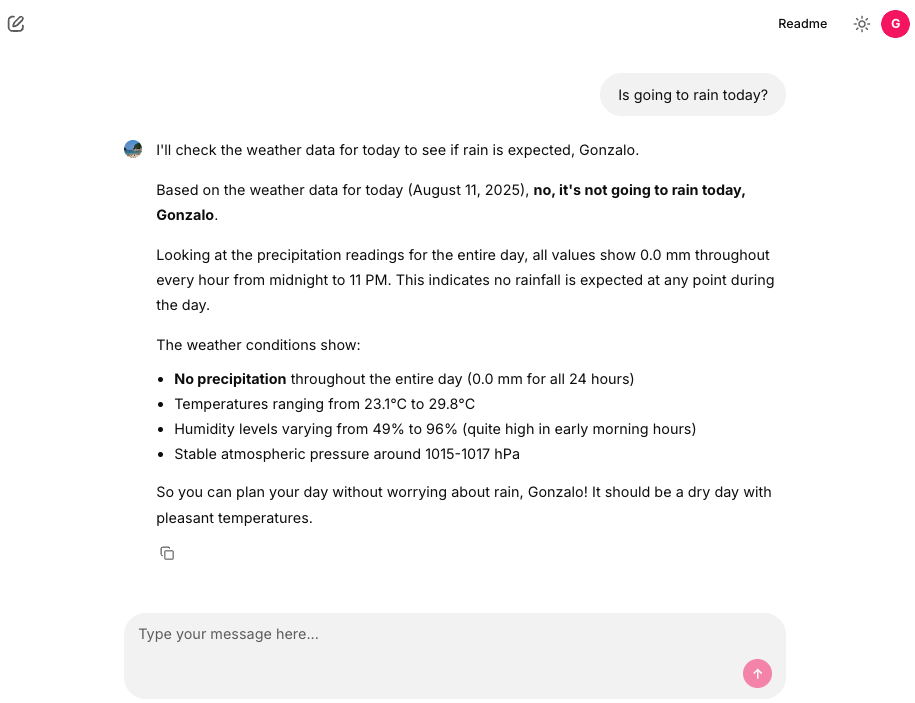
The Chainlit interface provides several starter prompts to help users interact with the weather agent:

@cl.set_starters
async def set_starters():
    return [
        cl.Starter(label="Is going to rain today?", message="Is going to rain today?"),
        cl.Starter(label="tomorrow's weather", message="What will the weather be like tomorrow?"),
        cl.Starter(label="Next 7 days weather", message="Make a weather forecast for the next 7 days."),
    ]

Chainlit also supports message history management, allowing users to see their previous interactions:

@cl.on_message
async def handle_message(message: cl.Message):
    message_history = cl.user_session.get("message_history")
    message_history.append({"role": "user", "content": message.content})
    
    msg = cl.Message(content="")
    await msg.send()
    
    app_user = cl.user_session.get("user")
    question = f"user: {app_user.display_name} Content: {message.content}"
    
    async for event in agent.stream_async(question):
        if "data" in event:
            await msg.stream_token(str(event["data"]))
        elif "message" in event:
            await msg.stream_token("\n")
            message_history.append(event["message"])
    
    await msg.update()

And that’s all. Thanks to Chainlit, we can build AI frontends and integrate them with OAuth2 authentication in a secure and efficient way. The combination of Chainlit’s interactive capabilities and Nginx’s robust authentication features provides a solid foundation for building AI applications that require user authentication.
Full code in my github account

Implementing OAuth2 with a Vue Frontend and Python Backend using Nginx as a Reverse Proxy

We’ve seen in other posts that we can use OAuth2-proxy to provide OAuth2 authentication in our application. Today, for example, we will protect a Vue application, but instead of using oauth2-proxy, we will implement the functionality provided by oauth2-proxy directly in Python.

Our Vue application is very simple: it has only one button that shows some information. The entire Vue application, as well as the backend that serves this information (developed with Flask), will be protected and authenticated with OAuth2. For this example, we will use GitHub as the authentication provider.

<script setup lang="ts">
import {ref} from "vue";

defineProps<{
  msg: string
}>()

const data = ref(null);
const showModal = ref(false);

const fetchData = async () => {
  try {
    const response = await fetch("/app/api/userinfo", { redirect: "manual" });

    const logoutStatuses = [401, 403, 302, 303];
    if (response.type === "opaqueredirect" || logoutStatuses.includes(response.status)) {
      window.location.href = "/app/oauth/logout";
    } else {
      data.value = await response.json();
      showModal.value = true;
    }
  } catch (error) {
    console.error("Error al obtener los datos", error);
  }
};

</script>

<template>
  <div class="greetings">
    <h1 class="green">{{ msg }}</h1>
    <h3>
      You’ve successfully created a project with
      <button @click="fetchData" class="bg-blue-500 text-white p-2 rounded">
        Load data
      </button>
    </h3>
    <div v-if="showModal" class="fixed inset-0 flex items-center justify-center bg-gray-800 bg-opacity-50">
      <div class="bg-white p-6 rounded shadow-lg w-1/3">
        <h2 class="text-xl font-bold mb-4">Datos del Backend</h2>
        <pre class="bg-gray-100 p-3 rounded text-sm">{{ data }}</pre>
        <button @click="showModal = false" class="mt-4 bg-red-500 text-white p-2 rounded">Cerrar</button>
      </div>
    </div>
  </div>
</template>

<style scoped>
h1 {
  font-weight: 500;
  font-size: 2.6rem;
  position: relative;
  top: -10px;
}

h3 {
  font-size: 1.2rem;
}

.greetings h1,
.greetings h3 {
  text-align: center;
}

@media (min-width: 1024px) {
  .greetings h1,
  .greetings h3 {
    text-align: left;
  }
}
</style>

The Flask backend is as follows and allows us to respond with user data in a protected route and a public route.

import logging
from datetime import datetime

from flask import Flask, session
from flask_compress import Compress

from core.oauth_proxy import setup_oauth
from settings import APP_PATH, SECRET, SESSION, DEBUG, OAUTH

app = Flask(__name__)
app.debug = DEBUG
app.secret_key = SECRET
app.config.update(SESSION)
Compress(app)
for logger_name in ['werkzeug', ]:
    logging.getLogger(logger_name).setLevel(logging.WARNING)

setup_oauth(app, OAUTH, APP_PATH)


@app.get(f"/{APP_PATH}/api/userinfo")
def protected_route():
    now = datetime.now().isoformat()
    return dict(
        session=session['user'],
        now=now
    )


@app.get(f"/{APP_PATH}/api/no_auth")
def public_route():
    return "public, route!"

In order to use OAuth2, we need to use a reverse proxy like NGINX. The NGINX configuration file is shown below.

upstream app {
    server host.docker.internal:5000;
}

upstream front {
    server host.docker.internal:5173;
}


server {
    listen 8000;
    server_tokens off;
    proxy_set_header Host $host;
    proxy_set_header X-Real-IP $remote_addr;
    proxy_set_header X-Forwarded-For $proxy_add_x_forwarded_for;
    proxy_set_header X-Forwarded-Proto $scheme;
    proxy_set_header X-Forwarded-Host $host:$server_port;

    location / {
        auth_request /app/oauth2/auth;
        error_page 401 = @error401;
        auth_request_set $auth_cookie $upstream_http_set_cookie;
        try_files $uri @proxy_to_front;
    }

    location /app/api/ {
        auth_request /app/oauth2/auth;
        error_page 401 = @error401;
        auth_request_set $auth_cookie $upstream_http_set_cookie;
        try_files $uri @proxy_to_app;
    }

    location /app/api/no_auth {
        try_files $uri @proxy_to_app;
    }

    location /app/oauth2/ {
        proxy_set_header X-Real-IP               $remote_addr;
        proxy_set_header X-Auth-Request-Redirect $request_uri;
        proxy_pass http://app;
    }

    location @proxy_to_app {
        proxy_pass http://app;
    }

    location @proxy_to_front {
        proxy_pass http://front;
    }

    location @error401 {
        auth_request_set $auth_cookie $upstream_http_set_cookie;
        add_header Set-Cookie $auth_cookie;
        return 302 /app/oauth2/sign_in;
    }
}

The authentication flow is managed as follows, using a small blueprint that handles OAuth2 redirections, token exchange, and user session storage.

import logging
import secrets
from urllib.parse import urlencode

import requests
from flask import Blueprint, jsonify
from flask import request, session, redirect

logger = logging.getLogger(__name__)


def _clean_session():
    session.pop('user', default=None)
    session.pop('state', default=None)
    session.pop('referer', default=None)


def get_oauth_proxy_blueprint(oauth_conf, app_path, *, sub_path="oauth2", callback_url='/callback',
                              signin_url='/sign_in', auth_url='/auth', logout_url='/logout'):
    blueprint = Blueprint('oauth_proxy', __name__, url_prefix=f'/{app_path}/{sub_path}')

    @blueprint.get(callback_url)
    def callback():
        referer = session.get('referer')
        state = request.args.get('state')
        session_state = session.get('state')

        if 'state' not in session:
            return redirect(f"{referer}")
        if state == session_state:
            authorization_code = request.args.get('code')
            token_data = {
                'grant_type': oauth_conf.get('GRANT_TYPE', 'authorization_code'),
                'code': authorization_code,
                'redirect_uri': oauth_conf['REDIRECT_URL'],
                'client_id': oauth_conf['CLIENT_ID'],
                'client_secret': oauth_conf['CLIENT_SECRET']
            }
            response = requests.post(oauth_conf['TOKEN_URL'],
                                     data=token_data,
                                     headers={'Accept': 'application/json'})
            response_data = response.json()
            headers = {
                "Authorization": f"Bearer {response_data.get('access_token')}",
                'Accept': 'application/json'
            }
            user_response = requests.get(oauth_conf['USER_URL'],
                                         data=token_data,
                                         headers=headers)
            if user_response.ok:
                user_data = user_response.json()
                session['user'] = dict(
                    username=user_data['login'],
                    name=user_data['name'],
                    email=user_data['email']
                )
                session.pop('state', default=None)
                session.pop('referer', default=None)
            else:
                _clean_session()
            return redirect(referer)

    @blueprint.get(signin_url)
    def sign_in():
        state = secrets.token_urlsafe(32)
        session['state'] = state
        authorize = oauth_conf['AUTHORIZE_URL']
        query_string = urlencode({
            'scope': oauth_conf.get('SCOPE', 'read write'),
            'prompt': oauth_conf.get('PROMPT', 'login'),
            'approval_prompt': oauth_conf.get('APPROVAL_PROMPT', 'auto'),
            'state': state,
            'response_type': oauth_conf.get('RESPONSE_TYPE', 'code'),
            'redirect_uri': oauth_conf['REDIRECT_URL'],
            'client_id': oauth_conf['CLIENT_ID']
        })
        return redirect(f"{authorize}?{query_string}")

    @blueprint.get(auth_url)
    def auth():
        if not session.get("user"):
            referer = request.headers.get('X-Auth-Request-Redirect')
            session['referer'] = referer
            return redirect(f"oauth2/sign_in", 401)
        else:

            return jsonify(dict(error='OK')), 200

    @blueprint.get(logout_url)
    def logout():
        _clean_session()
        return redirect(logout_url)

    return blueprint


def setup_oauth(app, oauth_conf, app_path, *, sub_path="oauth2", callback_url='/callback',
                signin_url='/sign_in', auth_url='/auth', logout_url='/logout'):
    app.register_blueprint(get_oauth_proxy_blueprint(oauth_conf, app_path, sub_path=sub_path, callback_url=callback_url,
                                                     signin_url=signin_url, auth_url=auth_url, logout_url=logout_url))

You can see the full code of the project in my github

OAuth2 Authentication in Streamlit Applications with Nginx and OAuth2-Proxy

Normally, when I want to provide authentication to a service, I use OAuth2. There are libraries to integrate this authentication mechanism into a web application, but sometimes we cannot do this easily because it is a third-party service over which we have no control. In these cases, it is possible that this third-party service has support for OAuth2 and can also log in with OAuth2. But sometimes this is not possible, or it is too complicated. In these cases, a solution is to use a proxy that handles the authentication and communicates with the third-party service. In this example, we will use a Streamlit application as if it were a third-party application.

import streamlit as st

st.set_page_config(
    page_title="Home",
    page_icon="👋",
)
st.write("# Welcome to Streamlit! 👋")
st.markdown(
    """
    Streamlit is an open-source app framework built specifically for
    Machine Learning and Data Science projects.
    **👈 Select a demo from the sidebar** to see some examples
    of what Streamlit can do!
    ### Want to learn more?
    - Check out [streamlit.io](https://streamlit.io)
    - Jump into our [documentation](https://docs.streamlit.io)
    - Ask a question in our [community
        forums](https://discuss.streamlit.io)
    ### See more complex demos
    - Use a neural net to [analyze the Udacity Self-driving Car Image
        Dataset](https://github.com/streamlit/demo-self-driving)
    - Explore a [New York City rideshare dataset](https://github.com/streamlit/demo-uber-nyc-pickups)
"""
)

st.sidebar.success("Select a demo above.")

Our Streamlit application has a page.

from random import randint

import streamlit as st

st.set_page_config(
    page_title="Hello",
    page_icon="👋",
)

st.markdown("# Plotting Demo")
st.sidebar.header("Plotting Demo")
st.write("This demo illustrates a combination of plotting with Streamlit. Enjoy!")

data = [dict(name=f"name{i}", value=randint(1, 1000)) for i in range(1, 101)]

progress_bar = st.sidebar.progress(0)
status_text = st.sidebar.empty()
chart = st.line_chart([item['value'] for item in data])

progress_bar.empty()

st.button("Re-run")

To use OAuth authentication in the Streamlit application, we are using Nginx as a reverse proxy with the auth_request directive to direct requests to an OAuth2-proxy service deployed in our stack. OAuth2-proxy can be configured to authenticate any OAuth2 server compatible with OpenID. In my example, I am using GitHub, but you can use ActiveDirectory, Google, Keycloak, or even your own OAuth2 server. This is my Nginx configuration:

This is my Nginx configuration:

upstream app {
    server streamlit:8501;
}

upstream oauth2 {
    server oauth2-proxy:4180;
}

server {
    listen 8000;

    location / {
        auth_request /oauth2/auth;
        error_page 401 = @error401;
        try_files $uri @proxy_to_app;
    }

    location /_stcore/stream {
        auth_request /oauth2/auth;
        error_page 401 = @error401;
        proxy_pass http://app/_stcore/stream;
        proxy_http_version 1.1;
        proxy_set_header X-Forwarded-For $proxy_add_x_forwarded_for;
        proxy_set_header Host $host;
        proxy_set_header Upgrade $http_upgrade;
        proxy_set_header Connection "upgrade";
        proxy_read_timeout 86400;
    }

    location @error401 {
        return 302 /oauth2/sign_in;
    }

    location /oauth2/ {
        try_files $uri @proxy_to_oauth2;
    }

    location @proxy_to_oauth2 {
        proxy_set_header Host $host;
        proxy_set_header X-Real-IP $remote_addr;
        proxy_set_header X-Forwarded-For $proxy_add_x_forwarded_for;
        proxy_set_header X-Forwarded-Proto $scheme;
        proxy_pass http://oauth2;
    }

    location @proxy_to_app {
        proxy_set_header X-Forwarded-Proto https;
        proxy_set_header X-Url-Scheme $scheme;
        proxy_set_header X-Forwarded-For $proxy_add_x_forwarded_for;
        proxy_set_header Host $http_host;
        proxy_redirect off;
        proxy_pass http://app;
    }
}

The complete stack can be seen in the docker-compose.yml:

version: '3.9'

services:
  streamlit:
    build: .
    environment:
      - ENVIRONMENT=docker
    command: ["streamlit", "run", "st.py", "--server.port=8501", "--server.address=0.0.0.0"]

  nginx:
    build: .docker/nginx
    ports:
      - "8000:8000"

  oauth2-proxy:
    image: quay.io/oauth2-proxy/oauth2-proxy:v7.8.1
    env_file:
      - .env

And that’s all. The advantage of using oauth2-proxy is that we don’t need to do anything within the Streamlit application to have OAuth2 authentication. This greatly simplifies the integration process, as all the authentication logic is handled outside the main application. Additionally, oauth2-proxy is compatible with any OAuth2 server that complies with OpenID, giving us the flexibility to use different authentication providers. By using Nginx as a reverse proxy, we can efficiently redirect and manage authentication requests, ensuring that only authenticated users can access our Streamlit application.

Full code available in my github account.

Python Flask and OAuth2: Building a Secure Authentication System

I typically use Flask for APIs and Django for web applications that utilize sessions and OAuth authentication. However, do I truly need Django for these functionalities? The answer is no. While Django provides pre-built components, similar capabilities are also accessible in Flask, and implementing them is quite straightforward. Additionally, I am a strong advocate of microframeworks. Today, we’ll demonstrate how to employ OAuth2 authentication using Flask. Let’s begin.

OAuth2 encompasses various flows, but today, we’ll focus on the most common one for web applications. The concept involves checking for a valid session. If one exists, great, but if not, the application will generate a session with a state (a randomly generated string) and then redirect to the OAuth2 server login page. Subsequently, the user will perform the login on the login server. Following that, the OAuth2 server will redirect to a validated callback URL with an authorization code (while also returning the provided state). The callback URL will then verify whether the state provided by the OAuth2 server matches the one in the session. Next, the callback route on your server, utilizing the authorization code, will obtain an access token (via a POST request to the OAuth2 server). With this access token, you can retrieve user information from the OAuth2 server and establish a valid session.

First we create a Flask application with sessions

from flask import Flask
from flask_session import Session

from settings import SECRET, SESSION


app = Flask(__name__)
app.secret_key = SECRET
app.config.update(SESSION)
Session(app)

Session configuration:

SESSION = dict(
    SESSION_PERMANENT=False,
    SESSION_TYPE="filesystem",
    SESSION_COOKIE_SECURE=True,
    SESSION_COOKIE_HTTPONLY=True,
    SESSION_COOKIE_SAMESITE='Lax',
    SESSION_COOKIE_DOMAIN=False,
)

I like to use blueprints to manage the Flask, so let’s add our application:

from modules.home.app import blueprint as home

...
app.register_blueprint(home, url_prefix=f'/')

I set up the blueprint in a init.py file

from pathlib import Path

from flask import Blueprint

from lib.oauth import check_session

base = Path(__file__).resolve().parent
blueprint = Blueprint(
    'front_home', __name__,
    template_folder=base.joinpath('templates')
)


@blueprint.before_request
def auth():
    return check_session()

You can see that we’re using a before_request middleware to check the session in every route of the blueprint.

def check_session():
    if not session.get("user"):
        state = secrets.token_urlsafe(32)
        session['state'] = state
        authorize = OAUTH['AUTHORIZE_URL']
        query_string = urlencode({
            'scope': OAUTH.get('SCOPE', 'read write'),
            'prompt': OAUTH.get('PROMPT', 'login'),
            'approval_prompt': OAUTH.get('APPROVAL_PROMPT', 'auto'),
            'state': state,
            'response_type': OAUTH.get('RESPONSE_TYPE', 'code'),
            'redirect_uri': OAUTH['REDIRECT_URL'],
            'client_id': OAUTH['CLIENT_ID']
        })
        return redirect(f"{authorize}?{query_string}")

And the routes of the blueprint:

from flask import render_template, session

from modules.home import blueprint


@blueprint.get(f"/")
def home():
    username = session['user']['username']
    return render_template('index.html',
                           username=username)

To do the login we need also to code our callback route. We will add a blueprint for that.

from lib.oauth import blueprint as oauth

...
app.register_blueprint(oauth)

That’s the OAuth2 callback:

import logging

import requests
from flask import Blueprint, abort
from flask import request, session, redirect

from settings import OAUTH

logger = logging.getLogger(__name__)

blueprint = Blueprint('oauth', __name__, url_prefix=f'/oauth')


@blueprint.get('/callback')
def callback():
    # Obtain the state from the request
    state = request.args.get('state')
    if 'state' not in session:
        return redirect(f"/")
    # Check if provided state match wht the session saved one
    if state == session['state']:
        # Obtain the authorization code from the request
        authorization_code = request.args.get('code')
        token_data = {
            'grant_type': OAUTH.get('GRANT_TYPE', 'authorization_code'),
            'code': authorization_code,
            'redirect_uri': OAUTH['REDIRECT_URL'],
            'client_id': OAUTH['CLIENT_ID'],
            'client_secret': OAUTH['CLIENT_SECRET']
        }
        # POST to OAuth2 server to obtain the access_token
        response = requests.post(OAUTH['TOKEN_URL'],
                                 data=token_data,
                                 headers={'Accept': 'application/json'})
        response_data = response.json()
        headers = {
            "Authorization": f"Bearer {response_data.get('access_token')}",
            'Accept': 'application/json'
        }
        # With the access_token you can obtain the user information
        user_response = requests.get(OAUTH['USER_URL'],
                                     data=token_data,
                                     headers=headers)
        if user_response.ok:
            # Now you are able to create the session 
            user_data = user_response.json()
            session['user'] = dict(
                username=user_data['login'],
                name=user_data['name'],
                email=user_data['email']
            )
            session.pop('state', default=None)
        else:
            abort(401)
        return redirect(f"/")
    else:
        abort(401)

Mainly that’s all. In this example we’re using Github’s OAuth2 server. You can use different ones, and also with your own OAuth2 server. Maybe, depending on the server, they way to obtain the user_data, can be different, and you should adapt it to your needs.

In my example I’m saving my OAuth2 credentials in a .env file. With this technique I can use different configurations depending on my environment (production, staging, …)

CLIENT_ID=my_client_id
CLIENT_SECRET=my_client_secret
TOKEN_URL=https://github.com/login/oauth/access_token
AUTHORIZE_URL=https://github.com/login/oauth/authorize
USER_URL=https://api.github.com/user
REDIRECT_URL=http://localhost:5000/oauth/callback

And I load this conf in my settings.py

import os
from pathlib import Path

from dotenv import load_dotenv

BASE_DIR = Path(__file__).resolve().parent
ENVIRONMENT = os.getenv('ENVIRONMENT', 'local')

load_dotenv(dotenv_path=Path(BASE_DIR).resolve().joinpath('env', ENVIRONMENT, '.env'))

OAUTH = dict(
    CLIENT_ID=os.getenv('CLIENT_ID'),
    CLIENT_SECRET=os.getenv('CLIENT_SECRET'),
    TOKEN_URL=os.getenv('TOKEN_URL'),
    AUTHORIZE_URL=os.getenv('AUTHORIZE_URL'),
    USER_URL=os.getenv('USER_URL'),
    REDIRECT_URL=os.getenv('REDIRECT_URL'),
)

And that’s all. Full code in my github account.