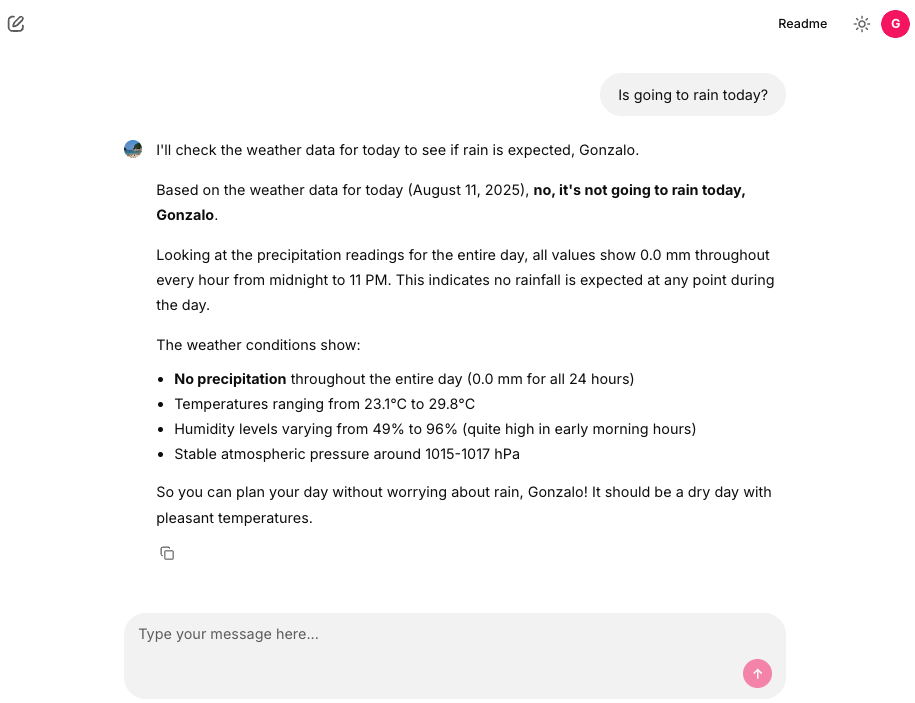
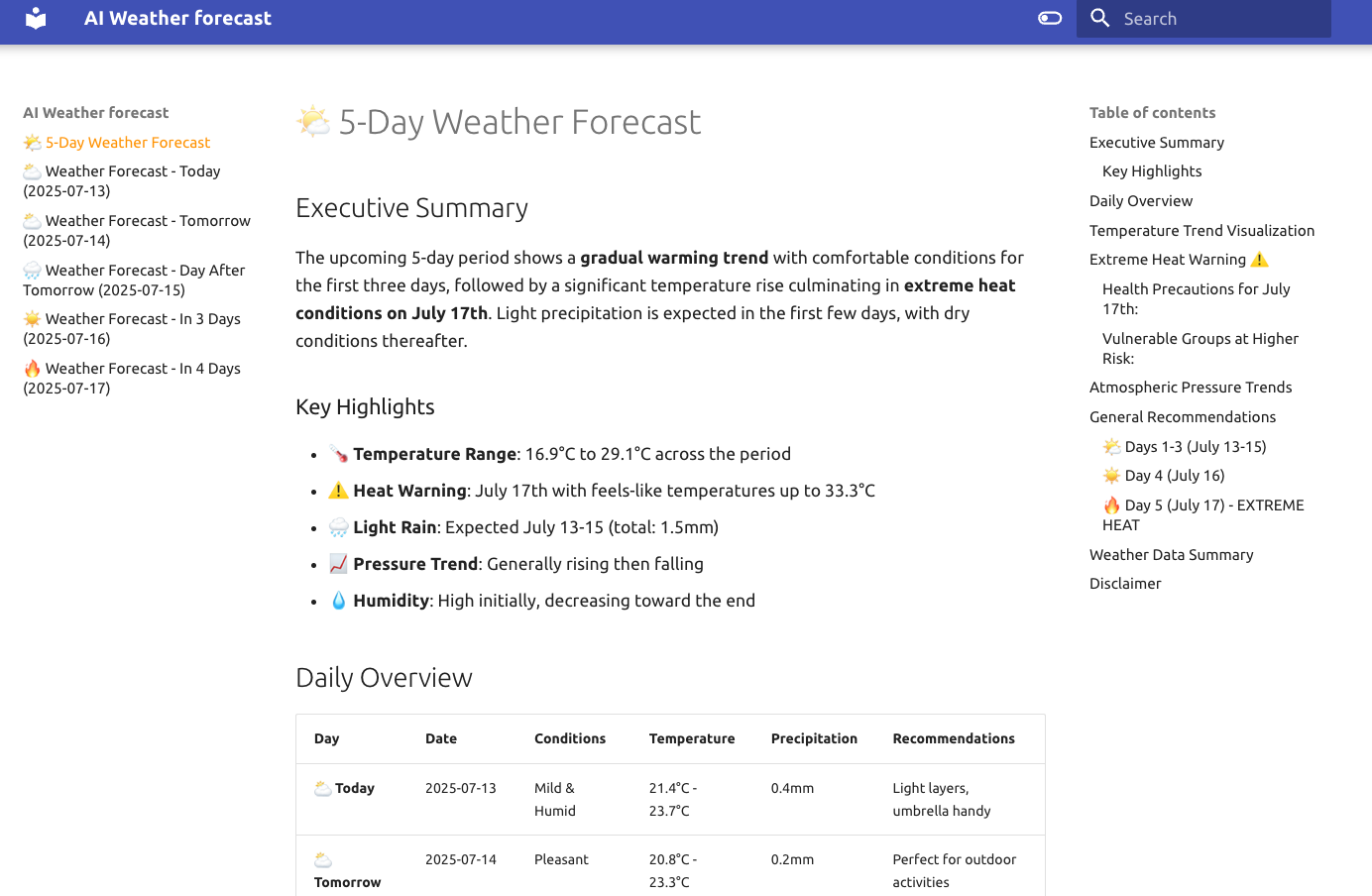
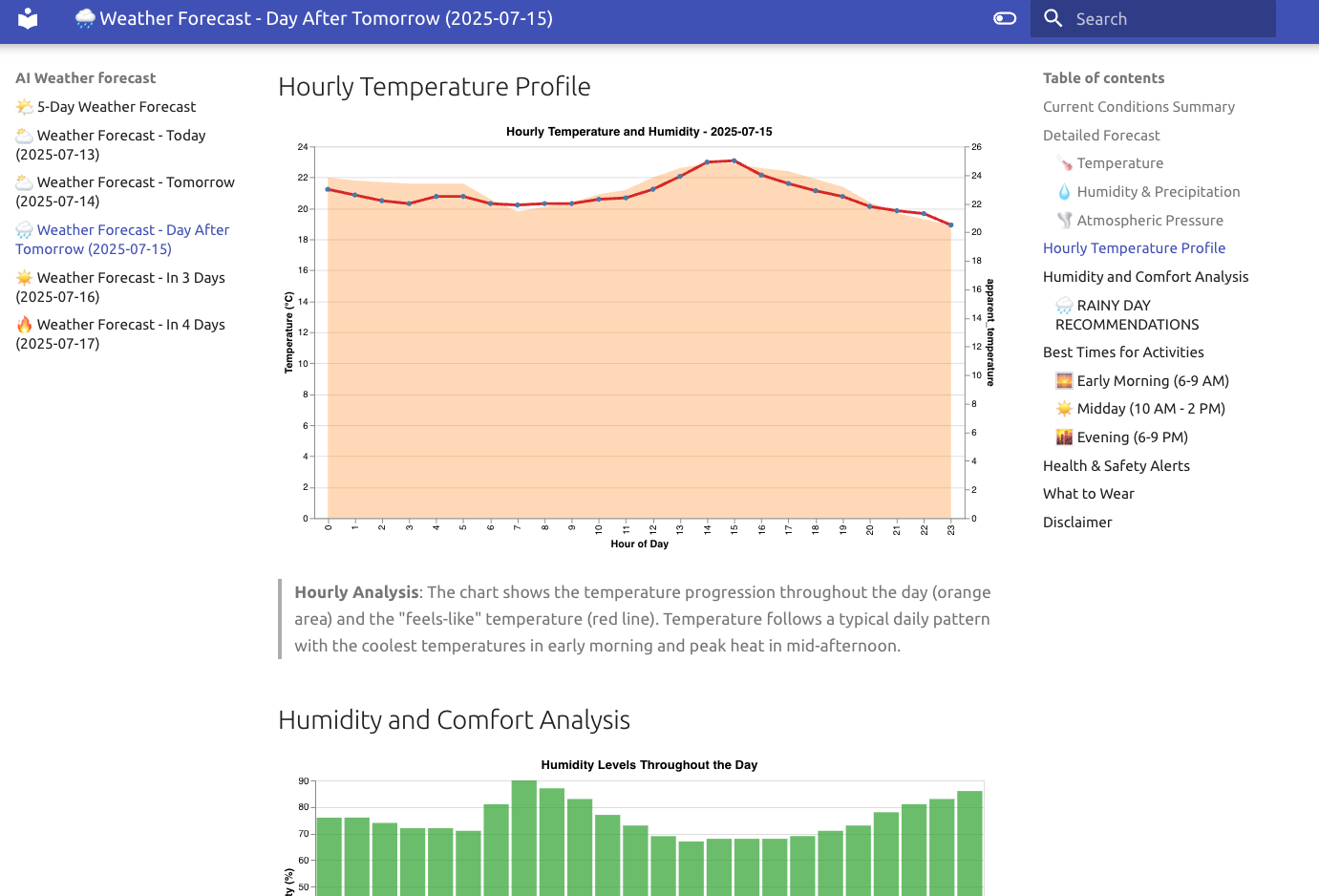
Chat with your Data: Building a File-Aware AI Agent with AWS Bedrock and Chainlit

We all know LLMs are powerful, but their true potential is unlocked when they can see your data. While RAG (Retrieval-Augmented Generation) is great for massive knowledge bases, sometimes you just want to drag and drop a file and ask questions about it.

Today we’ll build a “File-Aware” AI agent that can natively understand a wide range of document formats—from PDFs and Excel sheets to Word docs and Markdown files. We’ll use AWS Bedrock with Claude 4.5 Sonnet for the reasoning engine and Chainlit for the conversational UI.

The idea is straightforward: Upload a file, inject it into the model’s context, and let the LLM do the rest. No vector databases, no complex indexing pipelines—just direct context injection for immediate analysis.

The architecture is simple yet effective. We intercept file uploads in the UI, process them into a format the LLM understands, and pass them along with the user’s query.

┌──────────────┐      ┌──────────────┐      ┌────────────────────┐
│   Chainlit   │      │  Orchestrator│      │   AWS Bedrock      │
│      UI      │─────►│    Agent     │─────►│(Claude 4.5 Sonnet) │
└──────┬───────┘      └──────────────┘      └────────────────────┘
       │                      ▲
       │    ┌────────────┐    │
       └───►│ File Proc. │────┘
            │   Logic    │
            └────────────┘

The tech stack includes:

  • AWS Bedrock with Claude 4.5 Sonnet for high-quality reasoning and large context windows.
  • Chainlit for a chat-like interface with native file upload support.
  • Python for the backend logic.

The core challenge is handling different file types and presenting them to the LLM. We support a variety of formats by mapping them to Bedrock’s expected input types.

To enable file uploads in Chainlit, you need to configure the [features.spontaneous_file_upload] section in your .chainlit/config.toml. This is where you define which MIME types are accepted.

[features.spontaneous_file_upload]
    enabled = true
    accept = [
        "application/pdf",
        "text/csv",
        "application/msword",
        "application/vnd.openxmlformats-officedocument.wordprocessingml.document",
        "application/vnd.ms-excel",
        "application/vnd.openxmlformats-officedocument.spreadsheetml.sheet",
        "text/html",
        "text/plain",
        "text/markdown",
        "text/x-markdown"
    ]
    max_files = 20
    max_size_mb = 500
The main agent loop handles the conversation. It checks for uploaded files, processes them, and constructs the message payload for the LLM. We also include robust error handling to manage context window limits gracefully.
def get_question_from_message(message: cl.Message):
    content_blocks = None
    if message.elements:
        content_blocks = get_content_blocks_from_message(message)

    if content_blocks:
        content_blocks.append({"text": message.content or "Write a summary of the document"})
        question = content_blocks
    else:
        question = message.content

    return question


def get_content_blocks_from_message(message: cl.Message):
    docs = [f for f in message.elements if f.type == "file" and f.mime in MIME_MAP]
    content_blocks = []

    for doc in docs:
        file = Path(doc.path)
        file_bytes = file.read_bytes()
        shutil.rmtree(file.parent)

        content_blocks.append({
            "document": {
                "name": sanitize_filename(doc.name),
                "format": MIME_MAP[doc.mime],
                "source": {"bytes": file_bytes}
            }
        })

    return content_blocks

@cl.on_message
async def handle_message(message: cl.Message):
    task = asyncio.create_task(process_user_task(
        question=get_question_from_message(message),
        debug=DEBUG))
    cl.user_session.set("task", task)
    try:
        await task
    except asyncio.CancelledError:
        logger.info("User task was cancelled.")

This pattern allows for ad-hoc analysis. You don’t need to pre-ingest data. You can:

  1. Analyze Financials: Upload an Excel sheet and ask for trends.
  2. Review Contracts: Upload a PDF and ask for clause summaries.
  3. Debug Code: Upload a source file and ask for a bug fix.
By leveraging the large context window of modern models like Claude 4.5 Sonnet, we can feed entire documents directly into the prompt, providing the model with full visibility without the information loss often associated with RAG chunking.

And that's all. With tools like Chainlit and powerful APIs like AWS Bedrock, we can create robust, multi-modal assistants that integrate seamlessly into our daily workflows.

Full code in my github account.

Building scalable multi-purpose AI agents: Orchestrating Multi-Agent Systems with Strands Agents and Chainlit

We can build simple AI agents that handle specific tasks quite easily today. But what about building AI systems that can handle multiple domains effectively? One approach is to create a single monolithic agent that tries to do everything, but this quickly runs into problems of context pollution, maintenance complexity, and scaling limitations. In this article, we’ll show a production-ready pattern for building multi-purpose AI systems using an orchestrator architecture that coordinates domain-specific agents.

The idea is simple: Don’t build one agent to rule them all instead, create specialized agents that excel in their domains and coordinate them through an intelligent orchestrator. The solution is an orchestrator agent that routes requests to specialized sub-agents, each with focused expertise and dedicated tools. Think of it as a smart router that understands intent and delegates accordingly.

That’s the core of the Orchestrator Pattern for multi-agent systems:

User Query → Orchestrator Agent → Specialized Agent(s) → Orchestrator → Response

For our example we have three specialized agents:

  1. Weather Agent: Expert in meteorological data and weather patterns. It uses external weather APIs to fetch historical and current weather data.
  2. Logistics Agent: Specialist in supply chain and shipping operations. Fake logistics data is generated to simulate shipment tracking, route optimization, and delivery performance analysis.
  3. Production Agent: Focused on manufacturing operations and production metrics. Also, fake production data is generated to analyze production KPIs.

That’s the architecture in a nutshell:

┌─────────────────────────────────────────────┐
│          Orchestrator Agent                 │
│  (Routes & Synthesizes)                 │
└────────┬─────────┬─────────┬────────────────┘
         │         │         │
    ┌────▼────┐ ┌──▼─────┐ ┌─▼─────────┐
    │ Weather │ │Logistic│ │Production │
    │  Agent  │ │ Agent  │ │  Agent    │
    └────┬────┘ └──┬─────┘ └┬──────────┘
         │         │        │
    ┌────▼────┐ ┌──▼─────┐ ┌▼──────────┐
    │External │ │Database│ │ Database  │
    │   API   │ │ Tools  │ │  Tools    │
    └─────────┘ └────────┘ └───────────┘

The tech stack includes:

  • AWS Bedrock with Claude 4.5 Sonnet for agent reasoning
  • Strands Agents framework for agent orchestration
  • Chainlit for the conversational UI
  • FastAPI for the async backend
  • PostgreSQL for storing conversation history and domain data

The orchestrator’s job is simple but critical: understand the user’s intent and route to the right specialist(s).

MAIN_SYSTEM_PROMPT = """You are an intelligent orchestrator agent 
responsible for routing user requests to specialized sub-agents 
based on their domain expertise.

## Available Specialized Agents

### 1. Production Agent
**Domain**: Manufacturing operations, production metrics, quality control
**Handles**: Production KPIs, machine performance, downtime analysis

### 2. Logistics Agent
**Domain**: Supply chain, shipping, transportation operations
**Handles**: Shipment tracking, route optimization, delivery performance

### 3. Weather Agent
**Domain**: Meteorological data and weather patterns
**Handles**: Historical weather, atmospheric conditions, climate trends

## Your Decision Process
1. Analyze the request for key terms and domains
2. Determine scope (single vs multi-domain)
3. Route to appropriate agent(s)
4. Synthesize results when multiple agents are involved
"""

The orchestrator receives specialized agents as tools:

def get_orchestrator_tools() -> List[Any]:
    from tools.logistics.agent import logistics_assistant
    from tools.production.agent import production_assistant
    from tools.weather.agent import weather_assistant

    tools = [
        calculator,
        think,
        current_time,
        AgentCoreCodeInterpreter(region=AWS_REGION).code_interpreter,
        logistics_assistant,  # Specialized agent as tool
        production_assistant,  # Specialized agent as tool
        weather_assistant     # Specialized agent as tool
    ]
    return tools

Each specialized agent follows a consistent pattern. Here’s the weather agent:

@tool
@stream_to_step("weather_assistant")
async def weather_assistant(query: str):
    """
    A research assistant specialized in weather topics with streaming support.
    """
    try:
        tools = [
            calculator,
            think,
            current_time,
            AgentCoreCodeInterpreter(region=AWS_REGION).code_interpreter
        ]
        # Domain-specific tools
        tools += WeatherTools(latitude=MY_LATITUDE, longitude=MY_LONGITUDE).get_tools()

        research_agent = get_agent(
            system_prompt=WEATHER_ASSISTANT_PROMPT,
            tools=tools
        )

        async for token in research_agent.stream_async(query):
            yield token

    except Exception as e:
        yield f"Error in research assistant: {str(e)}"

Each agent has access to domain-specific tools. For example, the weather agent uses external APIs:

class WeatherTools:
    def __init__(self, latitude: float, longitude: float):
        self.latitude = latitude
        self.longitude = longitude

    def get_tools(self) -> List[tool]:
        @tool
        def get_hourly_weather_data(from_date: date, to_date: date) -> MeteoData:
            """Get hourly weather data for a specific date range."""
            url = (f"https://api.open-meteo.com/v1/forecast?"
                   f"latitude={self.latitude}&longitude={self.longitude}&"
                   f"hourly=temperature_2m,relative_humidity_2m...")
            response = requests.get(url)
            return parse_weather_response(response.json())
        
        return [get_hourly_weather_data]

The logistics and production agents use synthetic data generators for demonstration:

class LogisticsTools:
    def get_tools(self) -> List[tool]:
        @tool
        def get_logistics_data(
            from_date: date,
            to_date: date,
            origins: Optional[List[str]] = None,
            destinations: Optional[List[str]] = None,
        ) -> LogisticsDataset:
            """Generate synthetic logistics shipment data."""
            # Generate realistic shipment data with delays, costs, routes
            records = generate_synthetic_shipments(...)
            return LogisticsDataset(records=records, aggregates=...)
        
        return [get_logistics_data]

For UI we’re going to use Chainlit. The Chainlit integration provides real-time visibility into agent execution:

class LoggingHooks(HookProvider):
    async def before_tool(self, event: BeforeToolCallEvent) -> None:
        step = cl.Step(name=f"{event.tool_use['name']}", type="tool")
        await step.send()
        cl.user_session.set(f"step_{event.tool_use['name']}", step)

    async def after_tool(self, event: AfterToolCallEvent) -> None:
        step = cl.user_session.get(f"step_{event.tool_use['name']}")
        if step:
            await step.update()

@cl.on_message
async def handle_message(message: cl.Message):
    agent = cl.user_session.get("agent")
    message_history = cl.user_session.get("message_history")
    message_history.append({"role": "user", "content": message.content})
    
    response = await agent.run_async(message.content)
    await cl.Message(content=response).send()

This creates a transparent experience where users see:

  • Which agent is handling their request
  • What tools are being invoked
  • Real-time streaming of responses

Now we can handle a variety of user queries: For example:

User: “What was the average temperature last week?”

Flow:

  1. Orchestrator identifies weather domain
  2. Routes to weather_assistant
  3. Weather agent calls get_hourly_weather_data
  4. Analyzes and returns formatted response

Or multi-domain queries:

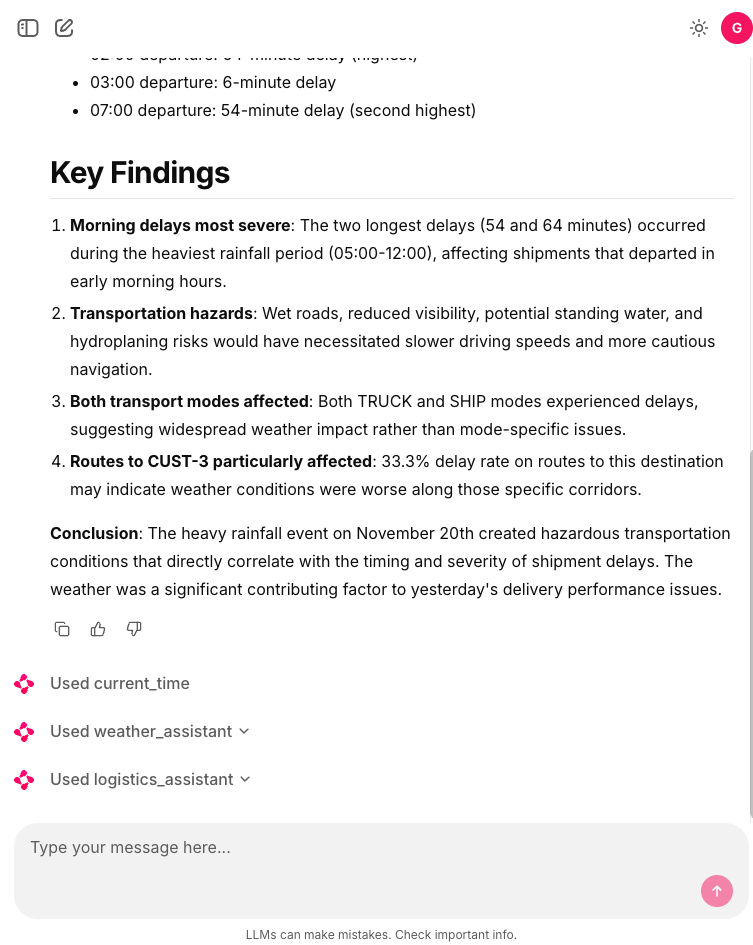
User: “Did weather conditions affect our shipment delays yesterday?”

Flow:

  1. Orchestrator identifies weather + logistics domains
  2. Routes to weather_assistant for climate data
  3. Routes to logistics_assistant for shipment data
  4. Synthesizes correlation analysis
  5. Returns unified insight

And complex analytics:

User: “Analyze production efficiency trends and correlate with weather and logistics performance based in yesterday’s data.”

Flow:

  1. Orchestrator coordinates all three agents
  2. Production agent retrieves manufacturing KPIs
  3. Weather agent provides environmental data
  4. Logistics agent supplies delivery metrics
  5. Orchestrator synthesizes multi-domain analysis

This architecture scales naturally in multiple dimensions. We can easily add new specialized agents without disrupting existing functionality. WE only need to create the new agent and register it as a tool with the orchestratortrator prompt with new domain description. That’s it.

The orchestrator pattern transforms multi-domain AI from a monolithic challenge into a composable architecture. Each agent focuses on what it does best, while the orchestrator provides intelligent coordination.

Full code in my github.

Implementing a Kafka Producer and Consumer in Python

Today we’re going to play with Kafka. We’ll implement a simple producer and consumer in Python using the kafka-python library. The project consists of two main components: First tne producer. It uses a dedicated class to send messages to a Kafka topic. One consumer. It Listens to a Kafka topic, processes messages received, and commits their offsets. Communication with Kafka is handled by a helper module that encapsulates producer and consumer configurations. The setup uses Docker Compose to manage the Kafka broker and supporting services such as Zookeeper.

Below is a simplified Producer class and corresponding function:

import json
import logging

from jsonencoder import DefaultEncoder
from kafka import KafkaProducer

from settings import KAFKA_BOOTSTRAP_SERVERS

logger = logging.getLogger(__name__)


def get_producer():
    return KafkaProducer(
        bootstrap_servers=KAFKA_BOOTSTRAP_SERVERS,
        value_serializer=lambda data: json.dumps(data, cls=DefaultEncoder).encode('utf-8')
    )


class Producer:
    def __init__(self):
        self.producer = get_producer()

    def send(self, topic: str, message: any):
        try:
            self.producer.send(topic, value=message)
            self.producer.flush()
            logger.info(f"Message sent to topic: {topic}: {message}")
        except Exception as e:
            logger.error(f"Error sending message to {topic}: {str(e)}")
            raise
        finally:
            if self.producer:
                self.producer.close()


def send_message(topic: str, message: any):
    producer = Producer()
    producer.send(topic, message)

We’re using click to build the command line interface.

import click
from datetime import datetime
from lib.kafka_broker import send_message


@click.command()
@click.option('--topic', required=True, help='topic')
@click.option('--message', required=True, help='message')
def run(topic, message):
    send_message(topic, dict(
        timestamp=datetime.now().isoformat(),
        body=message
    ))

The consumer processes messages by consuming them from a Kafka topic. When a message is received, it gets logged and the consumer commits the offsets, ensuring that no message is processed more than once. The consumer functionality is implemented in a callback that is passed as a parameter to the topic consumption function.

Below is the consumer’s function definition and command setup:

import logging
import click
from kafka import KafkaConsumer
from kafka.protocol.message import Message
from lib.kafka_broker import consume_topic

logger = logging.getLogger(__name__)

def process_message(message: Message, consumer: KafkaConsumer) -> None:
    logger.info(f"received message: {message.value}")
    consumer.commit()

@click.command()
@click.option('--topic', required=True, help='topic')
def run(topic):
    consume_topic(topic, process_message)

The consume_topic function (from lib/kafka_broker.py) configures the Kafka consumer to listen to a specific topic. On receipt of each message, the process_mensaje callback handles the message by logging information and committing the consumer’s current offset.

import json
import logging
from typing import Protocol

from kafka import KafkaConsumer
from kafka.protocol.message import Message

from settings import KAFKA_BOOTSTRAP_SERVERS

logger = logging.getLogger(__name__)

EARLIEST = 'earliest'  # Automatically reset the offset to the earliest offset.
LATEST = 'latest'  # Automatically reset the offset to the latest offset.
NONE = 'none'  # You must set the partition and index manually.


def get_consumer(topic, *,
                 auto_commit=False,
                 group_id=None,
                 auto_offset_reset=EARLIEST) -> KafkaConsumer:
    return KafkaConsumer(
        topic,
        bootstrap_servers=KAFKA_BOOTSTRAP_SERVERS,
        auto_offset_reset=auto_offset_reset,
        enable_auto_commit=auto_commit,
        group_id=group_id,
        value_deserializer=lambda data: json.loads(data.decode('utf-8'))
    )


class MessageProcessorProtocol(Protocol):
    def __call__(self, message: Message, consumer: KafkaConsumer) -> None:
        ...


def consume_topic(topic, callback: MessageProcessorProtocol, stop_event=None):
    logger.info(f"Listening to topic: {topic}")
    consumer = get_consumer(topic, group_id=topic)
    try:
        while stop_event is None or not stop_event.is_set():
            messages = consumer.poll(timeout_ms=1000)
            for tp, msgs in messages.items():
                for mensaje in msgs:
                    logger.info(f"Received message: {mensaje.value} "
                                f"Partition: {mensaje.partition}, "
                                f"Offset: {mensaje.offset}")
                    callback(mensaje, consumer)
    finally:
        consumer. Close()

The project relies on Docker Compose to run the required Kafka and Zookeeper containers. This setup allows the application to interact with a local Kafka broker without needing complex installation processes. A simplified excerpt of the docker-compose.yml file is shown below:


version: '3'

services:
  zookeeper:
    image: confluentinc/cp-zookeeper:latest
    container_name: zookeeper
    ports:
      - "2181:2181"
    environment:
      ZOOKEEPER_CLIENT_PORT: 2181
      ZOOKEEPER_TICK_TIME: 2000
    networks:
      - kafka-net

  kafka:
    image: confluentinc/cp-kafka:latest
    container_name: kafka
    depends_on:
      - zookeeper
    ports:
      - "9092:9092"
      - "29092:29092"
    environment:
      KAFKA_BROKER_ID: 1
      KAFKA_ZOOKEEPER_CONNECT: zookeeper:2181
      KAFKA_ADVERTISED_LISTENERS: PLAINTEXT://kafka:29092,PLAINTEXT_HOST://localhost:9092
      KAFKA_LISTENER_SECURITY_PROTOCOL_MAP: PLAINTEXT:PLAINTEXT,PLAINTEXT_HOST:PLAINTEXT
      KAFKA_INTER_BROKER_LISTENER_NAME: PLAINTEXT
      KAFKA_AUTO_CREATE_TOPICS_ENABLE: "true"
    networks:
      - kafka-net

networks:
  kafka-net:
    driver: bridge

And that’s all. Source code in my github account.

Building an AI Frontend with Chainlit and OAuth2 Authentication

Today we’ll explore how to build a secure AI frontend using Chainlit. Chainlit is Python framework that allows us to create interactive AI applications. In this example we are going to reuse the weather tool created in a previous post. Also, we will implement OAuth2 authentication with a Nginx as a reverse proxy.

The project consists of four main components:

  1. Nginx Reverse Proxy: Handles authentication via auth_request and routes traffic
  2. Fake OAuth Server: Simple Flask app that simulates OAuth2 authentication
  3. Chainlit Application: The main chat interface with AI capabilities
  4. Strands AI Agent: Weather-focused AI assistant with custom tools

The Nginx configuration implements OAuth2 authentication using the auth_request module:

server {
    listen 8000;

    location / {
        auth_request /oauth2/auth;
        
        auth_request_set $user_jwt $upstream_http_x_user_jwt;
        add_header X-Debug-User-JWT $user_jwt always;
        
        error_page 401 = @error401;
        try_files $uri @proxy_to_app;
    }

    location = /oauth2/auth {
        internal;
        proxy_pass http://oauth2/oauth2/auth;
        proxy_pass_request_body off;
        proxy_set_header Content-Length "";
        proxy_set_header X-Original-URI $request_uri;
        proxy_set_header X-Original-Remote-Addr $remote_addr;
        proxy_set_header X-Original-Host $host;
    }

    location @proxy_to_app {
        proxy_set_header X-User-JWT $user_jwt;
        proxy_pass http://chainlit;
    }
}

Key Features:

  • Every request to / triggers an authentication check via /oauth2/auth
  • JWT token is extracted from the OAuth response and forwarded to Chainlit
  • Unauthenticated users are redirected to the OAuth sign-in page
  • The JWT token is passed to Chainlit via the X-User-JWT header

A simple Flask application simulates an OAuth2 provider for demonstration purposes. In a production environment, you would replace this with a real OAuth2 provider or implemente the whole OAuth2 flow.

@app.get(f"/oauth2/auth")
def auth():
    now = datetime.now()
    response = make_response(jsonify(dict(error='OK')), 200)
    expiration = now + JWT_EXPIRATION_TIMEDELTA
    user = 'gonzalo'
    display_name = 'Gonzalo'
    response.headers['X-User-JWT'] = str(jwt.encode(dict(
        user=user,
        display_name=display_name,
        exp=int(expiration.timestamp())
    ), SECRET, algorithm=JWT_ALGORITHM))
    logger.info("Fake OAuth authentication successful")
    return response

Chainlit processes the JWT token via a custom header authentication callback:

@cl.header_auth_callback
def header_auth_callback(headers: Dict) -> Optional[cl.User]:
    if headers.get("x-user-jwt"):
        jwt_token = headers.get("x-user-jwt")
        try:
            decoded_payload = jwt.decode(jwt_token, SECRET, algorithms=[JWT_ALGORITHM])
            return cl.User(
                identifier=decoded_payload['user'],
                display_name=decoded_payload['display_name'],
                metadata={"role": 'user', "provider": "header"})
        except jwt.ExpiredSignatureError:
            cl.logger.error("Token has expired.")
            return None
    else:
        return None

This callback:

  • Extracts the JWT from the x-user-jwt header
  • Validates the token signature and expiration
  • Creates a Chainlit User object with the decoded information
  • Handles token expiration gracefully

The application uses Strands agents with both base tools and custom weather tools:

agent = get_agent(
    system_prompt=PROMPT_GENERAL,
    base_tools=get_all_base_tools(),
    custom_tools=get_all_custom_tools()
)

Base Tools Include:

  • Calculator
  • Browser access
  • Current time
  • Batch processing
  • Think (reasoning tool)

The weather functionality is implemented using custom Strands tools that fetch meteorological data:

class WeatherTools:
    def __init__(self, latitude: float, longitude: float):
        self.latitude = latitude
        self.longitude = longitude

    def get_tools(self, tools=None) -> List[tool]:
        @tool
        def get_hourly_weather_data(from_date: date, to_date: date) -> MeteoData:
            """
            Get hourly weather data for a specific date range in my city.
            
            Returns:
                MeteoData: Object containing weather readings for temperature, 
                          humidity, precipitation, etc.
            """
            # Implementation details...

The weather tools provide:

  • Hourly weather data for specific date ranges
  • Temperature readings (actual and apparent)
  • Humidity and precipitation data
  • Surface pressure measurements
  • Evapotranspiration data

The Chainlit interface provides several starter prompts to help users interact with the weather agent:

@cl.set_starters
async def set_starters():
    return [
        cl.Starter(label="Is going to rain today?", message="Is going to rain today?"),
        cl.Starter(label="tomorrow's weather", message="What will the weather be like tomorrow?"),
        cl.Starter(label="Next 7 days weather", message="Make a weather forecast for the next 7 days."),
    ]

Chainlit also supports message history management, allowing users to see their previous interactions:

@cl.on_message
async def handle_message(message: cl.Message):
    message_history = cl.user_session.get("message_history")
    message_history.append({"role": "user", "content": message.content})
    
    msg = cl.Message(content="")
    await msg.send()
    
    app_user = cl.user_session.get("user")
    question = f"user: {app_user.display_name} Content: {message.content}"
    
    async for event in agent.stream_async(question):
        if "data" in event:
            await msg.stream_token(str(event["data"]))
        elif "message" in event:
            await msg.stream_token("\n")
            message_history.append(event["message"])
    
    await msg.update()

And that’s all. Thanks to Chainlit, we can build AI frontends and integrate them with OAuth2 authentication in a secure and efficient way. The combination of Chainlit’s interactive capabilities and Nginx’s robust authentication features provides a solid foundation for building AI applications that require user authentication.

Full code in my github account

Building ReAct AI agents with sandboxed Python code execution using AWS Bedrock and LangGraph

In industrial environments, data analysis is crucial for optimizing processes, detecting anomalies, and making informed decisions. Manufacturing plants, energy systems, and industrial IoT generate massive amounts of data from sensors, machines, and control systems. Traditionally, analyzing this data requires specialized knowledge in both industrial processes and data science, creating a bottleneck for quick insights.

I’ve been exploring agentic AI frameworks lately, particularly for complex data analysis tasks. While working on industrial data problems, I realized that combining the reasoning capabilities of Large Language Models with specialized tools could create a powerful solution for industrial data analysis. This project demonstrates how to build a ReAct ( Reasoning and Acting) AI agent using LangGraph that can analyze manufacturing data, understand industrial processes, and provide actionable insights.

The goal of this project is to create an AI agent that can analyze industrial datasets (manufacturing metrics, sensor readings, process control data) and provide expert-level insights about production optimization, quality control, and process efficiency. Using LangGraph’s ReAct agent framework with AWS Bedrock, the system can execute Python code dynamically in a sandboxed environment, process large datasets, and reason about industrial contexts.

The dataset is a fake sample of industrial data with manufacturing metrics like temperature, speed, humidity, pressure, operator experience, scrap rates, and unplanned stops. In fact, I’ve generated the dataset using chatgpt

This project uses several key components:

  • LangGraph ReAct Agent: For building the multi-tool AI agent with ReAct (Reasoning and Acting) patterns that can dynamically choose tools and reason about results
  • AWS Bedrock: Claude Sonnet 4 as the underlying LLM for reasoning and code generation
  • Sandboxed Code Interpreter: Secure execution of Python code for data analysis using AWS Agent Core. One tool taken from strands-agents-tools library.
  • Industrial Domain Expertise: Specialized system prompts with knowledge of manufacturing processes, quality control, and industrial IoT

The agent has access to powerful tools:

  • Code Interpreter: Executes Python code safely in a sandboxed AWS environment using pandas, numpy, scipy, and other scientific libraries
  • Data Processing: Handles large industrial datasets with memory-efficient strategies
  • Industrial Context: Understands manufacturing processes, sensor data, and quality metrics

The system uses AWS Agent Core’s sandboxed code interpreter, which means:

  • Python code is executed in an isolated environment
  • No risk to the host system
  • Access to scientific computing libraries (pandas, numpy, scipy)
  • Memory management for large datasets

The core of the system is surprisingly simple. The ReAct agent is built using LangGraph’s create_react_agent with custom tools:

from langgraph.prebuilt import create_react_agent
from typing import List
import pandas as pd
from langchain_core.callbacks import BaseCallbackHandler


def analyze_df(df: pd.DataFrame, system_prompt: str, user_prompt: str,
               callbacks: List[BaseCallbackHandler], streaming: bool = False):
    code_interpreter_tools = CodeInterpreter()
    tools = code_interpreter_tools.get_tools()

    agent = create_react_agent(
        model=get_llm(model=DEFAULT_MODEL, streaming=streaming,
                      budget_tokens=12288, callbacks=callbacks),
        tools=tools,
        prompt=system_prompt
    )

    agent_prompt = f"""
    I have a DataFrame with the following data:
    - Columns: {list(df.columns)}
    - Shape: {df.shape}
    - data: {df}
    
    The output must be an executive summary with the key points.
    The response must be only markdown, not plots.
    """
    messages = [
        ("user", agent_prompt),
        ("user", user_prompt)
    ]
    agent_input = {"messages": messages}
    return agent. Invoke(agent_input)

The ReAct pattern (Reasoning and Acting) allows the agent to:

  1. Reason about what analysis is needed
  2. Act by calling the appropriate tools (in this case: code interpreter)
  3. Observe the results of code execution
  4. Re-reason and potentially call more tools if needed

This creates a dynamic loop where the agent can iteratively analyze data, examine results, and refine its approach – much more powerful than a single code execution.

The magic happens in the system prompt, which provides the agent with industrial domain expertise:

SYSTEM_PROMPT = """
# Industrial Data Analysis Agent - System Prompt

You are an expert AI agent specialized in industrial data analysis and programming. 
You excel at solving complex data problems in manufacturing, process control, 
energy systems, and industrial IoT environments.

## Core Capabilities
- Execute Python code using pandas, numpy, scipy
- Handle large datasets with chunking strategies  
- Process time-series data, sensor readings, production metrics
- Perform statistical analysis, anomaly detection, predictive modeling

## Industrial Domain Expertise
- Manufacturing processes and production optimization
- Process control systems (PID controllers, SCADA, DCS)
- Industrial IoT sensor data and telemetry
- Quality control and Six Sigma methodologies
- Energy consumption analysis and optimization
- Predictive maintenance and failure analysis
"""

The code interpreter tool is wrapped with safety validations:

def validate_code_ast(code: str) -> bool:
    """Validate Python code using AST to ensure safety."""
    try:
        ast.parse(code)
        return True
    except SyntaxError:
        return False


@tool
def code_interpreter(code: str) -> str:
    """Executes Python code in a sandboxed environment."""
    if not validate_code_ast(code):
        raise UnsafeCodeError("Unsafe code or syntax errors.")

    return code_tool(code_interpreter_input={
        "action": {
            "type": "executeCode",
            "session_name": session_name,
            "code": code,
            "language": "python"
        }
    })
The system uses Claude Sonnet 4 through AWS Bedrock with optimized parameters for industrial analysis:
def get_llm(model: str = DEFAULT_MODEL, max_tokens: int = 4096,
            temperature: float = TemperatureLevel.BALANCED,
            top_k: int = TopKLevel.DIVERSE,
            top_p: float = TopPLevel.CREATIVE) -> BaseChatModel:
    model_kwargs = {
        "max_tokens": max_tokens,
        "temperature": temperature,
        "top_k": top_k,
        "top_p": top_p
    }

    return ChatBedrock(
        model=model,
        client=aws_get_service('bedrock-runtime'),
        model_kwargs=model_kwargs
    )
The project includes fake sample industrial data with manufacturing metrics:

- `machine_id`: Equipment identifier
- `shift`: Production shift (A/M/N for morning/afternoon/night)
- `temperature`, `speed`, `humidity`, `pressure`: Process parameters
- `operator_experience`: Years of operator experience
- `scrap_kg`: Quality metric (waste produced)
- `unplanned_stop`: Equipment failure indicator

A typical analysis query might be: "Do temperature and speed setpoints vary across shifts?"
The agent will stream the response as it generates it.

The agent will:

1. Load and examine the dataset structure
2. Generate appropriate Python code for analysis
3. Execute the code in a sandboxed environment
4. Provide insights about shift-based variations
5. Suggest process optimization recommendations
import logging

import pandas as pd
from langchain_core.callbacks import StreamingStdOutCallbackHandler

from modules.df_analyzer import analyze_df
from prompts import SYSTEM_PROMPT

logging.basicConfig(
    format='%(asctime)s [%(levelname)s] %(message)s',
    level='INFO',
    datefmt='%d/%m/%Y %X')

logger = logging.getLogger(__name__)


class StreamingCallbackHandler(StreamingStdOutCallbackHandler):
    def on_llm_new_token(self, token: str, **kwargs):
        print(token, end='', flush=True)


df = pd.read_csv('fake_data.csv')

user_prompt = "Do temperature and speed setpoints vary across shifts?"
for chunk in analyze_df(
        user_prompt=user_prompt,
        df=df,
        system_prompt=SYSTEM_PROMPT,
        callbacks=[StreamingCallbackHandler()],
        streaming=True):
    logger.debug(chunk)

This project demonstrates the power of agentic AI for specialized domains. Instead of building custom analytics dashboards or writing specific analysis scripts, we provide the agent with:

  1. Domain Knowledge: Through specialized system prompts
  2. Tools: Safe code execution capabilities
  3. Context: The actual data to analyze

The agent can then:

  • Generate appropriate analysis code
  • Execute it safely
  • Interpret results with industrial context
  • Provide actionable recommendations

The result is a flexible system that can handle various industrial analysis tasks without pre-programmed solutions. The agent reasons about the problem, writes the necessary code (sandboxed), and provides expert-level insights.

Full code in my github.

Implementing OAuth2 with a Vue Frontend and Python Backend using Nginx as a Reverse Proxy

We’ve seen in other posts that we can use OAuth2-proxy to provide OAuth2 authentication in our application. Today, for example, we will protect a Vue application, but instead of using oauth2-proxy, we will implement the functionality provided by oauth2-proxy directly in Python.

Our Vue application is very simple: it has only one button that shows some information. The entire Vue application, as well as the backend that serves this information (developed with Flask), will be protected and authenticated with OAuth2. For this example, we will use GitHub as the authentication provider.

<script setup lang="ts">
import {ref} from "vue";

defineProps<{
  msg: string
}>()

const data = ref(null);
const showModal = ref(false);

const fetchData = async () => {
  try {
    const response = await fetch("/app/api/userinfo", { redirect: "manual" });

    const logoutStatuses = [401, 403, 302, 303];
    if (response.type === "opaqueredirect" || logoutStatuses.includes(response.status)) {
      window.location.href = "/app/oauth/logout";
    } else {
      data.value = await response.json();
      showModal.value = true;
    }
  } catch (error) {
    console.error("Error al obtener los datos", error);
  }
};

</script>

<template>
  <div class="greetings">
    <h1 class="green">{{ msg }}</h1>
    <h3>
      You’ve successfully created a project with
      <button @click="fetchData" class="bg-blue-500 text-white p-2 rounded">
        Load data
      </button>
    </h3>
    <div v-if="showModal" class="fixed inset-0 flex items-center justify-center bg-gray-800 bg-opacity-50">
      <div class="bg-white p-6 rounded shadow-lg w-1/3">
        <h2 class="text-xl font-bold mb-4">Datos del Backend</h2>
        <pre class="bg-gray-100 p-3 rounded text-sm">{{ data }}</pre>
        <button @click="showModal = false" class="mt-4 bg-red-500 text-white p-2 rounded">Cerrar</button>
      </div>
    </div>
  </div>
</template>

<style scoped>
h1 {
  font-weight: 500;
  font-size: 2.6rem;
  position: relative;
  top: -10px;
}

h3 {
  font-size: 1.2rem;
}

.greetings h1,
.greetings h3 {
  text-align: center;
}

@media (min-width: 1024px) {
  .greetings h1,
  .greetings h3 {
    text-align: left;
  }
}
</style>

The Flask backend is as follows and allows us to respond with user data in a protected route and a public route.

import logging
from datetime import datetime

from flask import Flask, session
from flask_compress import Compress

from core.oauth_proxy import setup_oauth
from settings import APP_PATH, SECRET, SESSION, DEBUG, OAUTH

app = Flask(__name__)
app.debug = DEBUG
app.secret_key = SECRET
app.config.update(SESSION)
Compress(app)
for logger_name in ['werkzeug', ]:
    logging.getLogger(logger_name).setLevel(logging.WARNING)

setup_oauth(app, OAUTH, APP_PATH)


@app.get(f"/{APP_PATH}/api/userinfo")
def protected_route():
    now = datetime.now().isoformat()
    return dict(
        session=session['user'],
        now=now
    )


@app.get(f"/{APP_PATH}/api/no_auth")
def public_route():
    return "public, route!"

In order to use OAuth2, we need to use a reverse proxy like NGINX. The NGINX configuration file is shown below.

upstream app {
    server host.docker.internal:5000;
}

upstream front {
    server host.docker.internal:5173;
}


server {
    listen 8000;
    server_tokens off;
    proxy_set_header Host $host;
    proxy_set_header X-Real-IP $remote_addr;
    proxy_set_header X-Forwarded-For $proxy_add_x_forwarded_for;
    proxy_set_header X-Forwarded-Proto $scheme;
    proxy_set_header X-Forwarded-Host $host:$server_port;

    location / {
        auth_request /app/oauth2/auth;
        error_page 401 = @error401;
        auth_request_set $auth_cookie $upstream_http_set_cookie;
        try_files $uri @proxy_to_front;
    }

    location /app/api/ {
        auth_request /app/oauth2/auth;
        error_page 401 = @error401;
        auth_request_set $auth_cookie $upstream_http_set_cookie;
        try_files $uri @proxy_to_app;
    }

    location /app/api/no_auth {
        try_files $uri @proxy_to_app;
    }

    location /app/oauth2/ {
        proxy_set_header X-Real-IP               $remote_addr;
        proxy_set_header X-Auth-Request-Redirect $request_uri;
        proxy_pass http://app;
    }

    location @proxy_to_app {
        proxy_pass http://app;
    }

    location @proxy_to_front {
        proxy_pass http://front;
    }

    location @error401 {
        auth_request_set $auth_cookie $upstream_http_set_cookie;
        add_header Set-Cookie $auth_cookie;
        return 302 /app/oauth2/sign_in;
    }
}

The authentication flow is managed as follows, using a small blueprint that handles OAuth2 redirections, token exchange, and user session storage.

import logging
import secrets
from urllib.parse import urlencode

import requests
from flask import Blueprint, jsonify
from flask import request, session, redirect

logger = logging.getLogger(__name__)


def _clean_session():
    session.pop('user', default=None)
    session.pop('state', default=None)
    session.pop('referer', default=None)


def get_oauth_proxy_blueprint(oauth_conf, app_path, *, sub_path="oauth2", callback_url='/callback',
                              signin_url='/sign_in', auth_url='/auth', logout_url='/logout'):
    blueprint = Blueprint('oauth_proxy', __name__, url_prefix=f'/{app_path}/{sub_path}')

    @blueprint.get(callback_url)
    def callback():
        referer = session.get('referer')
        state = request.args.get('state')
        session_state = session.get('state')

        if 'state' not in session:
            return redirect(f"{referer}")
        if state == session_state:
            authorization_code = request.args.get('code')
            token_data = {
                'grant_type': oauth_conf.get('GRANT_TYPE', 'authorization_code'),
                'code': authorization_code,
                'redirect_uri': oauth_conf['REDIRECT_URL'],
                'client_id': oauth_conf['CLIENT_ID'],
                'client_secret': oauth_conf['CLIENT_SECRET']
            }
            response = requests.post(oauth_conf['TOKEN_URL'],
                                     data=token_data,
                                     headers={'Accept': 'application/json'})
            response_data = response.json()
            headers = {
                "Authorization": f"Bearer {response_data.get('access_token')}",
                'Accept': 'application/json'
            }
            user_response = requests.get(oauth_conf['USER_URL'],
                                         data=token_data,
                                         headers=headers)
            if user_response.ok:
                user_data = user_response.json()
                session['user'] = dict(
                    username=user_data['login'],
                    name=user_data['name'],
                    email=user_data['email']
                )
                session.pop('state', default=None)
                session.pop('referer', default=None)
            else:
                _clean_session()
            return redirect(referer)

    @blueprint.get(signin_url)
    def sign_in():
        state = secrets.token_urlsafe(32)
        session['state'] = state
        authorize = oauth_conf['AUTHORIZE_URL']
        query_string = urlencode({
            'scope': oauth_conf.get('SCOPE', 'read write'),
            'prompt': oauth_conf.get('PROMPT', 'login'),
            'approval_prompt': oauth_conf.get('APPROVAL_PROMPT', 'auto'),
            'state': state,
            'response_type': oauth_conf.get('RESPONSE_TYPE', 'code'),
            'redirect_uri': oauth_conf['REDIRECT_URL'],
            'client_id': oauth_conf['CLIENT_ID']
        })
        return redirect(f"{authorize}?{query_string}")

    @blueprint.get(auth_url)
    def auth():
        if not session.get("user"):
            referer = request.headers.get('X-Auth-Request-Redirect')
            session['referer'] = referer
            return redirect(f"oauth2/sign_in", 401)
        else:

            return jsonify(dict(error='OK')), 200

    @blueprint.get(logout_url)
    def logout():
        _clean_session()
        return redirect(logout_url)

    return blueprint


def setup_oauth(app, oauth_conf, app_path, *, sub_path="oauth2", callback_url='/callback',
                signin_url='/sign_in', auth_url='/auth', logout_url='/logout'):
    app.register_blueprint(get_oauth_proxy_blueprint(oauth_conf, app_path, sub_path=sub_path, callback_url=callback_url,
                                                     signin_url=signin_url, auth_url=auth_url, logout_url=logout_url))

You can see the full code of the project in my github

Agentic AI for movie recommendations with Python and Strands Agents

Context 1: I like to go to the cinema. I normally go to the cinema on Saturday afternoons, at the first showing. In the city where I live there are three cinemas and all belong to the same company called Sade. I normally check the cinema schedules on their website, SadeCines.com, to see what’s playing. Also, I track the movies I see on Letterboxd. There I have my diary and also a list with the movies I see in the cinema. I rate the movies when I finish watching them. My first impression. I do that not to share with others, only to have a personal record of what I like and dislike.

Context 2: I’m on holidays and I like to code also, so I decided to build an AI agent that helps me decide what movie to watch on Saturday afternoons. This project is an example of over-engineering, I know, but I’ve done it as an exercise using Strands Agents, a framework for building multi-tool LLM agents that I’m using these days.

The aim of the project is to create an AI agent that can access the internet to check the cinema schedules, my Letterboxd profile, and then recommend me a movie to watch on Saturday afternoons. Normally the LLMs are good at reasoning, but they don’t have access to the internet. Also, they are not good at doing mathematical operations, but with agents we can use tools to do that. So I decided to build an agent that can access the internet (to check the cinema schedules, my Letterboxd profile and IMDb/Metacritic’s scores) and create the needed code to do the mathematical operations needed.

Strands Agents (it is similar to LangChain) allows us to build multi-tool LLM agents. In this example I’m using the pre-built tools provided by the framework, like:

  • calculator: for performing mathematical operations
  • think: for reasoning and decision-making
  • current_time: to get the current date and time
  • file_write: to write the recommendations to a file
  • batch: to execute multiple tools in parallel
  • code_interpreter: to execute Python code dynamically (sandboxed in an AWS environment)
  • browser: to scrape the cinema schedules from SadeCines.com and my Letterboxd profile (also sandboxed in an AWS environment)

Code interpreter is a powerful tool that allows us to execute Python code dynamically, which is useful for performing mathematical operations and data processing. For me it is the key to push the agents to the next level. LLMs can generate python code very well. They can generate code to build a Pandas dataframe, to filter the data, to calculate the average rating, etc. But they can also generate code that can be harmful, like deleting files, or accessing sensitive data. So we need to be careful with the code we execute. This issue is especially important when we are using prompts from users (in a chat, for example). Strands Agents provides a tool called python-repl that allows us to execute Python code locally within our environment. If you rely on your prompts it can be an option (I’ve sent a pull request to Strands Agents to make it a bit more safe). But in this project I’m using the code_interpreter tool, which is a sandboxed environment provided by AWS. This allows us to execute Python code safely without the risk of executing harmful code in your host environment.

In this project we need to scrape webpages to retrieve information from internet. Strands Agents provides us a built-in tool, called use_browser, to use a headless browser locally to access the Internet. In this project, I’m using the browser tool, which is also a sandboxed environment provided by AWS Bedrock. This allows us to scrape webs (using Playwright) and interact with web pages without the risk of executing harmful code in your host environment.

With this information, to build the agent is pretty straightforward. The idea of agents is not to code everything from scratch, but to provide to the agent the needed tools to solve the problem, and let the agent figure out how to use them using the prompts. When we work with LLM we have two kinds of prompts: the system prompt and the user prompt. The system prompt is used to define the agent’s behavior, while the user prompt is used to provide the input data.

In this project I’m using those prompts:

from settings import BASE_DIR

SYSTEM_PROMPT = f"""
You are an expert movie recommendation assistant to help me decide what to watch.

You have access to the following URLs and available movie analyses:
- https://sadecines.com/ With the movie schedules in my city's cinemas.
    Sadecines has a checkbox to filter the day of the week, so you can select Saturday.
- https://letterboxd.com/gonzalo123/films/diary/ Movies I have watched and rated.
- https://letterboxd.com/gonzalo123/list/cine-2025/detail/ Movies I have already seen in theaters in 2025.

You must take into account the user's preferences:
- Avoid movies in the "children" and "family" genres.
- I don't really like intimate or drama movies, except for rare exceptions.
- I like entertaining movies, action, science fiction, adventure, and comedies.

Take into account when making recommendations:
- The ratings of the movies on IMDb and Metacritic.
- But mainly consider my personal preferences,
    which can be seen in the list of movies I have watched and rated on Letterboxd.
"""

QUESTION = f"""
Analyze the movies showing this Saturday in the first session.

Present only those you recommend, excluding those not relevant according to my preferences,
and order them from best to worst according to your criteria.

Show the result in a table with the following columns:
- Title
- Genre
- IMDb Rating
- Metacritic Rating
- Summary
- Start Time
- End Time

Save the final report in a file named YYYYMMDD.md, following this structure:
{BASE_DIR}/
    └ reports/
        └ YYYYMMDD.md       # Movie analysis of the day, format `YYYYMMDD`

And the code of the agent is very simple (I’m using AWS Bedrock to run the agent)

import logging

from botocore.config import Config
from strands import Agent
from strands.models import BedrockModel
from strands_tools import calculator, current_time, think, file_write, batch
from strands_tools.browser import AgentCoreBrowser
from strands_tools.code_interpreter import AgentCoreCodeInterpreter

from promts import SYSTEM_PROMPT, QUESTION
from settings import AWS_REGION, MODEL_TEMPERATURE, MODEL, LLM_READ_TIMEOUT, LLM_CONNECT_TIMEOUT, LLM_MAX_ATTEMPTS

logging.basicConfig(
    format="%(asctime)s [%(levelname)s] %(message)s",
    level="INFO",
    datefmt="%d/%m/%Y %X",
)

logger = logging.getLogger(__name__)

agent = Agent(
    system_prompt=SYSTEM_PROMPT,
    model=BedrockModel(
        model_id=MODEL,
        temperature=MODEL_TEMPERATURE,
        boto_client_config=Config(
            read_timeout=LLM_READ_TIMEOUT,
            connect_timeout=LLM_CONNECT_TIMEOUT,
            retries={'max_attempts': LLM_MAX_ATTEMPTS}
        )
    ),
    tools=[
        calculator, think, current_time, file_write, batch,
        AgentCoreCodeInterpreter(region=AWS_REGION).code_interpreter,
        AgentCoreBrowser(region=AWS_REGION).browser]
)

result = agent(QUESTION)
logger.info(f"Total tokens: {result.metrics.accumulated_usage['totalTokens']}")
logger.info(f"Execution time: {sum(result.metrics.cycle_durations):.2f} seconds")
logger.info(f"Tools used: {list(result.metrics.tool_metrics.keys())}")

The lines of code never is a goal (we only need to write readable and maintainable code), but in this example we have more code in the prompts than in the code itself. Maybe it’s the sigh of our times.

And that’s all. I must say again that this project is just an example. It is an over-engineering example. Scaling this project would be very expensive. Working a little bit in a custom scraper in addition to custom python code, can do the same to solve this specific problem without the usage, and paid, the IA (cheap for a single user usage, but expensive when scaled). I think it is a good example to show how Agents and the power of the code interpreter and the browser tools in a few lines of code. And remember, I’m on holidays and I like to code (don’t blame me for that).

Full code in my Github account.

Building Production-Ready AI Agents with Strands-Agents and Python

Today we’re going to build an AI agent that can predict the weather using Strands-Agents framework and Python. This project is designed to show how to integrate external data sources, advanced computational tools, and AI capabilities into a cohesive system. For this experiment we’re going to use Strands-Agents framework, which provides a robust foundation for building intelligent agents that can interact with various tools and APIs. Strands-Agents comes with built-in tools that allow us to create agents that can perform complex tasks by orchestrating multiple tools and APIs. For this project we’re going to use the following tools:

  • calculator: for performing mathematical and financial calculations.
  • think: for reflecting on data and generating ideas.
  • file_write: for saving results and analyses to files.
  • python_repl: for executing Python code and performing advanced analyses.

The last one is particularly useful for overcoming the limitations of large language models (LLMs) when it comes to deterministic calculations. By using a Python REPL, we can ensure that our agent can perform precise computations without relying solely on the LLM’s probabilistic outputs. We have Pandas and Scikit-learn for statistical analysis, which allows us to perform advanced data manipulation and machine learning tasks, and the agent will be able to use these libraries to analyze weather data and generate forecasts. Also, I’ve created a custom tool to fetch hourly weather data from the Open-Meteo API, which provides real-time weather information for specific locations.

import logging
from datetime import datetime, date
from typing import List

import requests
from strands import tool

from modules.weather.models import (
    TemperatureReading, HumidityReading, ApparentTemperatureReading,
    PrecipitationReading, EvapotranspirationReading, SurfacePressureReading, MeteoData)

logger = logging.getLogger(__name__)


class Tools:
    def __init__(self, latitude: float, longitude: float):
        self.latitude = latitude
        self.longitude = longitude

    def get_tools(self) -> List[tool]:
        @tool
        def get_hourly_weather_data(from_date: date, to_date: date) -> MeteoData:
            """
            Get hourly weather data for a specific date range.
            Notes:
                - The response is a MeteoData object containing lists of readings for temperature, humidity,
                  apparent temperature, precipitation, evapotranspiration, and surface pressure.
                - Each reading has a timestamp and a value.

            Returns:
                MeteoData: Object containing weather readings for the specified date range
            """

            start_date = from_date.strftime('%Y-%m-%d')
            end_date = to_date.strftime('%Y-%m-%d')
            url = (f"https://api.open-meteo.com/v1/forecast?"
                   f"latitude={self.latitude}&"
                   f"longitude={self.longitude}&"
                   f"hourly=temperature_2m,relative_humidity_2m,apparent_temperature,precipitation,evapotranspiration,surface_pressure&"
                   f"start_date={start_date}&"
                   f"end_date={end_date}")
            response = requests.get(url)

            meteo = MeteoData(
                temperature=[],
                humidity=[],
                apparent_temperature=[],
                precipitation=[],
                evapotranspiration=[],
                surface_pressure=[]
            )
            data = response.json()

            weather_data_time = data['hourly']['time']

            logger.info(f"[get_hourly_weather_data] Fetched weather data from {start_date} to {end_date}. {len(weather_data_time)} records found.")
            for iso in weather_data_time:
                time = datetime.fromisoformat(iso)
                meteo.temperature.append(TemperatureReading(
                    time=time,
                    value=data['hourly']['temperature_2m'][data['hourly']['time'].index(iso)]))
                meteo.humidity.append(HumidityReading(
                    time=time,
                    value=data['hourly']['relative_humidity_2m'][data['hourly']['time'].index(iso)]))
                meteo.apparent_temperature.append(ApparentTemperatureReading(
                    time=time,
                    value=data['hourly']['apparent_temperature'][data['hourly']['time'].index(iso)]))
                meteo.precipitation.append(PrecipitationReading(
                    time=time,
                    value=data['hourly']['precipitation'][data['hourly']['time'].index(iso)]))
                meteo.evapotranspiration.append(EvapotranspirationReading(
                    time=time,
                    value=data['hourly']['evapotranspiration'][data['hourly']['time'].index(iso)]))
                meteo.surface_pressure.append(SurfacePressureReading(
                    time=time,
                    value=data['hourly']['surface_pressure'][data['hourly']['time'].index(iso)]))
            return meteo

        return [get_hourly_weather_data, ]

To allow the LLM to interact with this tool, we define a Pydantic model that describes the expected input and output formats. This ensures that the agent can correctly interpret the data it receives from the API and use it effectively in its analyses.

from datetime import datetime

from pydantic import BaseModel, Field


class TemperatureReading(BaseModel):
    """Temperature reading at 2 meters"""
    time: datetime = Field(..., description="Timestamp")
    value: float = Field(description="Temperature in °C")


class HumidityReading(BaseModel):
    """Relative humidity reading at 2 meters"""
    time: datetime = Field(..., description="Timestamp")
    value: int = Field(..., ge=0, le=100, description="Relative humidity in %")


class ApparentTemperatureReading(BaseModel):
    """Apparent temperature reading"""
    time: datetime = Field(..., description="Timestamp")
    value: float = Field(..., description="Apparent temperature in °C")


class PrecipitationReading(BaseModel):
    """Precipitation reading"""
    time: datetime = Field(..., description="Timestamp")
    value: float = Field(..., ge=0, description="Precipitation in mm")


class EvapotranspirationReading(BaseModel):
    """Evapotranspiration reading"""
    time: datetime = Field(..., description="Timestamp")
    value: float = Field(..., description="Evapotranspiration in mm")


class SurfacePressureReading(BaseModel):
    """Surface pressure reading"""
    time: datetime = Field(..., description="Timestamp")
    value: float = Field(..., gt=0, description="Surface pressure in hPa")


class MeteoData(BaseModel):
    """Model to store meteorological data"""
    temperature: list[TemperatureReading] = Field(..., description="List of temperature readings")
    humidity: list[HumidityReading] = Field(..., description="List of humidity readings")
    apparent_temperature: list[ApparentTemperatureReading] = Field(..., description="List of apparent temperature readings")
    precipitation: list[PrecipitationReading] = Field(..., description="List of precipitation readings")
    evapotranspiration: list[EvapotranspirationReading] = Field(..., description="List of evapotranspiration readings")
    surface_pressure: list[SurfacePressureReading] = Field(..., description="List of surface pressure readings")

The use of Strands-Agents is very simple. I’ve encapsulated the agent logic in a single function that initializes the agent with the necessary tools and prompts. The agent can then be used to generate weather forecasts or answer specific weather-related questions.

_ = ai(
    system_prompt=SYSTEM_PROMPT,
    user_prompt="What will the weather be like tomorrow?")

If I run this code, agent will use the provided tools to generate the answer. In the output of the command, you will see the agent’s reasoning, the tools it used, and the final answer. First it uses the current time tool to get the current date and time (using current_time tool), then it uses the get_hourly_weather_data tool to fetch the weather data, after that uses think tool to analyze the data, and finally it uses the python_repl tool to generate the needed calculations, using Pandas, and produce the final weather forecast. Here’s an example of the output you might see when running the agent:

12/07/2025 15:28:18 [INFO] Check agent weather.
12/07/2025 15:28:18 [INFO] Found credentials in shared credentials file: ~/.aws/credentials
12/07/2025 15:28:18 [INFO] Creating Strands MetricsClient
I'll help you get the weather forecast for tomorrow. First, let me get the current time to determine what "tomorrow" is, and then I'll fetch the weather data for you.
Tool #1: current_time
Now I'll get the hourly weather data for tomorrow (July 13, 2025):
Tool #2: get_hourly_weather_data
12/07/2025 15:28:24 [INFO] [get_hourly_weather_data] Fetched weather data from 2025-07-13 to 2025-07-13. 24 records found.
Let me analyze this weather data to provide you with a comprehensive forecast for tomorrow (July 13, 2025):
Tool #3: think
Let me analyze the weather data directly to provide you with tomorrow's forecast:
Tool #4: python_repl
WEATHER FORECAST FOR TOMORROW (July 13, 2025)
==================================================
Temperature Range: 20.5°C to 23.6°C
Average Temperature: 22.2°C
Feels Like Temperature: Up to 24.6°C

Humidity Range: 70% to 83%
Average Humidity: 77%

Total Precipitation: 1.0mm
Precipitation Timing: Brief shower 4-5 PM

Pressure: Rising from 1012.1 to 1019.9 hPa
Pressure Change: +7.8 hPa (improving conditions)

Tool #5: python_repl

DETAILED HOURLY BREAKDOWN
==============================

🌅 MORNING (6 AM - 12 PM):
Temperature: 20.6°C to 23.0°C
Humidity: 70% to 82%
Conditions: Clear, comfortable temperatures

☀️ AFTERNOON (12 PM - 6 PM):
Temperature: 22.6°C to 23.6°C
Humidity: 71% to 81%
Precipitation: 1.0mm (brief shower 4-5 PM)
Conditions: Warmest part of day, brief afternoon shower

🌙 EVENING (6 PM - 12 AM):
Temperature: 22.0°C to 22.4°C
Humidity: 75% to 82%
Conditions: Pleasant evening temperatures, increasing humidity

📋 SUMMARY & RECOMMENDATIONS:
• Mild and pleasant day with comfortable temperatures
• Brief shower expected between 4-5 PM (carry umbrella)
• Rising atmospheric pressure indicates stable weather
• High humidity in morning and evening - may feel muggy
• Good day for outdoor activities, except during afternoon shower
• Light layers recommended due to temperature variation
## Weather Forecast for Tomorrow (July 13, 2025)

**Overall Conditions:** A pleasant, mild day with mostly clear skies and a brief afternoon shower.

### 🌡️ **Temperature**
- **Range:** 20.5°C to 23.6°C (69°F to 74°F)
- **Feels like:** Up to 24.6°C (76°F)
- **Coolest:** Early morning around 2-6 AM
- **Warmest:** Mid-afternoon around 2 PM

### 🌧️ **Precipitation**
- **Total:** 1.0mm of rain
- **Timing:** Brief shower between 4-5 PM
- **Duration:** Short-lived, about 1 hour
- **Recommendation:** Carry an umbrella for the afternoon

### 💨 **Atmospheric Conditions**
- **Humidity:** 70-83% (higher in morning/evening)
- **Pressure:** Rising from 1012 to 1020 hPa (+7.8 hPa increase)
- **Trend:** Improving and stabilizing weather conditions

### ⏰ **Time-Based Breakdown**

**Morning (6 AM - 12 PM):** Clear and comfortable, 20.6-23°C
**Afternoon (12 PM - 6 PM):** Warmest period with brief shower, 22.6-23.6°C  
**Evening (6 PM - 12 AM):** Pleasant and stable, 22-22.4°C

### 📝 **Recommendations**
- **Clothing:** Light layers, as temperatures vary throughout the day
- **Activities:** Great for outdoor plans, just avoid 4-5 PM for the shower
- **Comfort:** May feel slightly muggy due to higher humidity
- **Overall:** A very pleasant summer day with stable, improving weather conditions

The rising atmospheric pressure indicates this will be a stable weather day with good conditions for most outdoor activities!
Process finished with exit code 0

Here you can see the ai function.

import logging

from botocore.config import Config
from strands import Agent
from strands.agent import AgentResult
from strands.models import BedrockModel
from strands_tools import calculator, file_write, current_time, think, python_repl

from core.aws import get_aws_session
from modules.weather.tools import Tools
from settings import (
    IA_MODEL, IA_TEMPERATURE, LLM_READ_TIMEOUT, LLM_CONNECT_TIMEOUT,
    LLM_MAX_ATTEMPTS, MY_LATITUDE, MY_LONGITUDE, )

logger = logging.getLogger(__name__)


def get_agent(
        system_prompt: str,
        read_timeout: int = LLM_READ_TIMEOUT,
        connect_timeout: int = LLM_CONNECT_TIMEOUT,
        max_attempts: int = LLM_MAX_ATTEMPTS) -> Agent:
    config = Config(
        read_timeout=read_timeout,
        connect_timeout=connect_timeout,
        retries={'max_attempts': max_attempts}
    )
    session = get_aws_session()

    base_tools = [calculator, think, python_repl, file_write, current_time]
    custom_tools = Tools(latitude=MY_LATITUDE, longitude=MY_LONGITUDE).get_tools()
    all_tools = base_tools + custom_tools

    bedrock_model = BedrockModel(
        model_id=IA_MODEL,
        temperature=IA_TEMPERATURE,
        boto_session=session,
        boto_client_config=config,
    )
    return Agent(
        model=bedrock_model,
        tools=all_tools,
        system_prompt=system_prompt
    )


def ai(
        system_prompt: str,
        user_prompt: str,
        read_timeout: int = 300,
        connect_timeout: int = 60,
        max_attempts: int = 5) -> AgentResult:
    agent = get_agent(
        system_prompt=system_prompt,
        read_timeout=read_timeout,
        connect_timeout=connect_timeout,
        max_attempts=max_attempts)

    return agent(user_prompt)

As you can see, the agent is only a few lines of code. The magic is in the prompts and the tools that it uses. The agent can be used to generate weather forecasts, analyze historical weather data, and provide practical recommendations based on the weather conditions. This is the main prompt:

FORECAST_PROMPT = f"""
## Instructions for the weather forecast
Your mission is to analyze weather data and provide accurate and useful forecasts for the next {{days}} days.
You have access to a tool called `get_hourly_weather_data` that allows you to obtain hourly weather data.
As a meteorology expert, you must thoroughly analyze the data and provide accurate and useful forecasts.

Take into account possible extreme heat days, especially in summer.
Remember that extreme heat is considered when maximum and minimum temperatures exceed local temperature thresholds for several consecutive days,
often during a heatwave. These temperatures, along with humidity, can be harmful to health, especially for vulnerable groups.

## Report style
All reports must be written in English.
The report must be clear, concise, and easy to understand.
It should include:
- A summary of current weather conditions.
- A detailed forecast for the coming days, including temperature, precipitation, wind, and any other relevant data.
- Practical recommendations based on the forecast, such as precautions to take or recommended activities.
- Be creative and innovative in your approach, using advanced data visualization techniques to enhance the report.

## Data visualization
The report, in markdown, must be visually appealing and innovative.
You will use tables, lists, and other formatting elements to enhance readability.

### Graph format
- Generate the graph configuration in JSON format, compatible with the Vegalite library.
- Ensure the JSON is valid and compatible with the Vegalite library.
- The graphs must be innovative, leveraging the library's potential. Do not limit yourself to simple bar or line charts. Aim for a wow effect.

- Required JSON structure:
    * title: main title of the graph, at the top of the graph. The title must be brief and descriptive.
    * the title must be in the layout.title.text directive
    * layout.showlegend will be true/false, to show the graph legend. Some graphs do not need a legend, such as simple line charts.
- After each graph, generate a blockquote briefly explaining what the graph shows and its context.

...

For the visualization I’m using MkDocs , a simple static site generator for Markdown files. To have more advanced visualizations, I’m using the Vega-Lite library, which allows you to create interactive and visually appealing charts. The agent generates the JSON configuration for the graphs in a format compatible with Vega-Lite, which can then be rendered in the Markdown reports.

For AI, I’m using Claude 3.5 Sonnet, provided by Amazon Bedrock. For the experiment it’s enough, but if you create a cron job to run the agent every day, you’ll have your 5-day forecasting system ready to go. The project tries to show how to use AI agents to solve real-world problems, and how to integrate them with external data sources and tools. The agent can be extended to include more advanced features, such as integrating with other APIs or using more complex machine learning models for weather prediction.

Full code in my github account.

Building an Agentic AI with Python, LangChain, AWS Bedrock and Claude 4 Sonnet

Today we are going to build an agent with IA. It is just an example of how to build a agent with LangChain and AWS Bedrock and Claude 4 Sonnet. The agent will be a “mathematical expert” capable of performing complex calculations and providing detailed explanations of its reasoning process. The idea is to provide the agent with the ability to perform mathematical operations like addition, subtraction. In fact, with additions and subtractions, we can perform all the mathematical operations, like multiplication, division, exponentiation, square root, etc. The agent will be able to perform these operations step by step, providing a detailed explanation of its reasoning process. I know that we don’t need to use AI to perform these operations, but the idea is to show how to build an agent with LangChain and AWS Bedrock and Claude 4 Sonnet.

The mathematical agent implements the tool-calling pattern, allowing the LLM to dynamically select and execute mathematical operations:

import logging

from langchain.agents import create_tool_calling_agent, AgentExecutor
from langchain.prompts import ChatPromptTemplate

from core.llm.aws import get_llm, Models
from modules.prompts import AGENT_SYSTEM_PROMPT
from modules.tools import MathTools
from settings import MAX_TOKENS

logger = logging.getLogger(__name__)


def run(question: str, model: Models = Models.CLAUDE_4):
    prompt = ChatPromptTemplate.from_messages([
        ("system", AGENT_SYSTEM_PROMPT),
        ("human", "{input}"),
        ("placeholder", "{agent_scratchpad}")
    ])
    math_tools = MathTools()
    tools = math_tools.get_tools()

    llm = get_llm(model=model, max_tokens=MAX_TOKENS)
    agent = create_tool_calling_agent(llm, tools, prompt)
    agent_executor = AgentExecutor(
        agent=agent,
        tools=tools,
        verbose=True,
        max_iterations=10
    )

    response = agent_executor.invoke({
        "input": question
    })

    logger.info(f"Agent response: {response['output']}")

Tools are defined using LangChain’s @tool decorator, providing automatic schema generation and type validation. Really we don’t need to create a class for the tools, but I have done it because I want to add an extra feature to the agent: the ability to keep a history of the operations performed. This will allow the agent to provide a detailed explanation of its reasoning process, showing the steps taken to arrive at the final result.

import logging
from typing import List

from langchain.tools import tool

logger = logging.getLogger(__name__)


class MathTools:

    def __init__(self):
        self.history = []

    def _diff_values(self, a: int, b: int) -> int:
        result = a - b
        self.history.append(f"{a} - {b} = {result}")
        return result

    def _sum_values(self, a: int, b: int) -> int:
        result = a + b
        self.history.append(f"{a} + {b} = {result}")
        return result

    def _get_history(self) -> str:
        if not self.history:
            return "No previous operations"
        return "\n".join(self.history[-5:])  # Last 5

    def get_tools(self) -> List:
        @tool
        def diff_values(a: int, b: int) -> int:
            """Calculates the difference between two numbers
            Args:
                a (int): first number
                b (int): second number
            Returns:
                int: difference of a - b
            """
            logger.info(f"Calculating difference: {a} - {b}")
            return self._diff_values(a, b)

        @tool
        def sum_values(a: int, b: int) -> int:
            """Sums two numbers
            Args:
                a (int): first number
                b (int): second number
            Returns:
                int: sum of a + b
            """
            logger.info(f"Calculating sum: {a} + {b}")
            return self._sum_values(a, b)

        @tool
        def get_history() -> str:
            """Gets the operation history
            Returns:
                str: last operations
            """
            logger.info("Retrieving operation history")
            return self._get_history()

        return [diff_values, sum_values, get_history]

The system prompt is carefully crafted to guide the agent’s behavior and establish clear operational boundaries:

AGENT_SYSTEM_PROMPT = """
You are an expert mathematical agent specialized in calculations.

You have access to the following tools:
- diff_values: Calculates the difference between two numbers
- sum_values: Sums two numbers
- get_history: Gets the operation history

Guidelines:
1. Only answer questions related to mathematical operations.
2. For complex operations, use step-by-step calculations:
   - Multiplication: Repeated addition
   - Division: Repeated subtraction
   - Exponentiation: Repeated multiplication
   - Square root: Use methods like Babylonian method or prime factorization.
"""

Now we can invoke our agent by asking questions such as ‘What’s the square root of 16 divided by two, squared?’. The agent will iterate using only the provided tools to obtain the result.

And that’s all. This project demonstrates how to build a production-ready AI agent using LangChain and AWS Bedrock. It’s just a boilerplate, but it can be extended to create more complex agents with additional capabilities and understand how AI agents work.

Full code in my GitHub account.

OAuth2 Authentication in Streamlit Applications with Nginx and OAuth2-Proxy

Normally, when I want to provide authentication to a service, I use OAuth2. There are libraries to integrate this authentication mechanism into a web application, but sometimes we cannot do this easily because it is a third-party service over which we have no control. In these cases, it is possible that this third-party service has support for OAuth2 and can also log in with OAuth2. But sometimes this is not possible, or it is too complicated. In these cases, a solution is to use a proxy that handles the authentication and communicates with the third-party service. In this example, we will use a Streamlit application as if it were a third-party application.

import streamlit as st

st.set_page_config(
    page_title="Home",
    page_icon="👋",
)
st.write("# Welcome to Streamlit! 👋")
st.markdown(
    """
    Streamlit is an open-source app framework built specifically for
    Machine Learning and Data Science projects.
    **👈 Select a demo from the sidebar** to see some examples
    of what Streamlit can do!
    ### Want to learn more?
    - Check out [streamlit.io](https://streamlit.io)
    - Jump into our [documentation](https://docs.streamlit.io)
    - Ask a question in our [community
        forums](https://discuss.streamlit.io)
    ### See more complex demos
    - Use a neural net to [analyze the Udacity Self-driving Car Image
        Dataset](https://github.com/streamlit/demo-self-driving)
    - Explore a [New York City rideshare dataset](https://github.com/streamlit/demo-uber-nyc-pickups)
"""
)

st.sidebar.success("Select a demo above.")

Our Streamlit application has a page.

from random import randint

import streamlit as st

st.set_page_config(
    page_title="Hello",
    page_icon="👋",
)

st.markdown("# Plotting Demo")
st.sidebar.header("Plotting Demo")
st.write("This demo illustrates a combination of plotting with Streamlit. Enjoy!")

data = [dict(name=f"name{i}", value=randint(1, 1000)) for i in range(1, 101)]

progress_bar = st.sidebar.progress(0)
status_text = st.sidebar.empty()
chart = st.line_chart([item['value'] for item in data])

progress_bar.empty()

st.button("Re-run")

To use OAuth authentication in the Streamlit application, we are using Nginx as a reverse proxy with the auth_request directive to direct requests to an OAuth2-proxy service deployed in our stack. OAuth2-proxy can be configured to authenticate any OAuth2 server compatible with OpenID. In my example, I am using GitHub, but you can use ActiveDirectory, Google, Keycloak, or even your own OAuth2 server. This is my Nginx configuration:

This is my Nginx configuration:

upstream app {
    server streamlit:8501;
}

upstream oauth2 {
    server oauth2-proxy:4180;
}

server {
    listen 8000;

    location / {
        auth_request /oauth2/auth;
        error_page 401 = @error401;
        try_files $uri @proxy_to_app;
    }

    location /_stcore/stream {
        auth_request /oauth2/auth;
        error_page 401 = @error401;
        proxy_pass http://app/_stcore/stream;
        proxy_http_version 1.1;
        proxy_set_header X-Forwarded-For $proxy_add_x_forwarded_for;
        proxy_set_header Host $host;
        proxy_set_header Upgrade $http_upgrade;
        proxy_set_header Connection "upgrade";
        proxy_read_timeout 86400;
    }

    location @error401 {
        return 302 /oauth2/sign_in;
    }

    location /oauth2/ {
        try_files $uri @proxy_to_oauth2;
    }

    location @proxy_to_oauth2 {
        proxy_set_header Host $host;
        proxy_set_header X-Real-IP $remote_addr;
        proxy_set_header X-Forwarded-For $proxy_add_x_forwarded_for;
        proxy_set_header X-Forwarded-Proto $scheme;
        proxy_pass http://oauth2;
    }

    location @proxy_to_app {
        proxy_set_header X-Forwarded-Proto https;
        proxy_set_header X-Url-Scheme $scheme;
        proxy_set_header X-Forwarded-For $proxy_add_x_forwarded_for;
        proxy_set_header Host $http_host;
        proxy_redirect off;
        proxy_pass http://app;
    }
}

The complete stack can be seen in the docker-compose.yml:

version: '3.9'

services:
  streamlit:
    build: .
    environment:
      - ENVIRONMENT=docker
    command: ["streamlit", "run", "st.py", "--server.port=8501", "--server.address=0.0.0.0"]

  nginx:
    build: .docker/nginx
    ports:
      - "8000:8000"

  oauth2-proxy:
    image: quay.io/oauth2-proxy/oauth2-proxy:v7.8.1
    env_file:
      - .env

And that’s all. The advantage of using oauth2-proxy is that we don’t need to do anything within the Streamlit application to have OAuth2 authentication. This greatly simplifies the integration process, as all the authentication logic is handled outside the main application. Additionally, oauth2-proxy is compatible with any OAuth2 server that complies with OpenID, giving us the flexibility to use different authentication providers. By using Nginx as a reverse proxy, we can efficiently redirect and manage authentication requests, ensuring that only authenticated users can access our Streamlit application.

Full code available in my github account.