AI-Powered CloudWatch Logs Analysis with Python and Strands Agents

When you’re debugging production issues at 3 AM, the last thing you want is to scroll through thousands of CloudWatch log entries trying to find that one error. I’ve built a CLI tool that uses AWS Bedrock (Claude Sonnet 4.5) to analyze CloudWatch logs intelligently. You ask questions in natural language, and it gives you insights instead of raw log dumps.

This project is an exploration of combining AWS services with AI agents. Yes, it’s probably over-engineered for simple log queries, but it demonstrates interesting patterns for handling large datasets with parallel AI processing.

The Problem

CloudWatch Logs Insights is powerful, but it has limitations:

  • You need to know the query syntax
  • Results are raw data, not insights
  • Large result sets are overwhelming
  • Pattern recognition requires manual analysis

What if you could ask: “What errors occurred in the last 2 hours?” and get an intelligent summary instead of 10,000 raw log entries?

Architecture

The tool implements two interaction modes: direct CLI queries and an interactive agent.

Key Components

CloudWatch Insights Query Layer (modules/logs/main.py)

  • Recursively subdivides time ranges when hitting AWS’s 10,000 result limit
  • Parses natural language time ranges (“last 2 hours”, “since yesterday”)
  • Supports custom CloudWatch Insights query syntax

Smart Dataset Routing

  • Small datasets (2,000 logs): Parallel worker-coordinator pattern
  • Configurable chunk size and max workers

Worker-Coordinator Pattern Each worker agent analyzes a chunk of logs (2,000 records), then a coordinator agent synthesizes all analyses into a coherent answer. This architecture allows processing 10,000+ log records efficiently while staying within Claude’s context limits.

Interactive Agent (agents/log_agent.py) A specialized agent with access to the analyze_cloudwatch_logs tool, configured with known log groups and time parsing capabilities.

Technology Stack

  • Python 3.13 with type hints and Pydantic models
  • boto3 for AWS CloudWatch Logs API
  • AWS Bedrock (Claude Sonnet 4.5) for AI analysis
  • Strands Agents for agent orchestration and tool integration
  • Click for CLI interface

Create your AWS credentials and configure the tool:

# Environment variables
AWS_REGION=eu-central-1
AWS_PROFILE_NAME=your-profile
MAX_CHUNKS_TO_PROCESS=5  # Safety limit for cost control

# Optional: Define known log groups
KNOWN_LOG_GROUPS="/aws/lambda/api,/aws/ecs/backend"

Configure known log groups in settings.py:

class LogGroups(StrEnum):
    """Known CloudWatch log groups for type-safe references."""
    API_LAMBDA = "/aws/lambda/api"
    BACKEND_ECS = "/aws/ecs/backend-service"
    DATABASE_RDS = "/aws/rds/instance/prod/postgresql"

Now you can ask specific questions about your logs:

poetry run python src/cli.py log \
  --group "/aws/lambda/api-handler" \
  --question "What errors occurred?" \
  --start "2025-12-20T10:00:00" \
  --end "2025-12-20T12:00:00"

With custom CloudWatch Insights query:

poetry run python src/cli.py log \
  --group "/aws/lambda/payment" \
  --question "Analyze payment failures" \
  --start "2025-12-20" \
  --query "fields @timestamp, @message, userId | filter @message like /ERROR/"

Using natural language time ranges:

poetry run python src/cli.py log \
  --group "/aws/ecs/backend" \
  --question "What performance issues occurred?" \
  --start "last 2 hours"

The project also allows us to launch an interactive session for exploratory analysis:

poetry run python src/cli.py agent

Example interaction:

============================================================
CloudWatch Logs Analysis Agent
============================================================
Ask me about your CloudWatch logs!

Examples:
  - What errors occurred in /aws/lambda/api in the last hour?
  - Analyze /aws/ecs/backend-service from last 2 hours for memory issues
  - Show me exceptions in /aws/lambda/payment-api since yesterday

Type 'exit', 'quit', or 'q' to quit.
============================================================

> What errors happened in /aws/lambda/api in the last hour?

[Agent analyzes logs and provides intelligent summary]

> Were there any timeouts?

[Agent refines analysis based on context]

The agent mode maintains conversation context and can refine analyses based on follow-up questions.

CloudWatch Insights limits results to 10,000 records per query. The tool automatically subdivides time ranges when hitting this limit:

def query_chunk_recursively(log_group: str, start: datetime, end: datetime,
                           query: str, depth: int = 0) -> list[list[dict]]:
    """
    Queries a time chunk and subdivides it recursively if it hits the result limit.
    Returns all log entries for the given time range.
    """
    status, rows = insights_query(log_group, start=start, end=end,
                                 query=query, limit=MAX_RESULTS_PER_QUERY)

    if len(rows) >= MAX_RESULTS_PER_QUERY:
        # Subdivide in half
        midpoint = start + (end - start) / 2
        first_half = query_chunk_recursively(log_group, start, midpoint, query, depth + 1)
        second_half = query_chunk_recursively(log_group, midpoint, end, query, depth + 1)
        return first_half + second_half

    return rows

This ensures you can analyze any time range without manual intervention, regardless of log volume.

For large datasets, logs are split into chunks and processed in parallel:

def analyze_chunk_with_worker(
    chunk: LogChunk, question: str, log_group: str, global_metadata: dict
) -> ChunkAnalysisResult:
    """
    Analyze a single chunk of logs using a worker agent.
    Each worker gets chunk-specific context and the user's question.
    """
    worker_prompt = WORKER_AGENT_PROMPT.format(
        chunk_index=chunk.chunk_index + 1,
        total_chunks=chunk.total_chunks,
        chunk_size=chunk.chunk_size,
        time_range=chunk.get_time_range_description(),
        question=question,
    )

    worker_agent = create_agent(
        system_prompt=worker_prompt,
        model=Models.CLAUDE_45,
        temperature=0.3,
        read_timeout=WORKER_TIMEOUT_SECONDS,
    )

    chunk_context = {
        "metadata": {...},
        "logs": chunk.logs,
    }

    result = worker_agent(prompt=[
        {"text": f"Question: {question}"},
        {"text": f"Log context: {json.dumps(chunk_context)}"},
        {"text": "Analyze this chunk of logs according to the guidelines in your system prompt."},
    ])

    return ChunkAnalysisResult(...)

Workers run concurrently using ThreadPoolExecutor:

with ThreadPoolExecutor(max_workers=MAX_PARALLEL_WORKERS) as executor:
    future_to_chunk = {
        executor.submit(analyze_chunk_with_worker, chunk, question, log_group, global_metadata): chunk
        for chunk in chunks
    }

    for future in as_completed(future_to_chunk):
        result = future.result()
        chunk_results.append(result)

After workers complete, a coordinator agent synthesizes their analyses:

def consolidate_with_coordinator(
    chunk_results: list[ChunkAnalysisResult],
    question: str,
    log_group: str,
    start: datetime,
    end: datetime,
    total_records: int,
) -> str:
    """
    Use coordinator agent to synthesize chunk analyses into final answer.
    """
    coordinator_context = {
        "metadata": {
            "log_group": log_group,
            "time_range": f"{start.isoformat()} to {end.isoformat()}",
            "total_records": total_records,
            "total_chunks": len(chunk_results),
        },
        "chunk_analyses": [
            {
                "chunk_index": r.chunk_index + 1,
                "time_range": r.chunk_time_range,
                "analysis": r.analysis,
            }
            for r in successful_results
        ],
    }

    result = coordinator(prompt=[
        {"text": f"Original Question: {question}"},
        {"text": f"Chunk Analyses: {json.dumps(coordinator_context)}"},
        {"text": "Synthesize these chunk analyses to answer the user's question."},
    ])

    return str(result)

This pattern allows analyzing datasets far exceeding Claude’s context window while maintaining coherent insights.

The tool supports flexible time specifications:

# modules/logs/time_parser.py
def parse_time_range(time_range: str) -> tuple[datetime, datetime]:
    """
    Parse natural language time ranges:
    - "last 2 hours"
    - "since yesterday"
    - "2025-12-10 to 2025-12-12"
    - "last 7 days"
    """
    # Implementation handles various patterns
    pass

The analyze_cloudwatch_logs tool integrates with Strands agents:

@tool
def analyze_cloudwatch_logs(
    log_group: Annotated[Union[LogGroups, str], "CloudWatch log group name"],
    question: Annotated[str, "Question to answer about the logs"],
    time_range: Annotated[Optional[str], "Time range examples: 'last 2 hours', 'since yesterday'"] = None,
    cloudwatch_sql: Annotated[Optional[str], "CloudWatch Insights query string"] = None,
) -> dict:
    """
    Analyze AWS CloudWatch Logs to answer questions about application behavior.
    Automatically handles large datasets through parallel chunking.
    """
    # Parse time range
    start_dt, end_dt = parse_time_range(time_range or "last 24 hours")

    # Call the existing analysis function
    analysis, metadata = ask_to_log(log_group, question, start_dt, end_dt,
                                   cloudwatch_sql=cloudwatch_sql or DEFAULT_CW_SQL)

    return {
        "status": "success",
        "content": [{"text": f"Analysis for log group '{log_group}':\n\n{analysis}"}],
        "metadata": metadata,
    }

This tool can be composed with other agent tools for more sophisticated workflows.

Each worker agent receives context about its role in the larger analysis:

WORKER_AGENT_PROMPT = """You are a CloudWatch Logs Analysis Worker Agent.

Role: Analyze a specific chunk of logs (part {chunk_index} of {total_chunks})
Time range: {time_range}
Chunk size: {chunk_size} log records

Your task:
1. Analyze this chunk for patterns, errors, anomalies related to: {question}
2. Provide factual observations, not speculation
3. Note timestamps for important events
4. Be concise - a coordinator will synthesize all chunks

Focus on:
- Error messages and stack traces
- Unusual patterns or spikes
- Performance indicators
- User-impacting events

Output format: Concise bullet points with timestamps.
"""

The coordinator synthesizes worker outputs into coherent insights:

COORDINATOR_AGENT_PROMPT = """You are a CloudWatch Logs Coordinator Agent.

Role: Synthesize analyses from {chunks_processed} worker agents
Dataset: {total_records} total log records
Time range: {time_range}

You've received chunk-level analyses. Your task:
1. Identify patterns across all chunks
2. Synthesize a coherent narrative answering the user's question
3. Highlight critical findings
4. Provide actionable insights

Output format:
- Executive summary
- Key findings (chronological if relevant)
- Patterns or trends observed
- Recommendations (if applicable)

Be direct and actionable. Focus on what matters.
"""

Processing large log volumes with AI can get expensive. The tool includes configurable safety limits:


# settings.py
MAX_CHUNKS_TO_PROCESS = int(os.getenv("MAX_CHUNKS_TO_PROCESS", "5"))

# In main.py
if len(chunks) > MAX_CHUNKS_TO_PROCESS:
    error_msg = (
        f"Dataset would generate {len(chunks)} chunks, which exceeds the maximum limit "
        f"of {MAX_CHUNKS_TO_PROCESS} chunks.\n\n"
        f"Options:\n"
        f"  1. Reduce time range to analyze fewer logs\n"
        f"  2. Increase MAX_CHUNKS_TO_PROCESS in settings\n"
        f"  3. Use more specific CloudWatch Insights filters"
    )
    return f"ERROR: {error_msg}", {...}

With default settings (chunk size = 2,000, max chunks = 5), you can analyze up to 10,000 log records per query. Adjust these values based on your budget and requirements.

The project uses Pydantic for all data structures:

# modules/logs/models.py
class LogChunk(BaseModel):
    """Represents a chunk of logs for parallel processing."""
    chunk_index: int
    total_chunks: int
    chunk_size: int
    start_timestamp: str | None
    end_timestamp: str | None
    logs: list[dict[str, str]]

    def get_time_range_description(self) -> str:
        if self.start_timestamp and self.end_timestamp:
            return f"{self.start_timestamp} to {self.end_timestamp}"
        return "Unknown time range"


class ChunkAnalysisResult(BaseModel):
    """Result from a worker agent analyzing a chunk."""
    chunk_index: int
    chunk_time_range: str
    chunk_size: int
    analysis: str
    success: bool = True
    error_message: str | None = None
    processing_time_seconds: float = 0.0

Let’s say you’re investigating a production incident:

# Step 1: Check what happened in the last hour
poetry run python src/cli.py log \
  --group "/aws/lambda/payment-api" \
  --question "What errors occurred?" \
  --start "last 1 hour"

# Output:
# Analysis for log group '/aws/lambda/payment-api' from 2025-12-20T14:00:00 to 2025-12-20T15:00:00:
#
# Key Findings:
# - 47 payment timeout errors between 14:23 and 14:45
# - Errors clustered around Stripe API calls
# - No database connection issues observed
# - Timeout duration: consistently 30 seconds
#
# Pattern: All failures occurred during userId sessions starting with 'eu-'
# suggesting regional routing issue.
#
# [Metadata: 8,432 records, 5 chunks, 23.4s]

The agent identified the pattern (regional issue) and specific time window without you writing complex queries or manually reviewing logs.

This project is deliberately over-engineered. For simple log queries, CloudWatch Insights is sufficient. But building this taught me about:

  • Managing AI context window limits at scale
  • Worker-coordinator patterns for parallel processing
  • Designing tools for agent consumption
  • Balancing cost vs. capability in AI systems

We can use this tool effectively in scenarios like:

  • Debugging complex incidents requiring pattern recognition
  • Onboarding new team members who don’t know your query syntax
  • Exploratory analysis where you don’t know what you’re looking for
  • Generating incident reports from raw logs

When NOT to Use This:

  • Real-time monitoring (use CloudWatch alarms)
  • Known queries you run repeatedly (use saved Insights queries)
  • Cost-sensitive environments (AI analysis adds expense)

AI agents transform log analysis from query construction to question asking. Instead of learning CloudWatch Insights syntax, you describe what you want to know. The worker-coordinator pattern demonstrates how to scale AI analysis beyond single-agent context limits.

Is it practical for every use case? No. Is it interesting to build and explore? Absolutely.

The complete implementation is available in my GitHub account.

What if the bug fixed itself? Letting AI agents detect bugs, fix the code, and create PRs proactively.

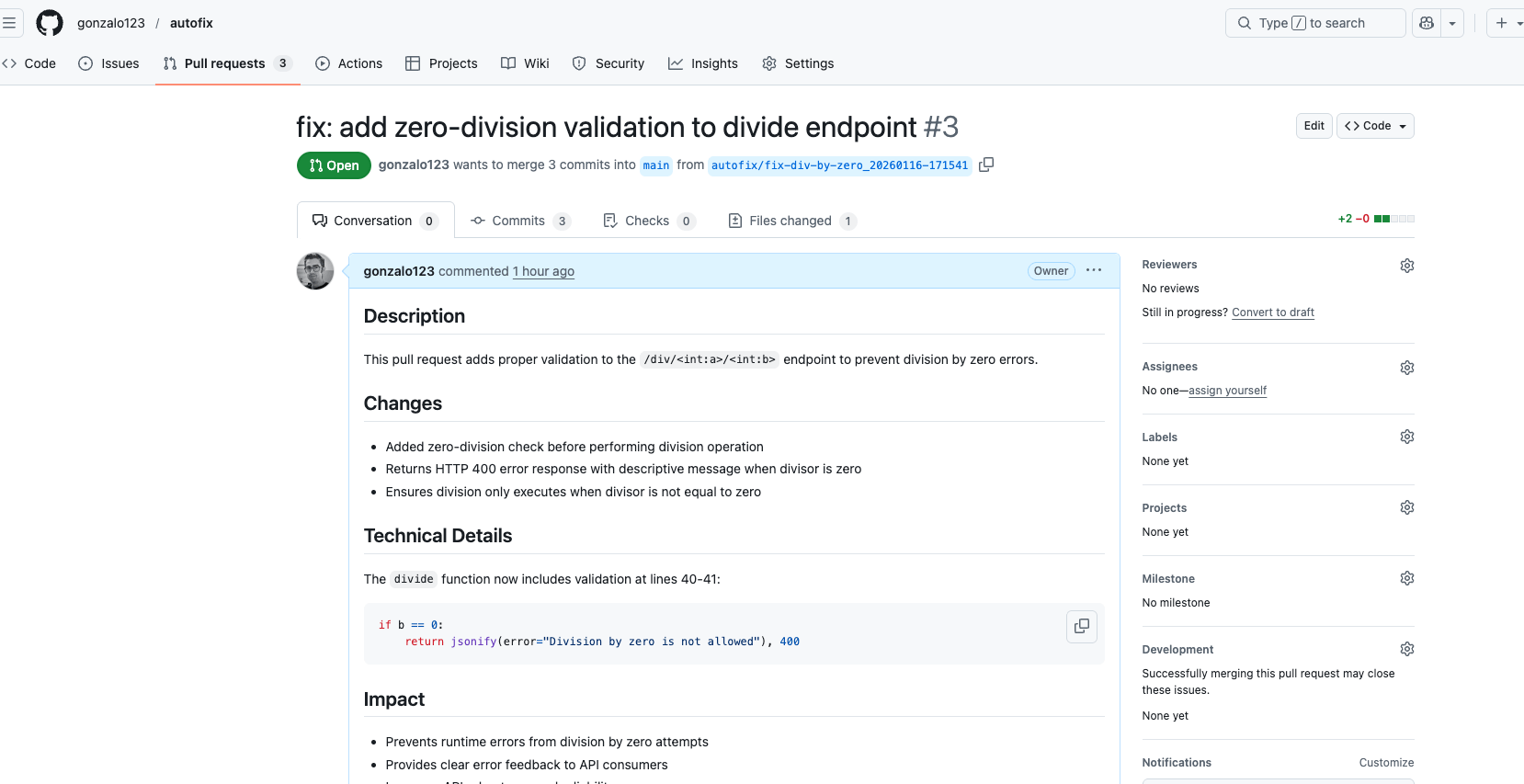
What if an AI could not only identify errors in your logs but actually fix them and create a pull request? I have done this experiment to do exactly that.

We can put or application logs in CloudWatch and use AI agents with a worker-coordinator pattern (I’ll share a post explaining this). Today the idea is going one step further. We will detecte errors in our logs, and for certain types of fixable errors, we will let an AI agent fix the code and create a pull request automatically.

The core of the system is a tool decorated with @tool from Strands Agents. This makes it available to any AI agent that needs to trigger a fix:

from strands import tool

@tool
async def register_error_for_fix(error: LogEntry) -> bool:
    """
    Register an error for automatic fixing.
    Clones repo, creates fix branch, uses Claude to fix, creates PR.
    """
    repo = _setup_repo()

    branch_name = _create_fix_branch(repo, error)
    if branch_name is None:
        return True  # Branch already exists, skip

    claude_response = await _invoke_claude_fix(error.message)
    if claude_response is None:
        return False

    pr_info = pr_title_generator(claude_response)
    _commit_and_push(repo, branch_name, pr_info)
    _create_pull_request(branch_name, pr_info)

    return True

Step by Step Implementation

1. Repository Setup with GitPython

The tool first clones the repo or pulls the latest changes:

from git import Repo

def _setup_repo() -> Repo:
    repo_url = f"https://x-access-token:{GITHUB_TOKEN}@github.com/{GITHUB_REPO}.git"

    if (WORK_DIR / ".git").exists():
        repo = Repo(WORK_DIR)
        repo.git.pull(repo_url)
    else:
        repo = Repo.clone_from(repo_url, WORK_DIR)

    return repo

2. Branch Creation with Deduplication

Each fix gets its own branch with a timestamp. If the branch already exists remotely, we skip it to avoid duplicate PRs:

def _create_fix_branch(repo: Repo, error: LogEntry) -> str | None:
    branch_name = f"autofix/{error.fix_short_name}_{error.timestamp.strftime('%Y%m%d-%H%M%S')}"

    remote_refs = [ref.name for ref in repo.remote().refs]
    if f"origin/{branch_name}" in remote_refs:
        logger.info(f"Branch {branch_name} already exists, skipping")
        return None

    new_branch = repo.create_head(branch_name)
    new_branch.checkout()
    return branch_name

3. The Magic: Claude Code SDK

This is where the actual fix happens. Claude Code SDK allows Claude to read and edit files in the codebase:

from claude_code_sdk import ClaudeCodeOptions, query

async def _invoke_claude_fix(error_message: str) -> str | None:
    prompt = f"Fix this error in the codebase: {error_message}"

    options = ClaudeCodeOptions(
        cwd=str(WORK_DIR),
        allowed_tools=["Read", "Edit"]  # Safe: no Write, no Bash
    )

    response = None
    async for response in query(prompt=prompt, options=options):
        logger.info(f"Claude response: {response}")

    return response.result if response else None

Note that we only allow Read and Edit tools – no Write (creating new files) or Bash (running commands). This keeps the fixes focused and safe.

4. PR Title Generation with Claude Haiku

For fast and cheap PR title generation, I use Claude Haiku with structured output:

from pydantic import BaseModel, Field

class PrTitleModel(BaseModel):
    pr_title: str = Field(..., description="Concise PR title")
    pr_description: str = Field(..., description="Detailed PR description")

def pr_title_generator(response: str) -> PrTitleModel:
    agent = create_agent(
        system_prompt=PR_PROMPT,
        model=Models.CLAUDE_45_HAIKU,
        tools=[]
    )

    result = agent(
        prompt=f"This is response from claude code: {response}\n\n"
               f"Generate a concise title for a GitHub pull request.",
        structured_output_model=PrTitleModel
    )

    return result.structured_output

The prompt enforces Conventional Commits style:

PR_PROMPT = """
You are an assistant expert in generating pull request titles for GitHub.
OBJECTIVE:
- Generate concise and descriptive titles for pull requests.
- IMPORTANT: Use Conventional Commits as a style reference.
CRITERIA:
- The title must summarize the main changes or fixes.
- Keep the title under 10 words.

5. Commit, Push, and Create PR

Finally, we commit everything, push to the remote, and create the PR via GitHub API:

def _commit_and_push(repo: Repo, branch_name: str, pr_info: PrTitleModel) -> None:
    repo.git.add(A=True)
    repo.index.commit(pr_info.pr_title)
    repo.git.push(get_authenticated_repo_url(), branch_name)

def _create_pull_request(branch_name: str, pr_info: PrTitleModel) -> None:
    gh = Github(GITHUB_TOKEN)
    gh_repo = gh.get_repo(GITHUB_REPO)
    gh_repo.create_pull(
        title=pr_info.pr_title,
        body=pr_info.pr_description,
        head=branch_name,
        base="main"
    )

The Triage Agent: Deciding What to Fix

The tool is exposed to a triage agent that analyzes logs and decides when to use it. The agent follows the ReAct pattern (Reasoning + Acting), where it explicitly reasons about each error before deciding to act:

TRIAGE_PROMPT = """
You are a senior DevOps engineer performing triage of production errors.

REGISTRATION CRITERIA:
- The error may be occurring frequently. Register ONLY ONCE.
- The error has a clear stacktrace that indicates the root cause.
- The error can be corrected with a quick fix.

DISCARD CRITERIA:
✗ Single/isolated errors (may be malicious input)
✗ Errors from external services (network, timeouts)
✗ Errors without a clear stacktrace
✗ Errors that require business decisions

Use the ReAct pattern:
Thought: [your analysis of the error]
Action: [register_error_for_fix if criteria met]
Observation: [tool result]
... (repeat for each error type)
Final Answer: [summary of registered errors]

This pattern forces the agent to reason explicitly before taking action, making decisions more transparent and debuggable.

The agent is given tools and makes the decision autonomously:

agent = create_agent(
    system_prompt=TRIAGE_PROMPT,
    model=Models.CLAUDE_45,
    tools=[register_error_for_fix]
)

result = agent(prompt=[
    {"text": f"Question: {question}"},
    {"text": f"Log context: {logs_json}"},
])

To test the system, I created a sample repository with intentional bugs and generated CloudWatch-like logs. The triage agent analyzes the logs, identifies fixable errors, and invokes the register_error_for_fix tool to create PRs automatically.

That’s the code (with the bug):

import logging
import traceback

from flask import Flask, jsonify

from lib.logger import setup_logging
from settings import APP, PROCESS, LOG_PATH, ENVIRONMENT

logger = logging.getLogger(__name__)

app = Flask(__name__)

setup_logging(
    env=ENVIRONMENT,
    app=APP,
    process=PROCESS,
    log_path=LOG_PATH)

for logger_name in ["werkzeug"]:
    logging.getLogger(logger_name).setLevel(logging.CRITICAL)


@app.errorhandler(Exception)
def handle_exception(e):
    logger.error(
        "Unhandled exception: %s",
        e,
        extra={"traceback": traceback.format_exc()},
    )
    return jsonify(error=str(e)), 500


@app.get("/div/<int:a>/<int:b>")
def divide(a: int, b: int):
    return dict(result=a / b)

As you can see, the /div// endpoint has a bug: it does not handle division by zero properly. We have executed the error and generated logs accordingly. As we have the logs in CloudWatch’s log group /projects/autofix we can execute a command to analyze them:

pyhon cli.py log --group /projects/autofix --question "Analyze those logs" --start 2026-01-16

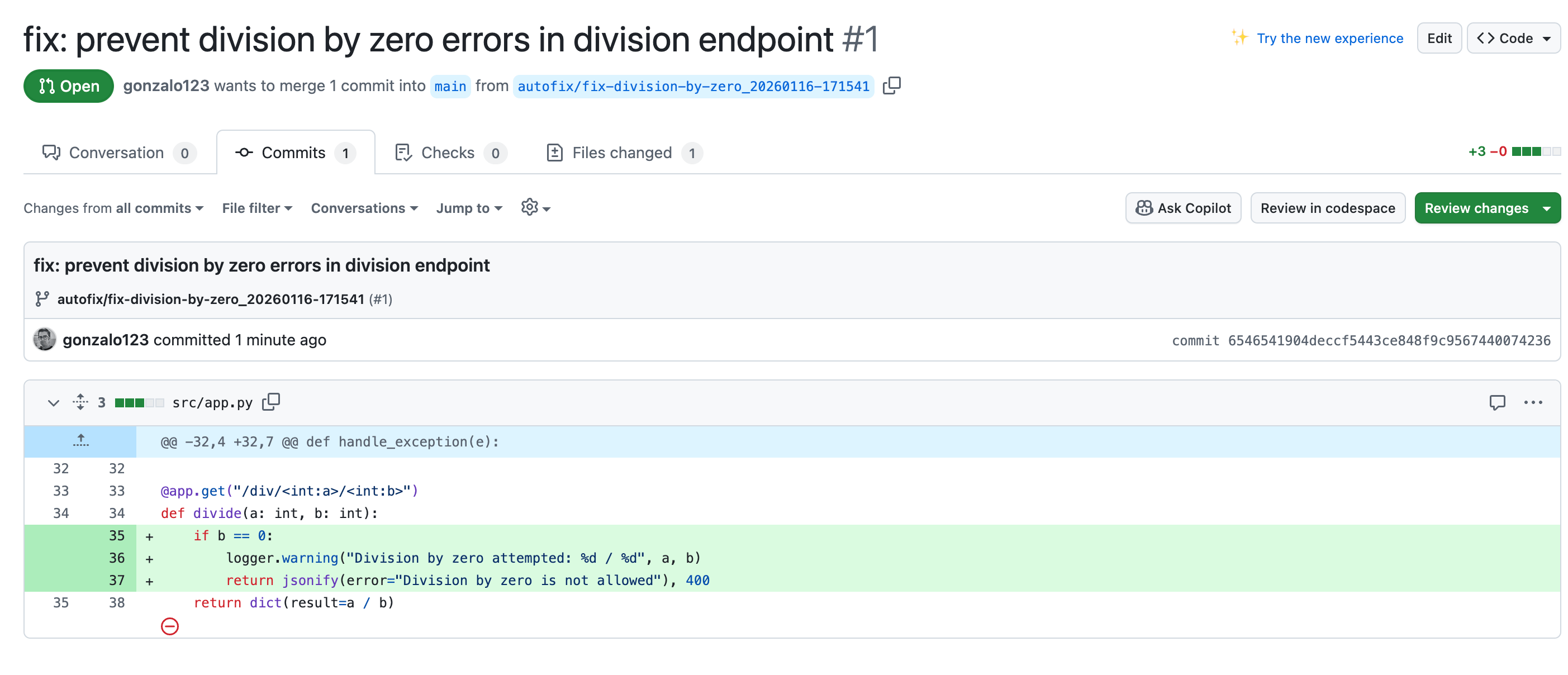
The AI agent will identify the division by zero error, decide it is fixable, and create a PR that modifies the code (using claude code in headless mode) to handle this case properly.

And that’s all! The AI agent has autonomously created a PR that fixes the bug. Now we can easily accept or reject the PR after human review. The bug has been fixed!

This experiment shows that AI agents can go beyond analysis to take action. By giving Claude Code SDK access to a sandboxed environment with limited tools (Read, Edit only), we get a system that can autonomously fix bugs while remaining controllable.

The key is setting clear boundaries: the triage agent decides what to fix based on strict criteria, and the fix agent is constrained to how it can modify code. This separation keeps the system predictable and safe.

Full code in my github

Sending logs to AWS CloudWatch with a sidecar pattern and Python

In a Docker Swarm environment, the sidecar pattern is a common architectural approach used to extend the functionality of a primary container without directly modifying it.

First there’s a primary container. This is the main application or service you want to run within a Docker Swarm service. It’s responsible for the core functionality of your application. In our case, this container will be the log generator. It will save logs within a json format.

The sidecar container is a secondary container that runs alongside the primary container. It’s tightly coupled with the primary container and assists it by providing additional services or functionality. In our example, the sidecar responsibility will be push logs to AWS CloudWatch. The idea is sharing a docker volume between both containers. Whit this technique, our primary container will not be affected in network latency generating logs.

The idea is to generate something like this:

version: '3.6'

services:
  api:
    image: api:latest
    logging:
      options:
        max-size: 10m
    deploy:
      restart_policy:
        condition: any
    volumes:
      - logs_volume:/src/logs
    environment:
      - ENVIRONMENT=production
      - PROCESS_ID=api
    ports:
      - 5000:5000
    command: gunicorn -w 1 app:app -b 0.0.0.0:5000 --timeout 180

  filebeat:
    image: cw:production
    command: bash -c "python cw.py && sleep 1m"
    deploy:
      restart_policy:
        condition: any
    environment:
      - LOG_GROUP=python_logs_example
      - LOG_STREAM_PREFIX=default
    volumes:
      - logs_volume:/src/logs
volumes:
  logs_volume:

Let’s go. First, we need to setup our aws credentials. We can use a profile or a IAM user

if AWS_PROFILE_NAME:
    session = boto3.Session(profile_name=AWS_PROFILE_NAME, region_name=AWS_REGION)
else:
    session = boto3.Session(
        aws_access_key_id=AWS_ACCESS_KEY_ID,
        aws_secret_access_key=AWS_SECRET_ACCESS_KEY,
        region_name=AWS_REGION)

logs = session. Client('logs')

then we need to setup the logGroup and logStream in CloudWatch. We can generate them by hand, but I preffer to generate them programatically, if they don’t exist.

def init_cloudwatch_stream():
    log_stream_name = f"{LOG_STREAM_PREFIX}_{datetime.now().strftime('%Y%m%d')}"

    log_groups = logs.describe_log_groups(logGroupNamePrefix=LOG_GROUP)['logGroups']
    if not any(group['logGroupName'] == LOG_GROUP for group in log_groups):
        logs.create_log_group(logGroupName=LOG_GROUP)

    log_streams = logs.describe_log_streams(
        logGroupName=LOG_GROUP,
        logStreamNamePrefix=log_stream_name
    )['logStreams']

    if not any(stream['logStreamName'] == log_stream_name for stream in log_streams):
        logs.create_log_stream(logGroupName=LOG_GROUP, logStreamName=log_stream_name)

    return log_stream_name

Now we need to upload logs to CloudWatch. We need to use put_log_events. To send multiple logs we need to use a sequenceToken (not the first time). To do that I use this trick.

function_parameters = dict(
    logGroupName=LOG_GROUP,
    logStreamName=log_stream_name
)

for f in glob(f'{LOG_PATH}/*.{LOG_EXTENSION}'):
    function_parameters['logEvents'] = get_log_events_from_file(f)
    response = logs.put_log_events(**function_parameters)
    function_parameters['sequenceToken'] = response['nextSequenceToken']

We also need to read log files and maybe change the fields according to your needs

def get_log_events_from_file(file):
    exclude_fields = ('@timestamp', 'logger')
    return [
        dict(
            timestamp=int(datetime.fromisoformat(d['@timestamp']).timestamp() * 1000),
            message=json.dumps({k: v for k, v in d.items() if k not in exclude_fields})
        ) for d in [json.loads(linea) for linea in open(file, 'r')]]

I like to have all the settings of my application in a file called settings.py. It’s a pattern that I’ve copied from Django. In this file also I read environment variables from a dotenv file.

import os
from pathlib import Path

from dotenv import load_dotenv

BASE_DIR = Path(__file__).resolve().parent
ENVIRONMENT = os.getenv('ENVIRONMENT', 'local')

load_dotenv(dotenv_path=Path(BASE_DIR).resolve().joinpath('env', ENVIRONMENT, '.env'))

AWS_ACCESS_KEY_ID = os.getenv('AWS_ACCESS_KEY_ID')
AWS_SECRET_ACCESS_KEY = os.getenv('AWS_SECRET_ACCESS_KEY')

AWS_PROFILE_NAME = os.getenv('AWS_PROFILE_NAME', False)
AWS_REGION = os.getenv('AWS_REGION')

LOG_GROUP = os.getenv('LOG_GROUP', 'python_logs_example')
LOG_STREAM_PREFIX = os.getenv('LOG_STREAM_PREFIX', 'default')

LOG_EXTENSION = 'log'
LOG_PATH = os.getenv('LOG_PATH', Path(BASE_DIR).resolve())

And that’s all. Your logs in CloudWatch uploaded in a background process decoupled from the main process.

Source code available in my github.

Handling Amazon SNS messages with PHP, Lumen and CloudWatch

This days I’m involve with Amazon’s AWS and since I am migrating my backends to Lumen I’m going to play a little bit with AWS and Lumen. Today I want to create a simple Lumen server to handle SNS notifications. One end-point to listen to SNS and another one to emit notifications. I also want to register logs within CloudWatch. Let’s start.

First the Lumen server.

use Laravel\Lumen\Application;

require __DIR__ . '/../vendor/autoload.php';

(new Dotenv\Dotenv(__DIR__ . &quot;/../env&quot;))-&gt;load();

$app = new Application();

$app-&gt;register(App\Providers\LogServiceProvider::class);
$app-&gt;register(App\Providers\AwsServiceProvider::class);

$app-&gt;group(['namespace' =&gt; 'App\Http\Controllers'], function (Application $app) {
    $app-&gt;get(&quot;/push&quot;, &quot;SnsController@push&quot;);
    $app-&gt;post(&quot;/read&quot;, &quot;SnsController@read&quot;);
});

$app-&gt;run();

As we can see there’s a route to push notifications and another one to read messages.

To work with SNS I will create a simple service provider

namespace App\Providers;

use Illuminate\Support\ServiceProvider;
use Aws\Sns\SnsClient;

class AwsServiceProvider extends ServiceProvider
{
    public function register()
    {
        $awsCredentials = [
            'region'      =&gt; getenv('AWS_REGION'),
            'version'     =&gt; getenv('AWS_VERSION'),
            'credentials' =&gt; [
                'key'    =&gt; getenv('AWS_CREDENTIALS_KEY'),
                'secret' =&gt; getenv('AWS_CREDENTIALS_SECRET'),
            ],
        ];

        $this-&gt;app-&gt;instance(SnsClient::class, new SnsClient($awsCredentials));
    }
}

Now We can create the routes in SnsController. Sns has a confirmation mechanism to validate endpoints. It’s well explained here

namespace App\Http\Controllers;

use Aws\Sns\SnsClient;
use Illuminate\Http\Request;
use Laravel\Lumen\Routing\Controller;
use Monolog\Logger;

class SnsController extends Controller
{
    private $request;
    private $logger;

    public function __construct(Request $request, Logger $logger)
    {
        $this-&gt;request = $request;
        $this-&gt;logger  = $logger;
    }

    public function push(SnsClient $snsClient)
    {
        $snsClient-&gt;publish([
            'TopicArn' =&gt; getenv('AWS_SNS_TOPIC1'),
            'Message'  =&gt; 'hi',
            'Subject'  =&gt; 'Subject',
        ]);

        return ['push'];
    }

    public function read(SnsClient $snsClient)
    {
        $data = $this-&gt;request-&gt;json()-&gt;all();

        if ($this-&gt;request-&gt;headers-&gt;get('X-Amz-Sns-Message-Type') == 'SubscriptionConfirmation') {
            $this-&gt;logger-&gt;notice(&quot;sns:confirmSubscription&quot;);
            $snsClient-&gt;confirmSubscription([
                'TopicArn' =&gt; getenv('AWS_SNS_TOPIC1'),
                'Token'    =&gt; $data['Token'],
            ]);
        } else {
            $this-&gt;logger-&gt;warn(&quot;read&quot;, [
                'Subject'   =&gt; $data['Subject'],
                'Message'   =&gt; $data['Message'],
                'Timestamp' =&gt; $data['Timestamp'],
            ]);
        }

        return &quot;OK&quot;;
    }
}

Finally I want to use CloudWatch so I will configure Monolog with another service provider. It’s also well explained here:

namespace App\Providers;

use Aws\CloudWatchLogs\CloudWatchLogsClient;
use Illuminate\Support\ServiceProvider;
use Maxbanton\Cwh\Handler\CloudWatch;
use Monolog\Formatter\LineFormatter;
use Monolog\Logger;

class LogServiceProvider extends ServiceProvider
{
    public function register()
    {
        $awsCredentials = [
            'region'      =&gt; getenv('AWS_REGION'),
            'version'     =&gt; getenv('AWS_VERSION'),
            'credentials' =&gt; [
                'key'    =&gt; getenv('AWS_CREDENTIALS_KEY'),
                'secret' =&gt; getenv('AWS_CREDENTIALS_SECRET'),
            ],
        ];

        $cwClient = new CloudWatchLogsClient($awsCredentials);

        $cwRetentionDays      = getenv('CW_RETENTIONDAYS');
        $cwGroupName          = getenv('CW_GROUPNAME');
        $cwStreamNameInstance = getenv('CW_STREAMNAMEINSTANCE');
        $loggerName           = getenv('CF_LOGGERNAME');

        $logger  = new Logger($loggerName);
        $handler = new CloudWatch($cwClient, $cwGroupName, $cwStreamNameInstance, $cwRetentionDays);
        $handler-&gt;setFormatter(new LineFormatter(null, null, false, true));

        $logger-&gt;pushHandler($handler);

        $this-&gt;app-&gt;instance(Logger::class, $logger);
    }
}

Debugging those kind of webhooks with a EC2 instance sometimes is a bit hard. But we can easily expose our local webserver to internet with ngrok.
We only need to start our local server

php -S 0.0.0.0:8080 -t www

And create a tunnel wiht ngrok

ngrok http 8080

And that’s up. Lumen and SNS up and running.

Code available in my github