Chat with your Data: Building a File-Aware AI Agent with AWS Bedrock and Chainlit

We all know LLMs are powerful, but their true potential is unlocked when they can see your data. While RAG (Retrieval-Augmented Generation) is great for massive knowledge bases, sometimes you just want to drag and drop a file and ask questions about it.

Today we’ll build a “File-Aware” AI agent that can natively understand a wide range of document formats—from PDFs and Excel sheets to Word docs and Markdown files. We’ll use AWS Bedrock with Claude 4.5 Sonnet for the reasoning engine and Chainlit for the conversational UI.

The idea is straightforward: Upload a file, inject it into the model’s context, and let the LLM do the rest. No vector databases, no complex indexing pipelines—just direct context injection for immediate analysis.

The architecture is simple yet effective. We intercept file uploads in the UI, process them into a format the LLM understands, and pass them along with the user’s query.

┌──────────────┐      ┌──────────────┐      ┌────────────────────┐
│   Chainlit   │      │  Orchestrator│      │   AWS Bedrock      │
│      UI      │─────►│    Agent     │─────►│(Claude 4.5 Sonnet) │
└──────┬───────┘      └──────────────┘      └────────────────────┘
       │                      ▲
       │    ┌────────────┐    │
       └───►│ File Proc. │────┘
            │   Logic    │
            └────────────┘

The tech stack includes:

  • AWS Bedrock with Claude 4.5 Sonnet for high-quality reasoning and large context windows.
  • Chainlit for a chat-like interface with native file upload support.
  • Python for the backend logic.

The core challenge is handling different file types and presenting them to the LLM. We support a variety of formats by mapping them to Bedrock’s expected input types.

To enable file uploads in Chainlit, you need to configure the [features.spontaneous_file_upload] section in your .chainlit/config.toml. This is where you define which MIME types are accepted.

[features.spontaneous_file_upload]
    enabled = true
    accept = [
        "application/pdf",
        "text/csv",
        "application/msword",
        "application/vnd.openxmlformats-officedocument.wordprocessingml.document",
        "application/vnd.ms-excel",
        "application/vnd.openxmlformats-officedocument.spreadsheetml.sheet",
        "text/html",
        "text/plain",
        "text/markdown",
        "text/x-markdown"
    ]
    max_files = 20
    max_size_mb = 500
The main agent loop handles the conversation. It checks for uploaded files, processes them, and constructs the message payload for the LLM. We also include robust error handling to manage context window limits gracefully.
def get_question_from_message(message: cl.Message):
    content_blocks = None
    if message.elements:
        content_blocks = get_content_blocks_from_message(message)

    if content_blocks:
        content_blocks.append({"text": message.content or "Write a summary of the document"})
        question = content_blocks
    else:
        question = message.content

    return question


def get_content_blocks_from_message(message: cl.Message):
    docs = [f for f in message.elements if f.type == "file" and f.mime in MIME_MAP]
    content_blocks = []

    for doc in docs:
        file = Path(doc.path)
        file_bytes = file.read_bytes()
        shutil.rmtree(file.parent)

        content_blocks.append({
            "document": {
                "name": sanitize_filename(doc.name),
                "format": MIME_MAP[doc.mime],
                "source": {"bytes": file_bytes}
            }
        })

    return content_blocks

@cl.on_message
async def handle_message(message: cl.Message):
    task = asyncio.create_task(process_user_task(
        question=get_question_from_message(message),
        debug=DEBUG))
    cl.user_session.set("task", task)
    try:
        await task
    except asyncio.CancelledError:
        logger.info("User task was cancelled.")

This pattern allows for ad-hoc analysis. You don’t need to pre-ingest data. You can:

  1. Analyze Financials: Upload an Excel sheet and ask for trends.
  2. Review Contracts: Upload a PDF and ask for clause summaries.
  3. Debug Code: Upload a source file and ask for a bug fix.
By leveraging the large context window of modern models like Claude 4.5 Sonnet, we can feed entire documents directly into the prompt, providing the model with full visibility without the information loss often associated with RAG chunking.

And that's all. With tools like Chainlit and powerful APIs like AWS Bedrock, we can create robust, multi-modal assistants that integrate seamlessly into our daily workflows.

Full code in my github account.
Building scalable multi-purpose AI agents: Orchestrating Multi-Agent Systems with Strands Agents and Chainlit

We can build simple AI agents that handle specific tasks quite easily today. But what about building AI systems that can handle multiple domains effectively? One approach is to create a single monolithic agent that tries to do everything, but this quickly runs into problems of context pollution, maintenance complexity, and scaling limitations. In this article, we’ll show a production-ready pattern for building multi-purpose AI systems using an orchestrator architecture that coordinates domain-specific agents.

The idea is simple: Don’t build one agent to rule them all instead, create specialized agents that excel in their domains and coordinate them through an intelligent orchestrator. The solution is an orchestrator agent that routes requests to specialized sub-agents, each with focused expertise and dedicated tools. Think of it as a smart router that understands intent and delegates accordingly.

That’s the core of the Orchestrator Pattern for multi-agent systems:

User Query → Orchestrator Agent → Specialized Agent(s) → Orchestrator → Response

For our example we have three specialized agents:

  1. Weather Agent: Expert in meteorological data and weather patterns. It uses external weather APIs to fetch historical and current weather data.
  2. Logistics Agent: Specialist in supply chain and shipping operations. Fake logistics data is generated to simulate shipment tracking, route optimization, and delivery performance analysis.
  3. Production Agent: Focused on manufacturing operations and production metrics. Also, fake production data is generated to analyze production KPIs.

That’s the architecture in a nutshell:

┌─────────────────────────────────────────────┐
│          Orchestrator Agent                 │
│  (Routes & Synthesizes)                 │
└────────┬─────────┬─────────┬────────────────┘
         │         │         │
    ┌────▼────┐ ┌──▼─────┐ ┌─▼─────────┐
    │ Weather │ │Logistic│ │Production │
    │  Agent  │ │ Agent  │ │  Agent    │
    └────┬────┘ └──┬─────┘ └┬──────────┘
         │         │        │
    ┌────▼────┐ ┌──▼─────┐ ┌▼──────────┐
    │External │ │Database│ │ Database  │
    │   API   │ │ Tools  │ │  Tools    │
    └─────────┘ └────────┘ └───────────┘

The tech stack includes:

  • AWS Bedrock with Claude 4.5 Sonnet for agent reasoning
  • Strands Agents framework for agent orchestration
  • Chainlit for the conversational UI
  • FastAPI for the async backend
  • PostgreSQL for storing conversation history and domain data

The orchestrator’s job is simple but critical: understand the user’s intent and route to the right specialist(s).

MAIN_SYSTEM_PROMPT = """You are an intelligent orchestrator agent 
responsible for routing user requests to specialized sub-agents 
based on their domain expertise.

## Available Specialized Agents

### 1. Production Agent
**Domain**: Manufacturing operations, production metrics, quality control
**Handles**: Production KPIs, machine performance, downtime analysis

### 2. Logistics Agent
**Domain**: Supply chain, shipping, transportation operations
**Handles**: Shipment tracking, route optimization, delivery performance

### 3. Weather Agent
**Domain**: Meteorological data and weather patterns
**Handles**: Historical weather, atmospheric conditions, climate trends

## Your Decision Process
1. Analyze the request for key terms and domains
2. Determine scope (single vs multi-domain)
3. Route to appropriate agent(s)
4. Synthesize results when multiple agents are involved
"""

The orchestrator receives specialized agents as tools:

def get_orchestrator_tools() -> List[Any]:
    from tools.logistics.agent import logistics_assistant
    from tools.production.agent import production_assistant
    from tools.weather.agent import weather_assistant

    tools = [
        calculator,
        think,
        current_time,
        AgentCoreCodeInterpreter(region=AWS_REGION).code_interpreter,
        logistics_assistant,  # Specialized agent as tool
        production_assistant,  # Specialized agent as tool
        weather_assistant     # Specialized agent as tool
    ]
    return tools

Each specialized agent follows a consistent pattern. Here’s the weather agent:

@tool
@stream_to_step("weather_assistant")
async def weather_assistant(query: str):
    """
    A research assistant specialized in weather topics with streaming support.
    """
    try:
        tools = [
            calculator,
            think,
            current_time,
            AgentCoreCodeInterpreter(region=AWS_REGION).code_interpreter
        ]
        # Domain-specific tools
        tools += WeatherTools(latitude=MY_LATITUDE, longitude=MY_LONGITUDE).get_tools()

        research_agent = get_agent(
            system_prompt=WEATHER_ASSISTANT_PROMPT,
            tools=tools
        )

        async for token in research_agent.stream_async(query):
            yield token

    except Exception as e:
        yield f"Error in research assistant: {str(e)}"

Each agent has access to domain-specific tools. For example, the weather agent uses external APIs:

class WeatherTools:
    def __init__(self, latitude: float, longitude: float):
        self.latitude = latitude
        self.longitude = longitude

    def get_tools(self) -> List[tool]:
        @tool
        def get_hourly_weather_data(from_date: date, to_date: date) -> MeteoData:
            """Get hourly weather data for a specific date range."""
            url = (f"https://api.open-meteo.com/v1/forecast?"
                   f"latitude={self.latitude}&longitude={self.longitude}&"
                   f"hourly=temperature_2m,relative_humidity_2m...")
            response = requests.get(url)
            return parse_weather_response(response.json())
        
        return [get_hourly_weather_data]

The logistics and production agents use synthetic data generators for demonstration:

class LogisticsTools:
    def get_tools(self) -> List[tool]:
        @tool
        def get_logistics_data(
            from_date: date,
            to_date: date,
            origins: Optional[List[str]] = None,
            destinations: Optional[List[str]] = None,
        ) -> LogisticsDataset:
            """Generate synthetic logistics shipment data."""
            # Generate realistic shipment data with delays, costs, routes
            records = generate_synthetic_shipments(...)
            return LogisticsDataset(records=records, aggregates=...)
        
        return [get_logistics_data]

For UI we’re going to use Chainlit. The Chainlit integration provides real-time visibility into agent execution:

class LoggingHooks(HookProvider):
    async def before_tool(self, event: BeforeToolCallEvent) -> None:
        step = cl.Step(name=f"{event.tool_use['name']}", type="tool")
        await step.send()
        cl.user_session.set(f"step_{event.tool_use['name']}", step)

    async def after_tool(self, event: AfterToolCallEvent) -> None:
        step = cl.user_session.get(f"step_{event.tool_use['name']}")
        if step:
            await step.update()

@cl.on_message
async def handle_message(message: cl.Message):
    agent = cl.user_session.get("agent")
    message_history = cl.user_session.get("message_history")
    message_history.append({"role": "user", "content": message.content})
    
    response = await agent.run_async(message.content)
    await cl.Message(content=response).send()

This creates a transparent experience where users see:

  • Which agent is handling their request
  • What tools are being invoked
  • Real-time streaming of responses

Now we can handle a variety of user queries: For example:

User: “What was the average temperature last week?”

Flow:

  1. Orchestrator identifies weather domain
  2. Routes to weather_assistant
  3. Weather agent calls get_hourly_weather_data
  4. Analyzes and returns formatted response

Or multi-domain queries:

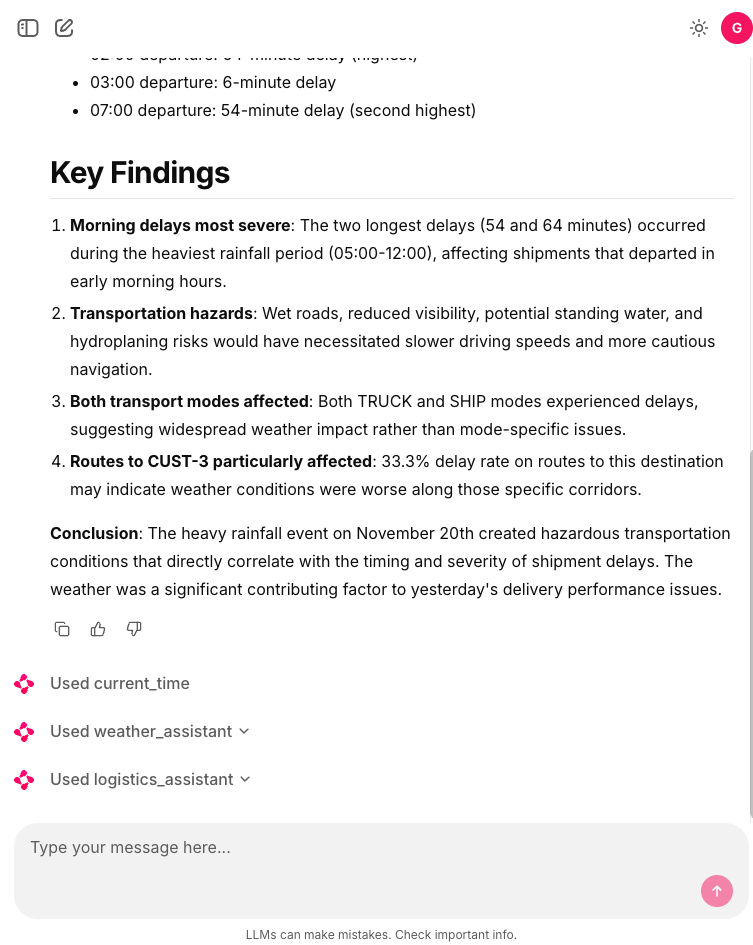
User: “Did weather conditions affect our shipment delays yesterday?”

Flow:

  1. Orchestrator identifies weather + logistics domains
  2. Routes to weather_assistant for climate data
  3. Routes to logistics_assistant for shipment data
  4. Synthesizes correlation analysis
  5. Returns unified insight

And complex analytics:

User: “Analyze production efficiency trends and correlate with weather and logistics performance based in yesterday’s data.”

Flow:

  1. Orchestrator coordinates all three agents
  2. Production agent retrieves manufacturing KPIs
  3. Weather agent provides environmental data
  4. Logistics agent supplies delivery metrics
  5. Orchestrator synthesizes multi-domain analysis

This architecture scales naturally in multiple dimensions. We can easily add new specialized agents without disrupting existing functionality. WE only need to create the new agent and register it as a tool with the orchestratortrator prompt with new domain description. That’s it.

The orchestrator pattern transforms multi-domain AI from a monolithic challenge into a composable architecture. Each agent focuses on what it does best, while the orchestrator provides intelligent coordination.

Full code in my github.

Building an AI Frontend with Chainlit and OAuth2 Authentication

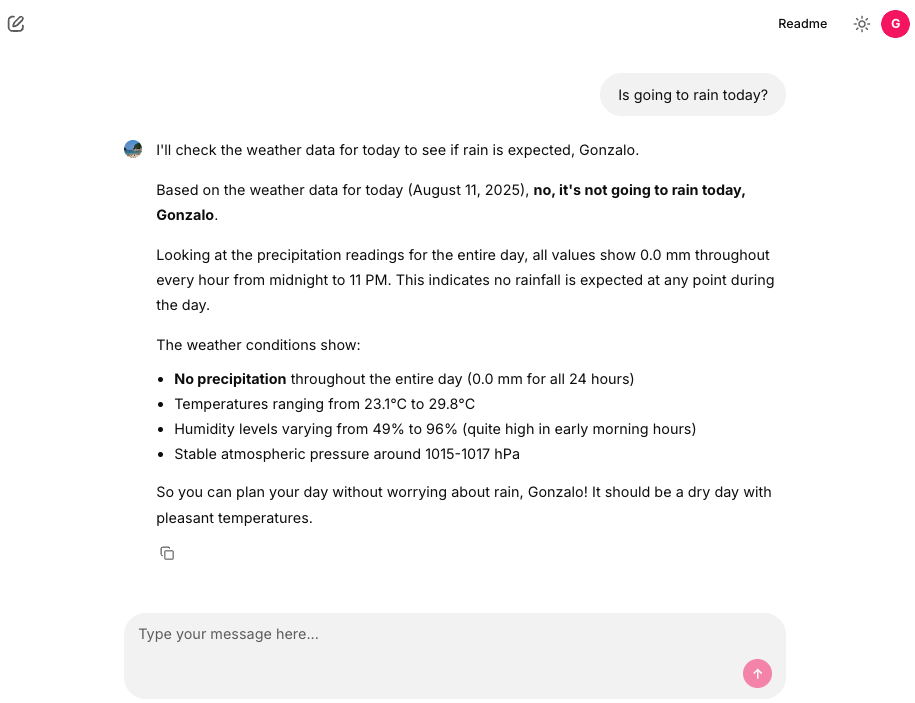
Today we’ll explore how to build a secure AI frontend using Chainlit. Chainlit is Python framework that allows us to create interactive AI applications. In this example we are going to reuse the weather tool created in a previous post. Also, we will implement OAuth2 authentication with a Nginx as a reverse proxy.

The project consists of four main components:

  1. Nginx Reverse Proxy: Handles authentication via auth_request and routes traffic
  2. Fake OAuth Server: Simple Flask app that simulates OAuth2 authentication
  3. Chainlit Application: The main chat interface with AI capabilities
  4. Strands AI Agent: Weather-focused AI assistant with custom tools

The Nginx configuration implements OAuth2 authentication using the auth_request module:

server {
    listen 8000;

    location / {
        auth_request /oauth2/auth;
        
        auth_request_set $user_jwt $upstream_http_x_user_jwt;
        add_header X-Debug-User-JWT $user_jwt always;
        
        error_page 401 = @error401;
        try_files $uri @proxy_to_app;
    }

    location = /oauth2/auth {
        internal;
        proxy_pass http://oauth2/oauth2/auth;
        proxy_pass_request_body off;
        proxy_set_header Content-Length "";
        proxy_set_header X-Original-URI $request_uri;
        proxy_set_header X-Original-Remote-Addr $remote_addr;
        proxy_set_header X-Original-Host $host;
    }

    location @proxy_to_app {
        proxy_set_header X-User-JWT $user_jwt;
        proxy_pass http://chainlit;
    }
}

Key Features:

  • Every request to / triggers an authentication check via /oauth2/auth
  • JWT token is extracted from the OAuth response and forwarded to Chainlit
  • Unauthenticated users are redirected to the OAuth sign-in page
  • The JWT token is passed to Chainlit via the X-User-JWT header

A simple Flask application simulates an OAuth2 provider for demonstration purposes. In a production environment, you would replace this with a real OAuth2 provider or implemente the whole OAuth2 flow.

@app.get(f"/oauth2/auth")
def auth():
    now = datetime.now()
    response = make_response(jsonify(dict(error='OK')), 200)
    expiration = now + JWT_EXPIRATION_TIMEDELTA
    user = 'gonzalo'
    display_name = 'Gonzalo'
    response.headers['X-User-JWT'] = str(jwt.encode(dict(
        user=user,
        display_name=display_name,
        exp=int(expiration.timestamp())
    ), SECRET, algorithm=JWT_ALGORITHM))
    logger.info("Fake OAuth authentication successful")
    return response

Chainlit processes the JWT token via a custom header authentication callback:

@cl.header_auth_callback
def header_auth_callback(headers: Dict) -> Optional[cl.User]:
    if headers.get("x-user-jwt"):
        jwt_token = headers.get("x-user-jwt")
        try:
            decoded_payload = jwt.decode(jwt_token, SECRET, algorithms=[JWT_ALGORITHM])
            return cl.User(
                identifier=decoded_payload['user'],
                display_name=decoded_payload['display_name'],
                metadata={"role": 'user', "provider": "header"})
        except jwt.ExpiredSignatureError:
            cl.logger.error("Token has expired.")
            return None
    else:
        return None

This callback:

  • Extracts the JWT from the x-user-jwt header
  • Validates the token signature and expiration
  • Creates a Chainlit User object with the decoded information
  • Handles token expiration gracefully

The application uses Strands agents with both base tools and custom weather tools:

agent = get_agent(
    system_prompt=PROMPT_GENERAL,
    base_tools=get_all_base_tools(),
    custom_tools=get_all_custom_tools()
)

Base Tools Include:

  • Calculator
  • Browser access
  • Current time
  • Batch processing
  • Think (reasoning tool)

The weather functionality is implemented using custom Strands tools that fetch meteorological data:

class WeatherTools:
    def __init__(self, latitude: float, longitude: float):
        self.latitude = latitude
        self.longitude = longitude

    def get_tools(self, tools=None) -> List[tool]:
        @tool
        def get_hourly_weather_data(from_date: date, to_date: date) -> MeteoData:
            """
            Get hourly weather data for a specific date range in my city.
            
            Returns:
                MeteoData: Object containing weather readings for temperature, 
                          humidity, precipitation, etc.
            """
            # Implementation details...

The weather tools provide:

  • Hourly weather data for specific date ranges
  • Temperature readings (actual and apparent)
  • Humidity and precipitation data
  • Surface pressure measurements
  • Evapotranspiration data

The Chainlit interface provides several starter prompts to help users interact with the weather agent:

@cl.set_starters
async def set_starters():
    return [
        cl.Starter(label="Is going to rain today?", message="Is going to rain today?"),
        cl.Starter(label="tomorrow's weather", message="What will the weather be like tomorrow?"),
        cl.Starter(label="Next 7 days weather", message="Make a weather forecast for the next 7 days."),
    ]

Chainlit also supports message history management, allowing users to see their previous interactions:

@cl.on_message
async def handle_message(message: cl.Message):
    message_history = cl.user_session.get("message_history")
    message_history.append({"role": "user", "content": message.content})
    
    msg = cl.Message(content="")
    await msg.send()
    
    app_user = cl.user_session.get("user")
    question = f"user: {app_user.display_name} Content: {message.content}"
    
    async for event in agent.stream_async(question):
        if "data" in event:
            await msg.stream_token(str(event["data"]))
        elif "message" in event:
            await msg.stream_token("\n")
            message_history.append(event["message"])
    
    await msg.update()

And that’s all. Thanks to Chainlit, we can build AI frontends and integrate them with OAuth2 authentication in a secure and efficient way. The combination of Chainlit’s interactive capabilities and Nginx’s robust authentication features provides a solid foundation for building AI applications that require user authentication.

Full code in my github account