Using Map-Reduce to process large documents with AI Agents and Python

We live in the era of Large Language Models (LLMs) with massive context windows. Claude 3.5 Sonnet offers 200k tokens, and Gemini 1.5 Pro goes up to 2 million. So, why do we still need to worry about document processing strategies? The answer is yes, we do. For example, AWS Bedrock has a strict limit of 4.5MB for documents, regardless of token count. That’s means we can’t just stuff file greater than 4.5MB into a prompt. Today we’ll show you how I built a production-ready document processing agent that handles large files by implementing a Map-Reduce pattern using Python, AWS Bedrock, and Strands Agents.

The core idea is simple: instead of asking the LLM to “read this book and answer” we break the book into chapters, analyze each chapter in parallel, and then synthesize the results.

Here is the high-level flow:
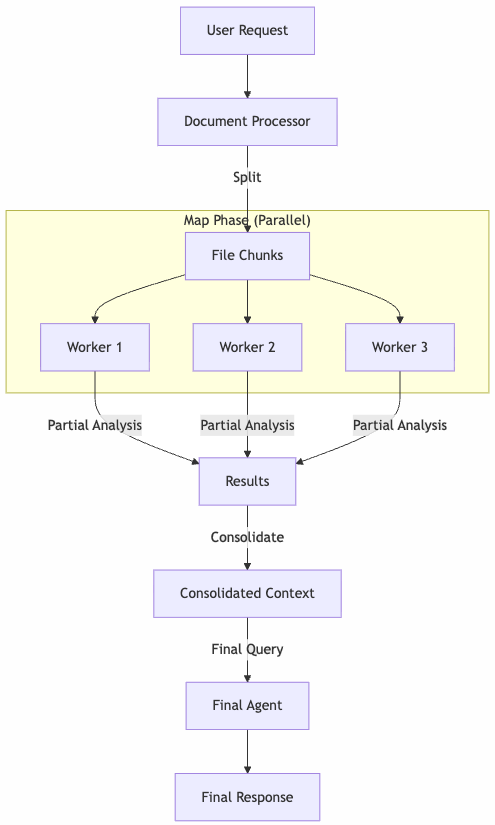
The heart of the implementation is the DocumentProcessor class. It decides whether to process a file as a whole or split it based on a size threshold. We define a threshold (e.g., 4.3MB) to stay safely within Bedrock’s limits. If the file is larger, we trigger the _process_big method.

# src/lib/processor/processor.py

BYTES_THRESHOLD = 4_300_000

async def _process_file(self, file: DocumentFile, question: str, with_callback=True):
    file_bytes = Path(file.path).read_bytes()
    # Strategy pattern: Choose the right processor based on file size
    processor = self._process_big if len(file_bytes) > BYTES_THRESHOLD else self._process
    async for chunk in processor(file_bytes, file, question, with_callback):
        yield chunk

To increase the performance, we use asyncio to process the file in parallel and we use a semaphore to control the number of workers.

async def _process_big(self, file_bytes: bytes, file: DocumentFile, question: str, with_callback=True) -> AsyncIterator[str]:
    # ... splitting logic ...
    semaphore = asyncio.Semaphore(self.max_workers)

    # Create async tasks for each chunk
    tasks = [
        self._process_chunk(chunk, i, file_name, question, handler.format, semaphore)
        for i, chunk in enumerate(chunks, 1)
    ]

    # Run in parallel
    results = await asyncio.gather(*tasks)
    
    # Sort results to maintain document order
    results.sort(key=lambda x: x[0])
    responses_from_chunks = [response for _, response in results]

Each chunk is processed by an isolated agent instance that only sees that specific fragment and the user’s question. Once we have the partial analyses, we consolidate them. This acts as a compression step: we’ve turned raw pages into relevant insights.

def _consolidate_and_truncate(self, responses: list[str], num_chunks: int) -> str:
    consolidated = "\n\n".join(responses)
    
    if len(consolidated) > MAX_CONTEXT_CHARS:
        # Safety mechanism to ensure we don't overflow the final context
        return consolidated[:MAX_CONTEXT_CHARS] + "\n... [TRUNCATED]"
    return consolidated

Finally, we feed this consolidated context to the agent for the final answer. In a long-running async process, feedback is critical. I implemented an Observer pattern to decouple the processing logic from the UI/Logging.

# src/main.py

class DocumentProcessorEventListener(ProcessingEventListener):
    async def on_chunk_start(self, chunk_number: int, file_name: str):
        logger.info(f"[Worker {chunk_number}] Processing chunk for file {file_name}")

    async def on_chunk_end(self, chunk_number: int, file_name: str, response: str):
        logger.info(f"[Worker {chunk_number}] Completed chunk for file {file_name}")

By breaking down large tasks, we not only bypass technical limits but often get better results. The model focuses on smaller sections, reducing hallucinations, and the final answer is grounded in a pre-processed summary of facts.

We don’t just send text; we send the raw document bytes. This allows the model (Claude 4.5 Sonnet via Bedrock) to use its native document processing capabilities. Here is how we construct the message payload:

# src/lib/processor/processor.py

def _create_document_message(self, file_format: str, file_name: str, file_bytes: bytes, text: str) -> list:
    return [
        {
            "role": "user",
            "content": [
                {
                    "document": {
                        "format": file_format,
                        "name": file_name,
                        "source": {"bytes": file_bytes},
                    },
                },
                {"text": text},
            ],
        },
    ]

When processing chunks, we don’t want the model to be chatty. We need raw information extraction. We use a “Spartan” system prompt that enforces brevity and objectivity, ensuring the consolidation phase receives high-signal input.

# src/lib/processor/prompts.py

SYSTEM_CHUNK_PROMPT = f"""
You are an artificial intelligence assistant specialized in reading and analyzing files.
You have received a chunk of a large file.
...
If the user's question cannot be answered with the information in the current chunk, do not answer it directly.

{SYSTEM_PROMPT_SPARTAN}

The SYSTEM_PROMPT_SPARTAN (injected above) explicitly forbids conversational filler, ensuring we maximize the token budget for actual data.

The project handles pdf and xlsx files. The rest of the file types are not processed and are given to the LLM as-is.

With this architecture, we can process large files in a production environment. This allows us to easily plug in different interfaces, whether it’s a CLI logger (as shown) or a WebSocket update for a UI frontend like Chainlit.

Full code in my github
Building scalable multi-purpose AI agents: Orchestrating Multi-Agent Systems with Strands Agents and Chainlit

We can build simple AI agents that handle specific tasks quite easily today. But what about building AI systems that can handle multiple domains effectively? One approach is to create a single monolithic agent that tries to do everything, but this quickly runs into problems of context pollution, maintenance complexity, and scaling limitations. In this article, we’ll show a production-ready pattern for building multi-purpose AI systems using an orchestrator architecture that coordinates domain-specific agents.

The idea is simple: Don’t build one agent to rule them all instead, create specialized agents that excel in their domains and coordinate them through an intelligent orchestrator. The solution is an orchestrator agent that routes requests to specialized sub-agents, each with focused expertise and dedicated tools. Think of it as a smart router that understands intent and delegates accordingly.

That’s the core of the Orchestrator Pattern for multi-agent systems:

User Query → Orchestrator Agent → Specialized Agent(s) → Orchestrator → Response

For our example we have three specialized agents:

  1. Weather Agent: Expert in meteorological data and weather patterns. It uses external weather APIs to fetch historical and current weather data.
  2. Logistics Agent: Specialist in supply chain and shipping operations. Fake logistics data is generated to simulate shipment tracking, route optimization, and delivery performance analysis.
  3. Production Agent: Focused on manufacturing operations and production metrics. Also, fake production data is generated to analyze production KPIs.

That’s the architecture in a nutshell:

┌─────────────────────────────────────────────┐
│          Orchestrator Agent                 │
│  (Routes & Synthesizes)                 │
└────────┬─────────┬─────────┬────────────────┘
         │         │         │
    ┌────▼────┐ ┌──▼─────┐ ┌─▼─────────┐
    │ Weather │ │Logistic│ │Production │
    │  Agent  │ │ Agent  │ │  Agent    │
    └────┬────┘ └──┬─────┘ └┬──────────┘
         │         │        │
    ┌────▼────┐ ┌──▼─────┐ ┌▼──────────┐
    │External │ │Database│ │ Database  │
    │   API   │ │ Tools  │ │  Tools    │
    └─────────┘ └────────┘ └───────────┘

The tech stack includes:

  • AWS Bedrock with Claude 4.5 Sonnet for agent reasoning
  • Strands Agents framework for agent orchestration
  • Chainlit for the conversational UI
  • FastAPI for the async backend
  • PostgreSQL for storing conversation history and domain data

The orchestrator’s job is simple but critical: understand the user’s intent and route to the right specialist(s).

MAIN_SYSTEM_PROMPT = """You are an intelligent orchestrator agent 
responsible for routing user requests to specialized sub-agents 
based on their domain expertise.

## Available Specialized Agents

### 1. Production Agent
**Domain**: Manufacturing operations, production metrics, quality control
**Handles**: Production KPIs, machine performance, downtime analysis

### 2. Logistics Agent
**Domain**: Supply chain, shipping, transportation operations
**Handles**: Shipment tracking, route optimization, delivery performance

### 3. Weather Agent
**Domain**: Meteorological data and weather patterns
**Handles**: Historical weather, atmospheric conditions, climate trends

## Your Decision Process
1. Analyze the request for key terms and domains
2. Determine scope (single vs multi-domain)
3. Route to appropriate agent(s)
4. Synthesize results when multiple agents are involved
"""

The orchestrator receives specialized agents as tools:

def get_orchestrator_tools() -> List[Any]:
    from tools.logistics.agent import logistics_assistant
    from tools.production.agent import production_assistant
    from tools.weather.agent import weather_assistant

    tools = [
        calculator,
        think,
        current_time,
        AgentCoreCodeInterpreter(region=AWS_REGION).code_interpreter,
        logistics_assistant,  # Specialized agent as tool
        production_assistant,  # Specialized agent as tool
        weather_assistant     # Specialized agent as tool
    ]
    return tools

Each specialized agent follows a consistent pattern. Here’s the weather agent:

@tool
@stream_to_step("weather_assistant")
async def weather_assistant(query: str):
    """
    A research assistant specialized in weather topics with streaming support.
    """
    try:
        tools = [
            calculator,
            think,
            current_time,
            AgentCoreCodeInterpreter(region=AWS_REGION).code_interpreter
        ]
        # Domain-specific tools
        tools += WeatherTools(latitude=MY_LATITUDE, longitude=MY_LONGITUDE).get_tools()

        research_agent = get_agent(
            system_prompt=WEATHER_ASSISTANT_PROMPT,
            tools=tools
        )

        async for token in research_agent.stream_async(query):
            yield token

    except Exception as e:
        yield f"Error in research assistant: {str(e)}"

Each agent has access to domain-specific tools. For example, the weather agent uses external APIs:

class WeatherTools:
    def __init__(self, latitude: float, longitude: float):
        self.latitude = latitude
        self.longitude = longitude

    def get_tools(self) -> List[tool]:
        @tool
        def get_hourly_weather_data(from_date: date, to_date: date) -> MeteoData:
            """Get hourly weather data for a specific date range."""
            url = (f"https://api.open-meteo.com/v1/forecast?"
                   f"latitude={self.latitude}&longitude={self.longitude}&"
                   f"hourly=temperature_2m,relative_humidity_2m...")
            response = requests.get(url)
            return parse_weather_response(response.json())
        
        return [get_hourly_weather_data]

The logistics and production agents use synthetic data generators for demonstration:

class LogisticsTools:
    def get_tools(self) -> List[tool]:
        @tool
        def get_logistics_data(
            from_date: date,
            to_date: date,
            origins: Optional[List[str]] = None,
            destinations: Optional[List[str]] = None,
        ) -> LogisticsDataset:
            """Generate synthetic logistics shipment data."""
            # Generate realistic shipment data with delays, costs, routes
            records = generate_synthetic_shipments(...)
            return LogisticsDataset(records=records, aggregates=...)
        
        return [get_logistics_data]

For UI we’re going to use Chainlit. The Chainlit integration provides real-time visibility into agent execution:

class LoggingHooks(HookProvider):
    async def before_tool(self, event: BeforeToolCallEvent) -> None:
        step = cl.Step(name=f"{event.tool_use['name']}", type="tool")
        await step.send()
        cl.user_session.set(f"step_{event.tool_use['name']}", step)

    async def after_tool(self, event: AfterToolCallEvent) -> None:
        step = cl.user_session.get(f"step_{event.tool_use['name']}")
        if step:
            await step.update()

@cl.on_message
async def handle_message(message: cl.Message):
    agent = cl.user_session.get("agent")
    message_history = cl.user_session.get("message_history")
    message_history.append({"role": "user", "content": message.content})
    
    response = await agent.run_async(message.content)
    await cl.Message(content=response).send()

This creates a transparent experience where users see:

  • Which agent is handling their request
  • What tools are being invoked
  • Real-time streaming of responses

Now we can handle a variety of user queries: For example:

User: “What was the average temperature last week?”

Flow:

  1. Orchestrator identifies weather domain
  2. Routes to weather_assistant
  3. Weather agent calls get_hourly_weather_data
  4. Analyzes and returns formatted response

Or multi-domain queries:

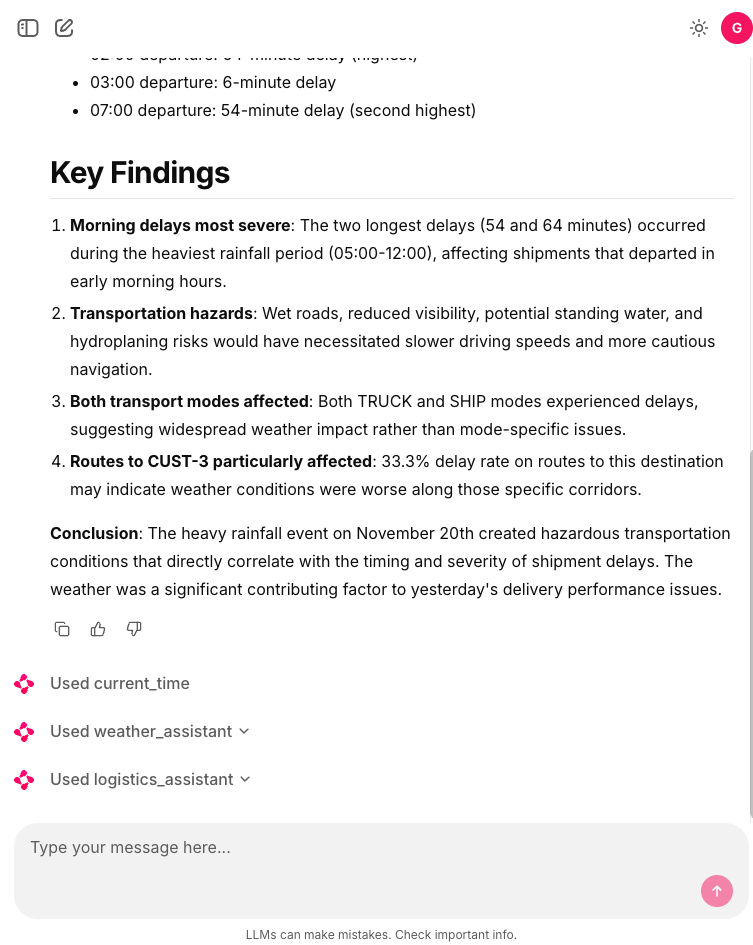
User: “Did weather conditions affect our shipment delays yesterday?”

Flow:

  1. Orchestrator identifies weather + logistics domains
  2. Routes to weather_assistant for climate data
  3. Routes to logistics_assistant for shipment data
  4. Synthesizes correlation analysis
  5. Returns unified insight

And complex analytics:

User: “Analyze production efficiency trends and correlate with weather and logistics performance based in yesterday’s data.”

Flow:

  1. Orchestrator coordinates all three agents
  2. Production agent retrieves manufacturing KPIs
  3. Weather agent provides environmental data
  4. Logistics agent supplies delivery metrics
  5. Orchestrator synthesizes multi-domain analysis

This architecture scales naturally in multiple dimensions. We can easily add new specialized agents without disrupting existing functionality. WE only need to create the new agent and register it as a tool with the orchestratortrator prompt with new domain description. That’s it.

The orchestrator pattern transforms multi-domain AI from a monolithic challenge into a composable architecture. Each agent focuses on what it does best, while the orchestrator provides intelligent coordination.

Full code in my github.