There’s more than one way to perform i18n translations within our AngularJS projects. IMHO the best one is https://angular-translate.github.io/, but today I’m going to show you how I’m doing translations in my small AngularJS projects (normally Ionic projects).
I’ve packaged my custom solution and I also create one bower package ready to use via bower command line:
I like to use constants to store default lang and translation table, but it isn’t necessary. We can just pass the default language and Lang object to our provider
This days I working a lot with AngularJs applications (who doesn’t?). Normally my backend is a Silex application. It’s pretty straightforward to build a REST api with Silex. But when we play with an AngularJs client we need to face with a a problem. POST requests “doesn’t” work. That’s not 100% true. They work, indeed, but they speak different languages.
Silex assumes our POST requests are encoded as application/x-www-form-urlencoded, but angular encodes POST requests as application/json. That’s not a problem. It isn’t mandatory to use one encoder or another.
For example
name: Gonzalo

surname: Ayuso
If we use application/x-www-form-urlencoded, it’s encoded to: name=Gonzalo&surname=Ayuso
And if we use application/json, it’s encoded to: { "name" : "Gonzalo", "surname" : "Ayuso" }
It’s the same but it isn’t.
Imagine this Silex example.
use Silex\Application;
use Symfony\Component\HttpFoundation\Request;

$app = new Application();

$app->post("/post", function (Application $app, Request $request) {
    return $app->json([
        'status' => true,
        'name'   => $request->get('name')
    ]);
});
This example works with application/x-www-form-urlencoded but it doesn’t work with application/json. We cannot use Symfony\Component\HttpFoundation\Request parameter’s bag as usual. We can get the raw request body with:
$request->getContent();
Our content in a application/json encoded Request is a JSON, so we can use json_decode to access to those parameters.
If we read the Silex documentation we can see how to handle those requests
In this post we’re going to enclose this code within a service provider. OK, that’s not really a service provider (it doesn’t provide any service). It just change the request (when we get application/json) without copy and paste the same code within each project.
use Silex\Application;
use G\AngularPostRequestServiceProvider;
use Symfony\Component\HttpFoundation\Request;

$app = new Application();
$app->register(new AngularPostRequestServiceProvider());

$app->post("/post", function (Application $app, Request $request) {
    return $app->json([
        'status' => true,
        'name'   => $request->get('name')
    ]);
});
The service provider is very simple
namespace G;

use Silex\Application;
use Symfony\Component\HttpFoundation\Request;
use Pimple\ServiceProviderInterface;
use Pimple\Container;

class AngularPostRequestServiceProvider implements ServiceProviderInterface
{
    public function register(Container $app)
    {
        $app->before(function (Request $request) {
            if ($this->isRequestTransformable($request)) {
                $transformedRequest = $this->transformContent($request->getContent());
                $request->request->replace($transformedRequest);
            }
        });
    }

    public function boot(Application $app)
    {
    }

    private function transformContent($content)
    {
        return json_decode($content, true);
    }

    private function isRequestTransformable(Request $request)
    {
        return 0 === strpos($request->headers->get('Content-Type'), 'application/json');
    }
}
You can see the whole code in my github account and also in packagist
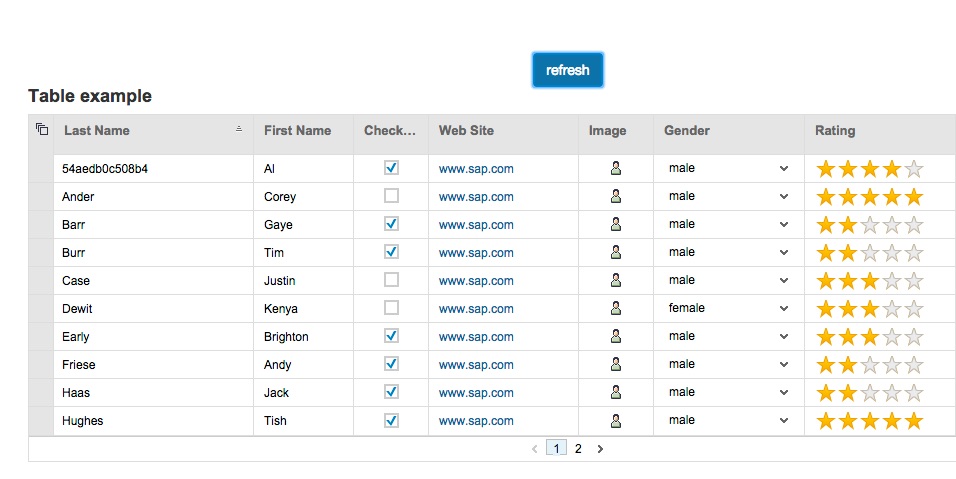
Last days I’ve been playing with OpenUI5. OpenUI5 is a web toolkit that SAP people has released as an open source project. I’ve read several good reviews about this framework, and because of that I started to hack a little bit with it. OpenUI5 came with a very complete set of controls. In this small example I want to use the “table” control. It’s just a datagrid. This days I playing a lot with Angular.js so I wanted to use together OpenUI5’s table control and Angularjs.
I’m not quite sure if it’s a good decision to use together both frameworks. In fact we don’t need Angular.js to create web applications using OpenUI5. OpenUI5 uses internally jQuery, but I wanted to hack a little bit and create one Angularjs directive to enclose one OpenUI5 datagrid.
First of all, we create one index.html. It’s just a boilerplate with angular + ui-router + ui-bootstrap. We also start our OpenUi5 environment with de default theme and including the table library
Then we create a directive enclosing the OpenUI5 needed code within a Angular module
(function () {
    'use strict';

    angular.module('ng.openui5', [])
        .directive('openui5Table', function () {

            function renderColumns(columns, oTable) {
                for (var i = 0; i <= columns.length; i++) {
                    oTable.addColumn(new sap.ui.table.Column(columns[i]));
                }
            }

            var link = function (scope, element) {

                var oData = scope.model.data,
                    oTable = new sap.ui.table.Table(scope.model.conf),
                    oModel = new sap.ui.model.json.JSONModel();

                oModel.setData({modelData: oData});
                renderColumns(scope.model.columns, oTable);

                oTable.setModel(oModel);
                oTable.bindRows("/modelData");
                oTable.sort(oTable.getColumns()[0]);

                oTable.placeAt(element);

                scope.$watch('model.data', function (data) {
                    if (data) {
                        oModel.setData({modelData: data});
                        oModel.refresh();
                    }
                }, true);

            };

            return {
                restrict: 'E',
                scope: {model: '=ngModel'},
                link: link
            };
        });
}());
And now we can create a simple Angular.js using the ng.openui5 module. In this application we configure the table and fetch the data from an externar API server
Today an original post. Maybe I’m the only one doing this, I know. 2014 is close to finish and I want to review how it went the year. Let’s start.
The bad parts:
My book about SOLID principles (in Spanish) isn’t released yet. It’s almost finished. It only needs a few reviews, but because one thing or another it looks like it isn’t be released this year. Lesson learned: Those kind of side projects must have a release date. If they haven’t, another side projects can grab our attention and they can be frozen.
No new languages learned this year. There was a good chance with Swift. A new language, but it didn’t attract my attention. Erlang books are still in my desk and also my aim to improve my Java skills didn’t success. I found nothing where apply my Java learning.
The good parts:
Finally I can say JavaScript is a first class language within my personal software stack. Various projects with JS this year and I feel very comfortable writing JavaScript code. That’s also the year of Angular.js (for me and probably a lot of people).
This year has been the year of mobile development for me. I’ve been involved with several projects using Cordova/Phonegap framework. I the beginning to install Cordova environment, compile, deploy the application into the device was something “heroic” but now it turns into trivial operations. I still remember my beginning with jQuery Mobile. Horrible. Then I started using Angular.js and Topcoat. Much better, but still problems when switching between Android and IOs. Finally I re-discover Ionic framework. Incredible project. Hybrid applications with angular.js with very complete toolkit. This year has been crowed by push notifications, camera plugins, barcode scanners, token based authorisations, Websockets and things like that. Now hybrid applications with Phonegap/Cordova live in my comfort zone along with Silex, Angular, PHP… (that’s means I need to find other places outside it)
The last part of the year I’ve been working a lot with automation tools: Bower and Grunt mainly. I also started to work with JavaScript testing with Karma and Jasmine
This year I’ve been a proud speaker at DeSymfony Day in Barcelona. On incredible weekend. Meeting with colleagues, speaker dinner, great conversations, and tourism in a great city. Definitely the most beautiful room for a conference that I ever been
Katayunos The coding dojo where we play with TDD and Pair Programming is still alive. Maybe not as continuous as I’d like, but we still meet together 20-25 people one Saturday morning to improve our programming skill, from time to time
My personal blog is still alive too. It’s close to be 5 years old (OK, technically speaking 6, but first year it wasn’t a serious one). More than 20k views per month and sometimes close to 30k (Hey, thank you for reading!)
And that’s all. It was a good year. Hopefully it will be worse than 2015 🙂
Remember my last post about WebSockets and AngularJs? Today we’re going to play with something similar. I want to create a key-value interface to play with websockets. Let me explain it a little bit.
First we’re going to see the backend. One Silex application with two routes: a get one and a post one:
If you work with in-house iOS applications you need to define a distribution strategy (you cannot use Apple Store, indeed). Apple provides documentation to do it. Basically we need to place our ipa file in addition to the plist file (generated when we archive our application with xCode). I’m not going to explain how to do it here. As I said before it’s well documented. Here I’m going to explain how to do the same trick than the Android’s post but now with our iOS application.
With iOS, to install the application, we only need to provide the iTunes link to our plist application (something like this: itms-services://?action=download-manifest&url=http://url.to.plist) and open it with the InAppBrowser plugin.
We can use exactly the same angularJs used the the previous post to check the version and the same server-side verification.
We also can detect the platform with Device plugin and do one thing or another depending on we are using Android or iOS.
Here you can see one example using ionic framework. This example uses one $http interceptor to send version number within each request and we trigger ‘wrong.version’ to the event dispatcher when it detects a wrong versions between client and server
Angular creates one $scope object for each controller. We also have a $rootScope accesible from every controllers. But, can we access to one controller’s $scope from another controller? The sort answer is no. Also if our application needs to access to another controller’s $scope, we probably are doing something wrong and we need to re-think our problem. But anyway it’s possible to access to another controller’s $scope if we store it within a service. Let me show you and example.
Imagine this little example:
<!doctype html>
<html ng-app="app">
<head>
    <script src="https://ajax.googleapis.com/ajax/libs/angularjs/1.3.0-beta.18/angular.js"></script>
    <script src="app.js"></script>
</head>
<body>

<div ng-controller="OneController">
    <h2>OneController</h2>
    <button ng-click="buttonClick()">
        buttonClick on current scope
    </button>
</div>

<div ng-controller="TwoController">
    <h2>TwoController</h2>
    <button ng-click="buttonClick()">
        buttonClick on current scope
    </button>
</div>
</body>
</html>
As we can see we define two controllers: “OneController” and “TwoController”.
That’s the application:
var app = angular.module('app', []);

app.controller('OneController', function ($scope) {
    $scope.variable1 = "One";

    $scope.buttonClick = function () {
        console.log("OneController");
        console.log("$scope::variable1", $scope.variable1);
    };
});

app.controller('TwoController', function ($scope) {
    $scope.variable1 = "Two";

    $scope.buttonClick = function () {
        console.log("TwoController");
        console.log("$scope::variable1", $scope.variable1);
    };
});
If we need to access to another controller’s $scope we need to store those scopes within a service. For example with this minimal service:
app.factory('Scopes', function ($rootScope) {
    var mem = {};

    return {
        store: function (key, value) {
            mem[key] = value;
        },
        get: function (key) {
            return mem[key];
        }
    };
});
And now we need to store the $scope in the service:
app.controller('OneController', function ($scope, Scopes) {
    Scopes.store('OneController', $scope);
    ...
});
app.controller('TwoController', function ($scope, Scopes) {
    Scopes.store('TwoController', $scope);
    ...
});
And now we can access to another’s $scope
Here the full example:
<!doctype html>
<html ng-app="app">
<head>
    <script src="https://ajax.googleapis.com/ajax/libs/angularjs/1.3.0-beta.18/angular.js"></script>
    <script src="app.js"></script>
</head>
<body>

<div ng-controller="OneController">
    <h2>OneController</h2>
    <button ng-click="buttonClick()">
        buttonClick on current scope
    </button>
    <button ng-click="buttonClickOnTwoController()">
        buttonClick on TwoController's scope
    </button>
</div>

<div ng-controller="TwoController">
    <h2>TwoController</h2>
    <button ng-click="buttonClick()">
        buttonClick on current scope
    </button>
    <button ng-click="buttonClickOnOneController()">
        buttonClick on OneController's scope
    </button>
</div>
</body>
</html>
and app.js
var app = angular.module('app', []);

app.run(function ($rootScope) {
    $rootScope.$on('scope.stored', function (event, data) {
        console.log("scope.stored", data);
    });
});
app.controller('OneController', function ($scope, Scopes) {

    Scopes.store('OneController', $scope);

    $scope.variable1 = "One";

    $scope.buttonClick = function () {
        console.log("OneController");
        console.log("OneController::variable1", Scopes.get('OneController').variable1);
        console.log("TwoController::variable1", Scopes.get('TwoController').variable1);
        console.log("$scope::variable1", $scope.variable1);
    };

    $scope.buttonClickOnTwoController = function () {
        Scopes.get('TwoController').buttonClick();
    };
});
app.controller('TwoController', function ($scope, Scopes) {

    Scopes.store('TwoController', $scope);

    $scope.variable1 = "Two";

    $scope.buttonClick = function () {
        console.log("TwoController");
        console.log("OneController::variable1", Scopes.get('OneController').variable1);
        console.log("TwoController::variable1", Scopes.get('TwoController').variable1);
        console.log("$scope::variable1", $scope.variable1);
    };

    $scope.buttonClickOnOneController = function () {
        Scopes.get('OneController').buttonClick();
    };
});
app.factory('Scopes', function ($rootScope) {
    var mem = {};

    return {
        store: function (key, value) {
            $rootScope.$emit('scope.stored', key);
            mem[key] = value;
        },
        get: function (key) {
            return mem[key];
        }
    };
});
I’m a big fan of websockets. I’ve got various post about them (here, here). Last months I’m working with angularjs projects and because of that I wanna play a little bit with websockets (with socket.io) and angularjs.
I want to build one angular service.
angular.module('io.service', []).
    factory('io', function ($http) {
        var socket,
            apiServer,
            ioEvent,
            watches = {};

        return {
            init: function (conf) {
                apiServer = conf.apiServer;
                ioEvent = conf.ioEvent;

                socket = io.connect(conf.ioServer);
                socket.on(ioEvent, function (data) {
                    return watches.hasOwnProperty(data.item) ? watches[data.item](data) : null;
                });
            },

            emit: function (arguments) {
                return $http.get(apiServer + '/request', {params: arguments});
            },

            watch: function (item, closure) {
                watches[item] = closure;
            },

            unWatch: function (item) {
                delete watches[item];
            }
        };
    });
The idea of the application is to watch one model’s variable (‘question’ in this example) and each time it changes we will send the value to the websocket server and we’ll so something (we will convert the string to upper case in our example)
As you can read in one of my previous post I don’t like to send messages from the web browser to the websocket server directly (due do to authentication issues commented here). I prefer to use one server (a Silex server in this example)
Maybe this post can be obvious but I’ve spoken about it with various developers who don’t know it. It really improves the developing process of cordova/phonegap apps with android at least for me.
With android we can see the log with “adb logcat” but it’s a nightmare. Huge amount of information about our app and also about the operating system. If we’re grep ninjas we can handle it, but as well as I’m not a ninja I prefer another solution. Do you know “chrome://inspect/”? If not, have a look as soon as possible to this tool. We can see the browser’s console of our android in our desktop browser. We only need to enable “usb remote debugger” within our android device and plug with a USB cable. Chrome will detect the remote browser and we can see the console in the same way than we see it when we use Chrome locally.
But we’re speaking about cordova/phonegap apps here so, what we need to do to use chrome://inspect with our hybrid apps? The answer is simple: we don’t need to do anything. Cordova applications is nothing than a Webkit browser inside a native app. Chrome es Webkit too so chrome://inspect will detect our remote device app and we will open console.
This small trick in addition to the last post really marks a before and an after at least in my developing process.
If our app crashes in the device we only need to see the console’s log within our browser and see what happens. We also can add functionality, change variables, and override functions in the same way than we do it with our local browser.
Recent months I’ve working with enterprise mobile applications. This apps are’t distributed using any marketplace, so I need to handle the distributions process. With Android you can compile your apps, create your APK files and distribute them. You can send the files by email, use a download link, send the file with bluetooth, or whatever. With iOS is a bit different. You need to purchase one Enterprise license, compile the app and distribute your IPA files using Apple’s standards.
OK, but this post is not about how to distribute apps outside the markets. This post is about one big problem that appears when we need to upgrade our apps. How do the user knows that there’s a new version of the application and he needs to upgrade? When we work inside Google Play Store we don’t need to worry about it, but if we distribute our apps manually we need do something. We can send push notifications or email to the user to inform about the new version. Let me show you how I’m doing it.
My problem isn’t only to let know to the user about a new version. Sometimes I also need to ensure that the user runs the last version of the app. Imagine a critical bug (solved in the last release) but the user don’t upgrade.
First we need to create a static html page where the user can download the APK file. Imagine that this is the url where the user can download the last version of the app:
http://192.168.1.1:8888/app.apk
We can check the version of the app against the server each time the user opens the application, but this check means network communication and it’s slow. We need to reduce the communication between client and server to the smallest expression and only when it’s strictly necessary. Check the version each time can be good in a desktop application, but it reduces the user experience with mobile apps. My approach is slightly different. Normally we use token based authenticationwithin mobile apps. That’s means we need to send our token with all request. If we send the token, we also can send the version.
In a angular app we can define the version and the path of our apk using a key-value store.
Now we need to add version parameter to each request (we can easily create a custom http service to append this parameter to each request automatically, indeed)
We can create a simple backend to take care of the version and throws an HTTP exception (one 410 HTTP error for example) if versions doesn’t match. Here you can see a simple Silex example:
<?php

include __DIR__ . "/../vendor/autoload.php";

use Silex\Application;
use Symfony\Component\HttpFoundation\Request;
use Symfony\Component\HttpFoundation\Response;
use Symfony\Component\HttpKernel\Exception\HttpException;

$app = new Application([
    'debug'   => true,
    'version' => 4,
]);

$app->after(function (Request $request, Response $response) {
    $response->headers->set('Access-Control-Allow-Origin', '*');
});

$app->get('/api/doSomething', function (Request $request, Application $app) {
    if ($request->get('_version') != $app['version']) {
        throw new HttpException(410, "Wrong version");
    } else {
        return $app->json('hello');
    }
});

$app->run();
With this simple example we can realize if user has a wrong version within each server request. If version don’t match we can, for example redirect to an specific route to inform that the user needs to upgrade the app and provide a link to perform the action.
With Android we cannot create a link to APK file. It doesn’t work. We need to download the APK (using FileTransfer plugin) and open the file using webintent plugin.
The code is very simple:
var fileTransfer = new FileTransfer();
fileTransfer.download(encodeURI(androidUrl),
    "cdvfile://localhost/temporary/app.apk",
    function (entry) {
        window.plugins.webintent.startActivity({
            action: window.plugins.webintent.ACTION_VIEW,
            url: entry.toURL(),
            type: 'application/vnd.android.package-archive'
        }, function () {
        }, function () {
            alert('Failed to open URL via Android Intent.');
            console.log("Failed to open URL via Android Intent. URL: " + entry.fullPath);
        });
    }, function (error) {
        console.log("download error source " + error.source);
        console.log("download error target " + error.target);
        console.log("upload error code" + error.code);
    }, true);
And basically that’s all. When user self-upgrade the app it closes automatically and he needs to open it again, but now with the correct version.

 Gonzalo Ayuso - Web Architect