Building a Silex application from one Behat/Gherkin feature file

Last days I’ve playing with Behat. Behat is a behavior driven development (BDD) framework based on Ruby’s Cucumber. Basically with Behat we defenie features within one feature file. I’m not going to crate a Behat tutorial (you can read more about Behat here). Behat use Gherkin to write the features files. When I was playing with Behat I had one idea. The idea is simple: Can we use Gherking to build a Silex application?. It was a good excuse to study Gherking, indeed ;).

Here comes the feature file:

Feature: application API
  Scenario: List users
    Given url "/api/users/list.json"
    And request method is "GET"
    Then instance "\Api\Users"
    And execute function "listUsers"
    And format output into json

  Scenario: Get user info
    Given url "/api/user/{userName}.json"
    And request method is "GET"
    Then instance "\Api\User"
    And execute function "info"
    And format output into json

  Scenario: Update user information
    Given url "/api/user/{userName}.json"
    And request method is "POST"
    Then instance "\Api\User"
    And execute function "update"
    And format output into json

Our API use this simple library:

<?php

namespace Api;
use Symfony\Component\HttpFoundation\Request;

class User
{
    private $request;

    public function __construct(Request $request)
    {
        $this->request = $request;
    }

    public function info()
    {
        switch ($this->request->get('userName')) {
            case 'gonzalo':
                return array('name' => 'Gonzalo', 'surname' => 'Ayuso');
            case 'peter':
                return array('name' => 'Peter', 'surname' => 'Parker');
        }
    }

    public function update()
    {
        return array('infoUpdated');
    }
}
<?php

namespace Api;
use Symfony\Component\HttpFoundation\Request;

class Users
{
    public function listUsers()
    {
        return array('gonzalo', 'peter');
    }
}

The idea is simple. Parse the feature file with behat/gherkin component and create a silex application. And here comes the “magic”. This is a simple working prototype, just an experiment for a rainy sunday.

<?php
include __DIR__ . '/../vendor/autoload.php';
define(FEATURE_PATH, __DIR__ . '/api.feature');

use Behat\Gherkin\Lexer,
        Behat\Gherkin\Parser,
        Behat\Gherkin\Keywords\ArrayKeywords,
        Behat\Gherkin\Node\FeatureNode,
        Behat\Gherkin\Node\ScenarioNode,
        Symfony\Component\HttpFoundation\Request,
        Silex\Application;

$keywords = new ArrayKeywords([
    'en' => [
        'feature' => 'Feature',
        'background' => 'Background',
        'scenario' => 'Scenario',
        'scenario_outline' => 'Scenario Outline',
        'examples' => 'Examples',
        'given' => 'Given',
        'when' => 'When',
        'then' => 'Then',
        'and' => 'And',
        'but' => 'But'
    ],
]);

function getMatch($subject, $pattern) {
    preg_match($pattern, $subject, $matches);
    return isset($matches[1]) ? $matches[1] : NULL;
}

$app = new Application();

function getScenarioConf($scenario) {
    $silexConfItem = [];

    /** @var $scenario  ScenarioNode */
    foreach ($scenario->getSteps() as $step) {
        $route = getMatch($step->getText(), '/^url "([^"]*)"$/');

        if (!is_null($route)) {
            $silexConfItem['route'] = $route;
        }

        $requestMethod = getMatch($step->getText(), '/^request method is "([^"]*)"$/');
        if (!is_null($requestMethod)) {
            $silexConfItem['requestMethod'] = strtoupper($requestMethod);
        }

        $instance = getMatch($step->getText(), '/^instance "([^"]*)"$/');
        if (!is_null($instance)) {
            $silexConfItem['className'] = $instance;
        }

        $method = getMatch($step->getText(), '/^execute function "([^"]*)"$/');
        if (!is_null($method)) {
            $silexConfItem['method'] = $method;
        }

        if ($step->getText() == 'format output into json') {
            $silexConfItem['jsonEncode'] = TRUE;
        }
    }
    return $silexConfItem;
}

/** @var $features FeatureNode */
$features = (new Parser(new Lexer($keywords)))->parse(file_get_contents(FEATURE_PATH), FEATURE_PATH);

foreach ($features->getScenarios() as $scenario) {
    $silexConfItem = getScenarioConf($scenario);
    $app->match($silexConfItem['route'], function (Request $request) use ($app, $silexConfItem) {
            function getConstructorParams($rClass, $request) {
                $parameters =[];
                foreach ($rClass->getMethod('__construct')->getParameters() as $parameter) {
                    if ('Symfony\Component\HttpFoundation\Request' == $parameter->getClass()->name) {
                        $parameters[$parameter->getName()] = $request;
                    }
                }
                return $parameters;
            }

            $rClass = new ReflectionClass($silexConfItem['className']);
            $obj = ($rClass->hasMethod('__construct')) ?
                    $rClass->newInstanceArgs(getConstructorParams($rClass, $request)) :
                    new $silexConfItem['className'];

            $output = $obj->{$silexConfItem['method']}();

            return ($silexConfItem['jsonEncode'] === TRUE) ? $app->json($output, 200) : $output;
        }
    )->method($silexConfItem['requestMethod']);
}

$app->run();

You can see the source code in github. What do you think?
How to rewrite urls with PHP 5.4’s built-in web server

PHP 5.4 comes with a flaming built-in web server. This server is (obviously) not suitable to use in production environments, but it’s great if we want to check one project quickly:

  • git clone from github
  • composer install to install dependencies
  • run the built-in web server and test the application.
php -S localhost:8888 -t www/

But is very usual to use mod_rewrite or similar to send all requests to the front controller. With apache is pretty straight forward to do it:

<IfModule mod_rewrite.c>
    Options -MultiViews
    RewriteEngine On
    RewriteCond %{REQUEST_FILENAME} !-f
    RewriteRule ^(.*)$ index.php [QSA,L]
</IfModule>

But, does it work with the built-in web server? The answer is yes, but with another syntax. We only need to create one router file and start our server with this router:

<?php
// www/routing.php
if (preg_match('/\.(?:png|jpg|jpeg|gif)$/', $_SERVER["REQUEST_URI"])) {
    return false;
} else {
    include __DIR__ . '/index.php';
}

And now we start the server with:

php -S localhost:8888 www/routing.php

Easy, isn’t it?

How to send the output of Symfony’s process Component to a node.js server in Real Time with Socket.io

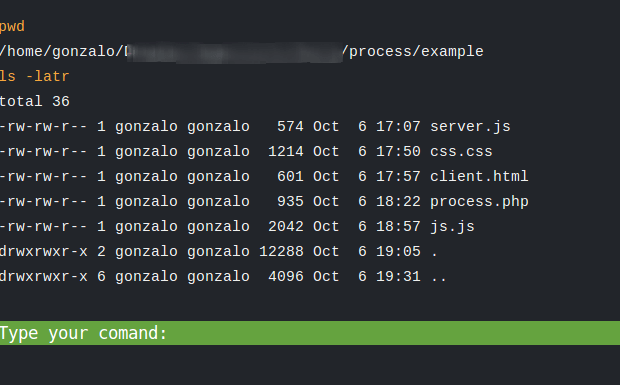
Today another crazy idea. Do you know Symfony Process Component? The Process Component is a simple component that executes commands in sub-processes. I like to use it when I need to execute commands in the operating system. The documentation is pretty straightforward. Normally when I want to collect the output of the script (imagine we run those scripts within a crontab) I save the output in a log file and I can check it even in real time with tail -f command.

This approach works, but I want to do it in a browser (call me crazy :)). I’ve written a couple of posts with something similar. What I want to do now? The idea is simple:

First I want to execute custom commands with process. Just follow the process documentation:

<?php
use Symfony\Component\Process\Process;

$process = new Process('ls -lsa');
$process->setTimeout(3600);
$process->run();
if (!$process->isSuccessful()) {
    throw new \RuntimeException($process->getErrorOutput());
}

print $process->getOutput();

Process has one cool feature, we can give feedback in real-time by passing an anonymous function to the run() method:

<?php
use Symfony\Component\Process\Process;

$process = new Process('ls -lsa');
$process->run(function ($type, $buffer) {
    if ('err' === $type) {
        echo 'ERR > '.$buffer;
    } else {
        echo 'OUT > '.$buffer;
    }
});

The idea now is to use this callback to send a TCP socket to one server with node.js

var LOCAL_PORT = 5600;
var server = require('net').createServer(function (socket) {
    socket.on('data', function (msg) {
        console.log(msg);
    });
}).listen(LOCAL_PORT);

server.on('listening', function () {
    console.log("TCP server accepting connection on port: " + LOCAL_PORT);
});

Now we change our php script to

<?php
include __DIR__ . "/../vendor/autoload.php";

use Symfony\Component\Process\Process;

function runProcess($command)
{
    $address = 'localhost';
    $port = 5600;
    $socket = socket_create(AF_INET, SOCK_STREAM, SOL_TCP);
    socket_connect($socket, $address, $port);

    $process = new Process($command);
    $process->setTimeout(3600);
    $process->run(
        function ($type, $buffer) use ($socket) {
            if ('err' === $type) {
                socket_write($socket, "ERROR\n", strlen("ERROR\n"));
                socket_write($socket, $buffer, strlen($buffer));
            } else {

                socket_write($socket, $buffer, strlen($buffer));
            }
        }
    );
    if (!$process->isSuccessful()) {
        throw new \RuntimeException($process->getErrorOutput());
    }
    socket_close($socket);
}

runProcess('ls -latr /');

Now with the node.js started, if we run the php script, we will see the output of the process command in the node’s terminal. But we want to show it in a browser. What can we do? Of course, socket.io. We change the node.js command to:

var LOCAL_PORT = 5600;
var SOKET_IO_PORT = 8000;
var ioClients = [];

var io = require('socket.io').listen(SOKET_IO_PORT);

var server = require('net').createServer(function (socket) {
    socket.on('data', function (msg) {
        ioClients.forEach(function (ioClient) {
            ioClient.emit('log', msg.toString().trim());
        });
    });
}).listen(LOCAL_PORT);

io.sockets.on('connection', function (socketIo) {
    ioClients.push(socketIo);
});

server.on('listening', function () {
    console.log("TCP server accepting connection on port: " + LOCAL_PORT);
});

and finally we create a simple web client:

<script src="http://localhost:8000/socket.io/socket.io.js"></script>
<script>
    var socket = io.connect('http://localhost:8000');
    socket.on('log', function (data) {
        console.log(data);
    });
</script>

Now if we start one browser we will see the output of our command line process within the console tab of the browser.

If you want something like webConsole, I also have created the example, With a Web UI enabling to send custom commands. You can see it in github.

Obviously that’s only one experiment with a lot of security issues that we need to take into account if we want to use it in production. What do you think?

Handling dates with PHP

I’ve seen a lot of newbies (and not newbies) having problems handling dates in PHP (and even with SQL and another languages). When I see someone having problems with dates, I always ask the same question. I type in a text editor “27/11/2012” and I ask him: What is it? If your answer is “This is a date” you should continue reading the post 🙂

“27/11/2012” in a text editor is not a date. It’s a string representing a date (my birthday this year, indeed 🙂 ). We also must take into account that we cannot show a “raw” date. We only can apply a mask to a date if we want to show it. Because of that dates are normally stored internally as UNIX timestams or something similar.You can say that when we perform one SELECT statement with a date field we don’t see one timestamp. That’s because the tool that you are using to show the date field applies one mask to your date. The default mask can be also a problem. “01/02/2012” represents 01/February/2012 or 02/January/2012? We don’t know. Depends on the mask that we are using.

When we work with PHP is very usual to use dates. Sometimes we need to pass them to SQL queries, perform operations (such as add days, diffs, compare, …). When I started with PHP 10 years ago we use to use mktime(), date(), and insane operations with split/join with strings. That’s the past. Now we have DateTime.

It’s pretty straightforward to use it. We can use one static factory to create DateTime objects

$date = DateTime::createFromFormat('d/m/Y', '27/11/2012');

Now $date is a variable that stores a DateTime object. If we want to show it, we need to apply one format. For example:

$date = DateTime::createFromFormat('d/m/Y', '27/11/2012');
echo $date->format('m/d/Y');  // outputs 11/27/2012

I’m not going to create a tutorial of DateTime here. It’s very good described (as always) within PHP official documentation. There is something that I love with DateTime objects also:

$date1 = DateTime::createFromFormat('d/m/Y', '27/11/2012');
$date2 = DateTime::createFromFormat('d/m/Y', '27/11/2011');

if ($date1 > $date2) {
    echo "It works!"
}

In my last projects when I need to use Dates I like to cast the variables as DateTime objects. Let me show you a little example:

<?php

class Dummy
{
    /** @var DateTime */
    private $date;
    private $defaultFormat = 'd/m/Y';

    public function setDate(DateTime $date)
    {
        $this->date = $date;
    }

    public function getDate()
    {
        return $this->date;
    }

    public function getFormattedDate($format = NULL)
    {
        return $this->date->format($this->getFormat($format));
    }

    public function setFormattedDate($formatedDate, $format = NULL)
    {
        $this->date = DateTime::createFromFormat($this->getFormat($format), $formatedDate);
    }

    public function setDefaultFormat($format)
    {
        $this->defaultFormat = $format;
    }

    private function getFormat($format)
    {
        return is_null($format) ? $this->defaultFormat : $format;
    }
}

But maybe, as always, the best documentation are the Unit Tests

<?php

class DummyTest extends \PHPUnit_Framework_TestCase
{
    public function testDate()
    {
        $date  = DateTime::createFromFormat('d/m/Y', '1/2/2012');
        $dummy = new Dummy();
        $dummy->setDate($date);
        $this->assertEquals($date, $dummy->getDate());
    }

    public function testDateWithAlternativeSetter()
    {
        $dummy = new Dummy();
        $dummy->setFormattedDate('1/2/2012', 'd/m/Y');
        $this->assertEquals(DateTime::createFromFormat('d/m/Y', '1/2/2012'), $dummy->getDate());
    }

    public function testDateWithAlternativeSetterWithDeffaultFormatSet()
    {
        $dummy = new Dummy();
        $dummy->setDefaultFormat('d/m/Y');
        $dummy->setFormattedDate('1/2/2012');
        $this->assertEquals(DateTime::createFromFormat('d/m/Y', '1/2/2012'), $dummy->getDate());
    }

    public function testFormatGetterWithDefaultFormat()
    {
        $dummy = new Dummy();
        $dummy->setFormattedDate('1/2/2012');
        $this->assertEquals('2012', $dummy->getDate()->format('Y'));
    }
    
    public function testFormatGetter()
    {
        $dummy = new Dummy();
        $dummy->setFormattedDate('1/2/2012');
        $this->assertEquals('2012', $dummy->getFormattedDate('Y'));
    }

    public function testDiffDates()
    {
        $dummy = new Dummy();
        $dummy->setFormattedDate('1/2/2012');
        $date = DateTime::createFromFormat('d/m/Y', '1/2/2011');

        $this->assertTrue($date < $dummy->getDate());
    }

    public function testModifyDates()
    {
        // leap-years
        $dummy = new Dummy();
        $dummy->setFormattedDate('28/02/1908');
        $this->assertEquals('29/02/1908', $dummy->getDate()->modify("+1 day")->format('d/m/Y'));

        // Non leap-years
        $dummy = new Dummy();
        $dummy->setFormattedDate('28/02/2001');
        $this->assertEquals('01/03/2001', $dummy->getDate()->modify("+1 day")->format('d/m/Y'));
    }
}

What do you think?

The reason why singleton is a “problem” with PHPUnit

Singleton is a common design pattern. It’s easy to understand and we can easily implement it with PHP:

<?php
class Foo
{
    static private $instance = NULL;

    static public function getInstance()
    {
        if (self::$instance == NULL) {
            self::$instance = new static();
        }
        return self::$instance;
    }
}

Maybe this pattern is not as useful as it is in J2EE world. With PHP everything dies within each request, so we cannot persist our instances between requests (without any persistent mechanism such as databases, memcached or external servers). But at least in PHP we can share the same instance, with this pattern, in our script. No matter were we are, we use Foo::getInstance() and we get our instance. It useful when we work, for example, with database connections and service containers.

If we work with TDD we most probably use PHPUnit. Imagine a simple script to test the instantiation of our Foo class

class FooTest extends PHPUnit_Framework_TestCase
{
    public function testGetInstance()
    {
        $this->assertInstanceOf('Foo', Foo::getInstance());
    }
}

All is green. It works.

Imagine now we want to “improve” our Foo class and we want to create a counter:

    public function testCounter()
    {
        $foo = Foo::getInstance();
        $this->assertEquals(0, $foo->getCounter());
        $foo->incrementCounter();
        $this->assertEquals(1, $foo->getCounter());
    }

Now our test fails, So we change our implementation of the class to pass the test and we add to Foo class

    private $counter = 0;

    public function getCounter()
    {
        return $this->counter;
    }

    public function incrementCounter()
    {
        $this->counter++;
    }

It’s green again. We are using a singleton pattern to get the instance of the class and we are using TDD, so what’s the problem? I will show you with an example. Imagine we need to improve our Foo class and we want a getter to say if counter is even or not. We add a new test:

    public function testIsOdd()
    {
        $foo = Foo::getInstance();
        $this->assertEquals(FALSE, $foo->counterIsOdd(), '0 is even');
        $foo->incrementCounter();
        $this->assertEquals(TRUE, $foo->counterIsOdd(), '1 is uneven');
    }

And we implement the code to pass the test again:

    public function counterIsOdd()
    {
        return $this->counter % 2 == 0 ? FALSE : TRUE;
    }

But it doesn’t work. Our test is red now. Why? The answer is simple. We are sharing the same instance of Foo class in both tests, so in the first one our counter start with 0 (the default value) but with the second one it start with 1, because the first test has changed the state of the instance (and we are reusing it).

This is a trivial example, but real world problems with this issue are a bit nightmare. Imagine, for example, that we use singleton pattern to get the database connection (a common usage of this pattern). Suddenly we break one test (because we have created a wrong SQL statement). Imagine we have a test suite with 100 assertions. We have broken one assertion (the second one, for example), and our PHPUnit script will say that we have 99 errors (the second one and all the following ones). That happens because our script can’t reuse the database connection (it’s broken in the second test). Too much garbage in the output of the PHPUnit script and that’s not agile.

How to solve it? We have two possible solutions. The first one is avoid singletons as a plague. We have alternatives such as dependency injection, but if we really want to use them (they are not forbidden, indeed) we need to remember to write one static function in our class to reset all our static states and call after each test. PHPUnit allow to execute something at the end of each test with tearDown() function. So we add to our test:

class FooTest extends PHPUnit_Framework_TestCase
{
...
    public function tearDown()
    {
        Foo::tearDown();
    }
}

And now we implement the tearDown function in our Foo Class

    public static function tearDown()
    {
        static::$instance = NULL;
    }

And all works again. All is green and green is cool, isn’t it? 🙂

Note: Take into account that “problem” is between quotes in the title. That’s beacause singleton is not a “real” problem. We can use it, it isn’t forbiden, but we need to realize the collateral effects that its usage can throw to our code.

Combining Zend Framework2 and Symfony2 components with Composer to build PHP projects

Zend Framework 2 is finally stable. I must admit that I’m not a big fan of ZF (or even Symfony2) as a full stack framework. I normally prefer to use micro frameworks, but those two frameworks (ZF2 and SF2) are great as component libraries. Today we are going to build a simple console application (using symfony/console component) to list the database tables (using zendframework/zend-db‘s Metadata). Let’s start.

First we need our composer.json file. We can find our Symfony components at Packaist (that’s means we don’t need to do anything special in the composer.json file), but Zend Framework2 has its own repository. No problem, it’s properly described in the documentation:

{
    "repositories": [
        {
            "type": "composer",
            "url": "http://packages.zendframework.com/"
        }
    ],
    "require": {
        "symfony/console":"dev-master",
        "zendframework/zend-db":"2.0.*"
    },
    "autoload":{
        "psr-0":{
            "":"lib/"
        }
    }
}

Now we run composer install (as always) and we already have our components in vendor folder and the autoloader will properly include the files on demand. So we can work in our console application without any problem.

<?php
namespace GonzaloDb;

// file: lib/GonzaloDb/SchemeCommand.php

use Symfony\Component\Console\Command\Command;
use Symfony\Component\Console\Input\InputArgument;
use Symfony\Component\Console\Input\InputOption;
use Symfony\Component\Console\Input\InputInterface;
use Symfony\Component\Console\Output\OutputInterface;

use Zend\Db\Sql\Sql;
use Zend\Db\Adapter\Adapter;
use Zend\Db\Metadata\Metadata;

class SchemeCommand extends Command
{
    protected function configure()
    {
        $command = $this->setName('GonzaloDb:listTables')->setDescription('list all tables');
        $command->addArgument('host', InputArgument::REQUIRED, 'DB Host');
        $command->addArgument('port', InputArgument::REQUIRED, 'DB Port');
        $command->addArgument('database', InputArgument::REQUIRED, 'DB name');
        $command->addArgument('username', InputArgument::REQUIRED, 'Username');
        $command->addArgument('password', InputArgument::REQUIRED, 'Password');

        $command->addOption('listFields', NULL, InputOption::VALUE_NONE, 'list table Fields');
    }

    protected function execute(InputInterface $input, OutputInterface $output)
    {
        $adapterParameter = array(
            'driver'   => 'PDO_Pgsql',
            'host'     => $input->getArgument('host'),
            'port'     => $input->getArgument('port'),
            'database' => $input->getArgument('database'),
            'username' => $input->getArgument('username'),
            'password' => $input->getArgument('password')
        );

        $adapter = new Adapter($adapterParameter);

        $metadata   = new Metadata($adapter);
        $tableNames = $metadata->getTableNames();
        foreach ($tableNames as $tableName) {
            $output->writeln("Table: <info>$tableName</info>");
            if ($input->getOption('listFields')) {
                $table = $metadata->getTable($tableName);

                foreach ($table->getColumns() as $column) {
                    $output->writeln('  <comment>' . $column->getName() . '</comment> -> ' . $column->getDataType());
                }
            }
        }
    }
}

We also can use unit tests within console applications:

<?php

// file: tests/SchemeCommandTest.php
/*
CREATE TABLE users(
  userid character varying(50),
  name character varying(100),
  email character varying(50),
    CONSTRAINT users_pkey PRIMARY KEY (userid)
);
 */
use Symfony\Component\Console\Application;
use Symfony\Component\Console\Tester\CommandTester;
use GonzaloDb\SchemeCommand;

class SchemeCommandTest extends \PHPUnit_Framework_TestCase
{
    private $command;

    public function setUp()
    {
        $application = new Application();
        $application->add(new SchemeCommand());

        $this->command = $application->find('GonzaloDb:listTables');
    }

    public function testListTables()
    {
        $commandTester = new CommandTester($this->command);
        $commandTester->execute(
            array(
                 'command'  => $this->command->getName(),
                 'host'     => '127.0.0.1',
                 'port'     => 5432,
                 'database' => 'mydb',
                 'username' => 'username',
                 'password' => 'password',
            )
        );
        $this->assertRegExp('/Table: users/', $commandTester->getDisplay());
        $this->assertNotRegExp('/name -> character varying/', $commandTester->getDisplay());
    }

    public function testListTablesAndFields()
    {
        $commandTester = new CommandTester($this->command);
        $commandTester->execute(
            array(
                 'command'      => $this->command->getName(),
                 'host'         => '127.0.0.1',
                 'port'         => 5432,
                 'database'     => 'mydb',
                 'username'     => 'username',
                 'password'     => 'password',
                 '--listFields' => TRUE
            )
        );
        $this->assertRegExp('/Table: users/', $commandTester->getDisplay());
        $this->assertRegExp('/name -> character varying/', $commandTester->getDisplay());
    }
}

And that’s all. Zend Framework2 increases or toolbox as developers and with the power of Composer we can start building applications very fast. I like it 🙂

Dependency Injection Containers with PHP. When Pimple is not enough.

Two months ago I wrote an article about Dependency Injection with PHP and Pimple. After the post I was speaking about it with a group of colleagues and someone threw a question:

What happens if your container grows up? Does Pimple scale well?

The answer is not so easy. Pimple is really simple and good for small projects, but it becomes a little mess when we need to scale. Normally when I face a problem like that I like to checkout the Symfony2 code. It usually implements a good solution. There’s something I really like from Symfony2: it’s a brilliant component library and we can use those components within our projects instead of using the full stack framework. So why don’t we only use the Dependency Injection component from SF2 instead Pimple to solve the problem? Let’s start:

We are going to use composer to load our dependencies so we start writing our composer.json file. We want to use yaml files so we need to add “symfony/yaml” and “symfony/config” in addition to “symfony/dependency-injection”:

{
    "require": {
        "symfony/dependency-injection": "dev-master",
        "symfony/yaml": "dev-master",
        "symfony/config": "dev-master"
    },
    "autoload":{
        "psr-0":{
            "":"lib/"
        }
    },
}

Now we can run “composer install” command and we already have our vendors and our autolader properly set.

We are going to build exactly the same example than in the previous post:

<?php
class App
{
    private $proxy;

    public function __construct(Proxy $proxy)
    {
        echo "App::__construct\n";
        $this->proxy = $proxy;
    }

    public function hello()
    {
        return $this->proxy->hello();
    }
}

class Proxy
{
    private $curl;

    public function __construct(Curl $curl)
    {
        $this->curl = $curl;
    }

    public function hello()
    {
        echo "Proxy::__construct\n";
        return $this->curl->doGet();
    }
}

class Curl
{
    public function doGet()
    {
        echo "Curl::doGet\n";
        return "Hello";
    }
}

Now we create our file “services.yml” describing our dependency injection container behaviour:

services:
  app:
    class:     App
    arguments: [@Proxy]
  proxy:
    class:     Proxy
    arguments: [@Curl]
  curl:
    class:     Curl

and finally we can build the script:

<?php
include __DIR__ . "/vendor/autoload.php";

use Symfony\Component\DependencyInjection\ContainerBuilder;
use Symfony\Component\DependencyInjection\Reference;
use Symfony\Component\Config\FileLocator;
use Symfony\Component\DependencyInjection\Loader\YamlFileLoader;

$container = new ContainerBuilder();
$loader = new YamlFileLoader($container, new FileLocator(__DIR__));
$loader->load('services.yml');

$container->get('app')->hello();

IMHO is as simple a Pimple but much more flexible, customizable and it’s also well documented. For example we can split our yaml files into different ones and load them:

<?php
include __DIR__ . "/vendor/autoload.php";

use Symfony\Component\DependencyInjection\ContainerBuilder;
use Symfony\Component\DependencyInjection\Reference;
use Symfony\Component\Config\FileLocator;
use Symfony\Component\DependencyInjection\Loader\YamlFileLoader;

$container = new ContainerBuilder();
$loader = new YamlFileLoader($container, new FileLocator(__DIR__));
$loader->load('services1.yml');
$loader->load('services2.yml');
$container->get('app')->hello();

An we also can use imports in our yaml files:

imports:
  - { resource: services2.yml }
services:
  app:
    class:     App
    arguments: [@Proxy]

If you don’t like yaml syntax and you prefer XML (I know. It looks insane :)) you can use it, or even programatically with PHP.

What do you think?

Source code in github (see the README to install the vendors)

Deployment tip: How to use environ variables to create different environments with PHP

If you use a framework such as Symfony2 this problem is solved for you, but if you aren’t using any framework you probably need to solve it in one way or another. Let me explain it. One typical scenario: production and development. We have one development database and another one for production. Each database has it’s own connection string. Probably we need to hard-code the connection string within the PHP code, but obviously if we are in the development environment we are going to use one connection string and the production one in the production environment. We can solve the problem with exotic tricks in the deployment script. I like to use exactly the same source code in all environments. Exactly the same means exactly the same, so I cannot change the code before pushing it to production. Mainly because normally my production environment usually it’s a cloud, and change the code it’s a mess. What can we do?

The solution that I like for this kind of problems is to use apache’s environ variables. We inject the environ variables in the virtual host configuration:

<VirtualHost *:80>
    ...
    SetEnv GONZALO_ENVIRON development
    ...
</VirtualHost>

Now we can read the environ variable easily with PHP with:

$environ = getenv('GONZALO_ENVIRON');

I’ve seen people who use this trick to avoid to hard-code our database passwords and connection string in the PHP souce code. Using this the developers cannot see the passwords (only sysadmins). I don’t like it, basically because I’m a hybrid between developer and sysadmin and this method is not agile for me, but maybe it can be useful for you.

I will show you a little example using this technique.

<?php
include(__DIR__ . '/../lib/App.php');

$environ = getenv('GONZALO_ENVIRON');
$app = new App($environ);
echo $app->run();

We have two different configuration files one for development:

<?php
return array(
    'ENVIRON' => 'DEVELOPMENT',
    'DB'      => array(
        'MAIN' => array(
            'dsn'      => 'pgsql:host=127.0.0.1;port=5432;dbname=dev_dbname',
            'username' => 'devel_username',
            'password' => 'devel_password',
            'options'  => array(
                PDO::ATTR_ERRMODE            => PDO::ERRMODE_EXCEPTION,
                PDO::ATTR_DEFAULT_FETCH_MODE => PDO::FETCH_NAMED
            )
        )
    )
);

And another one for production

return array(
    'ENVIRON' => 'PRODUCTION',
    'DB'      => array(
        'MAIN' => array(
            'dsn'      => 'pgsql:host=xxx.xxx.xxx.xxx;port=5432;dbname=prod_dbname',
            'username' => 'prod_username',
            'password' => 'prod_password',
            'options'  => array(
                PDO::ATTR_ERRMODE            => PDO::ERRMODE_EXCEPTION,
                PDO::ATTR_DEFAULT_FETCH_MODE => PDO::FETCH_NAMED
            )
        )
    )
);

Our app library:

class AppException extends Exception{}

class App
{
    private $conf;

    public function __construct($environ)
    {
        $this->conf = $this->getConfFromEnviron($environ);
    }

    private function getConfFromEnviron($environ)
    {
        $filePath = $this->getConfFilePath($environ);
        if (!is_file($filePath)) {
            throw new AppException("File '{$filePath}' not found");
        }
        return require($filePath);
    }

    private function getConfFilePath($environ)
    {
        return __DIR__ . "/../conf/{$environ}.php";
    }

    public function getFromConf($key)
    {
        $out = $this->conf;
        foreach (explode('.', $key) as $item) {
            if (isset($out[$item])) {
                $out = $out[$item];
            } else {
                throw new AppException("Key '{$key}' not found");
            }
        }
        return $out;
    }

    public function run()
    {
        $environ = $this->getFromConf('ENVIRON');
        return "Hello from {$environ}";
    }
}

But probably the best way to explain it is with the tests:

class AppTest extends PHPUnit_Framework_TestCase
{
    public function testEnvironDevelopment()
    {
        $environ = 'development';
        $app     = new App($environ);
        $this->assertEquals('Hello from DEVELOPMENT', $app->run());
    }

    public function testEnvironProduction()
    {
        $environ = 'production';
        $app     = new App($environ);
        $this->assertEquals('Hello from PRODUCTION', $app->run());
    }

    /**
     * @expectedException AppException
     */
    public function testEnvironNotFound()
    {
        $environ = 'xxxxx';
        $app     = new App($environ);
    }

    public function testGetConf()
    {
        $environ = 'development';
        $app     = new App($environ);

        $this->assertEquals('DEVELOPMENT', $app->getFromConf('ENVIRON'));
        $this->assertEquals('devel_username', $app->getFromConf('DB.MAIN.username'));
        $this->assertEquals('devel_password', $app->getFromConf('DB.MAIN.password'));
    }

    /**
     * @expectedException AppException
     */
    public function testGetConfWithKeyNotFound()
    {
        $environ = 'development';
        $app     = new App($environ);

        $app->getFromConf('DB.MAIN.xxx');
    }
}

You can see the whole code at github

Encode our PHP code into spaces and new line characters

According to one my last blog post with an exotic usage of dynamic includes with PHP we will keep on with something still more exotic. The idea is to create clean code. And what is cleaner than the blank?

We will encode our PHP code into spaces and new line characters (\n). The idea is simple. We will translate each character of our script into (n) spaces where (n) is the hexadecimal representation of it’s ASCII code.

function decodeText($encodedText) {
    $out = array();
    foreach (explode("\n", $encodedText) as $line) {
        $lineOut = array();
        foreach (explode("\t", $line) as $item) {
            $lineOut[] = chr(strlen($item));
        }
        $out[] = implode(null, $lineOut);
    }
    return implode("\n", $out);
}

function encodeText($text) {
    $out = array();
    foreach (explode("\n", $text) as $line) {
        $lineOut = array();
        foreach (str_split($line) as $item) {
            $lineOut[] = str_repeat(" ", ord($item));
        }
        $out[] = implode("\t", $lineOut);
    }
    return implode("\n", $out);
}

And now we will create two functions to include our files and parse them with PHP. One function to include from raw input and another to include files.

function includeFromFile($file)
{
    $raw = file_get_contents($file);
    includeFromRaw($raw);
}

function includeFromRaw($rawText)
{
    $decodedCode = decodeText($rawText);
    $tmpfname = tempnam("/tmp", "blank");
    $handle = fopen($tmpfname, "w");
    fwrite($handle, $decodedCode);
    fclose($handle);
    ob_start(function($buffer) use ($tmpfname, $decodedCode) {
        return str_replace($tmpfname, "<pre>" . htmlentities($decodedCode). "</pre>", $buffer);
    });
    include $tmpfname;
    ob_end_flush();
    unlink($tmpfname);
}

Now we can use:

$text = encodeText('<?php echo "Gonzalo";' . "\n" . ' print_r(array(1,2,311)); ?>');
includeFromRaw($text);

Or if we save our code with the name “Blank.clean”

includeFromFile("Blank.clean");

Now if you are brave enough you can write code in our new blankAndSpaces programming language, instead of PHP 🙂

Building a simple API proxy server with PHP

This days I’m playing with Backbone and using public API as a source. The Web Browser has one horrible feature: It don’t allow to fetch any external resource to our host due to the cross-origin restriction. For example if we have a server at localhost we cannot perform one AJAX request to another host different than localhost. Nowadays there is a header to allow it: Access-Control-Allow-Origin. The problem is that the remote server must set up this header. For example I was playing with github’s API and github doesn’t have this header. If the server is my server, is pretty straightforward to put this header but obviously I’m not the sysadmin of github, so I cannot do it. What the solution? One possible solution is, for example, create a proxy server at localhost with PHP. With PHP we can use any remote API with curl (I wrote about it here and here for example). It’s not difficult, but I asked myself: Can we create a dummy proxy server with PHP to handle any request to localhost and redirects to the real server, Instead of create one proxy for each request?. Let’s start. Problably there is one open source solution (tell me if you know it) but I’m on holidays and I want to code a little bit (I now, it looks insane but that’s me 🙂 ).

The idea is:

...
$proxy->register('github', 'https://api.github.com');
...

And when I type:

http://localhost/github/users/gonzalo123

and create a proxy to :

https://api.github.com/users/gonzalo123

The request method is also important. If we create a POST request to localhost we want a POST request to github too.

This time we’re not going to reinvent the wheel, so we will use symfony componets so we will use composer to start our project:

We create a conposer.json file with the dependencies:

{
    "require": {
        "symfony/class-loader":"dev-master",
        "symfony/http-foundation":"dev-master"
    }
}

Now

php composer.phar install

And we can start coding. The script will look like this:

register('github', 'https://api.github.com');
$proxy->run();

foreach($proxy->getHeaders() as $header) {
    header($header);
}
echo $proxy->getContent();

As we can see we can register as many servers as we want. In this example we only register github. The application only has two classes:
RestProxy, who extracts the information from the request object and calls to the real server through CurlWrapper.

<?php
namespace RestProxy;

class RestProxy
{
    private $request;
    private $curl;
    private $map;

    private $content;
    private $headers;

    public function __construct(\Symfony\Component\HttpFoundation\Request $request, CurlWrapper $curl)
    {
        $this->request  = $request;
        $this->curl = $curl;
    }

    public function register($name, $url)
    {
        $this->map[$name] = $url;
    }

    public function run()
    {
        foreach ($this->map as $name => $mapUrl) {
            return $this->dispatch($name, $mapUrl);
        }
    }

    private function dispatch($name, $mapUrl)
    {
        $url = $this->request->getPathInfo();
        if (strpos($url, $name) == 1) {
            $url         = $mapUrl . str_replace("/{$name}", NULL, $url);
            $queryString = $this->request->getQueryString();

            switch ($this->request->getMethod()) {
                case 'GET':
                    $this->content = $this->curl->doGet($url, $queryString);
                    break;
                case 'POST':
                    $this->content = $this->curl->doPost($url, $queryString);
                    break;
                case 'DELETE':
                    $this->content = $this->curl->doDelete($url, $queryString);
                    break;
                case 'PUT':
                    $this->content = $this->curl->doPut($url, $queryString);
                    break;
            }
            $this->headers = $this->curl->getHeaders();
        }
    }

    public function getHeaders()
    {
        return $this->headers;
    }

    public function getContent()
    {
        return $this->content;
    }
}

The RestProxy receive two instances in the constructor via dependency injection (CurlWrapper and Request). This architecture helps a lot in the tests, because we can mock both instances. Very helpfully when building RestProxy.

The RestProxy is registerd within packaist so we can install it using composer installer:

First install componser

curl -s https://getcomposer.org/installer | php

and create a new project:

php composer.phar create-project gonzalo123/rest-proxy proxy

If we are using PHP5.4 (if not, what are you waiting for?) we can run the build-in server

cd proxy
php -S localhost:8888 -t www/

Now we only need to open a web browser and type:

http://localhost:8888/github/users/gonzalo123

The library is very minimal (it’s enough for my experiment) and it does’t allow authorization.

Of course full code is available in github.